If you’ve ever watched employees complete a training course on Friday and struggle to apply it by Monday, the problem probably isn’t motivation. It’s the way the training is delivered.
Most employees are expected to sit through lengthy courses, absorb a large amount of information at once, and recall it weeks later when they finally need it. In reality, that’s not how people learn or retain knowledge.
The shift toward microlearning reflects this challenge. According to the ATD Microlearning: Short-Form Learning for Long-Term Impact Report in 2025, only 7% of organizations report not using microlearning today, highlighting how quickly organizations are moving toward shorter, more targeted learning experiences.
That’s why I’ve been researching microlearning LMS platforms. The best ones deliver training in short, focused lessons that fit naturally into the workday, improve completion rates, and reinforce learning over time. In this guide, I’ll share the platforms I found most effective and where each one fits best.
What Is a Microlearning LMS?
It’s not the same thing as taking a long course and slicing it into smaller pieces. The architecture is built around retrieval practice and performance support, meaning learners get content when they need it, in a format they’ll actually finish.
For L&D managers dealing with deskless workers, high-turnover roles, or compliance-heavy environments, that distinction matters a lot.
Why it matters for your training outcomes:
- Fights the forgetting curve by spacing content repetition across days and weeks, not cramming it into one sitting
- Supports just-in-time learning so employees pull relevant knowledge at the moment of need, not two weeks before they need it
- Works on mobile without a desktop login, which is non-negotiable if any portion of your workforce isn’t at a desk
- Gives you completion data and performance signals without chasing learners through email
- Makes content updates faster since you’re editing a 3-minute module, not rebuilding an entire course
- Reduces time-to-productivity for new hires by breaking onboarding into digestible daily check-ins
- Scales across roles, languages, and locations without proportionally scaling your L&D headcount
10 Best Microlearning LMS Platforms
After testing and researching dozens of platforms, I found that the best online microlearning platforms make it easy to create, deliver, and track bite-sized training that employees actually complete.
Below are the online microlearning platform tools I believe offer the right mix of engagement, flexibility, and ease of use for modern workplace learning.
| Tool | Best For | User Rating | Pricing |
| ProProfs Training Maker | AI-Powered Course Creation and Scalable Compliance Training | 4.8/5 (Capterra) | Forever free for up to 10 learners. Paid plans start at $1.99/learner/month, billed annually. |
| TalentCards | Frontline and Deskless Worker Training via Mobile Flashcards | 4.6/5 (Capterra) | Starts at $49/month |
| TalentLMS | Growing Teams That Need a Full LMS With Microlearning Built In | 4.7/5 (Capterra) | Starts at $119/month |
| Docebo | Enterprise Teams Needing AI Automation and Social Learning at Scale | 4.4/5 (Capterra) | Custom Quote |
| SAP Litmos | Compliance-Heavy Industries With High-Volume Mobile Training Needs | N/A | Custom Quote |
| OttoLearn | Knowledge Retention Through Spaced Repetition and Adaptive Delivery | N/A | $250/month, billed annually |
| EduMe | On-Demand Workforce Training Delivered Through Existing Communication Channels | 4.7/5 (Capterra) | Custom Quote |
| Cornerstone OnDemand | Large Enterprises Aligning Microlearning With Skills, Performance, and Talent Strategy | 4.3/5 (Capterra) | Custom Quote |
| Axonify | Frontline Workforce Enablement With Science-Backed Daily Reinforcement | 4.7/5 (Capterra) | Custom Quote |
| SC Training (Formerly EdApp) | Teams That Want Free AI-Powered Microlearning With Mobile-First Delivery | 4.7/5 (Capterra) | Starts at $5/learner/month, billed annually |
1. ProProfs Training Maker – Best for Easy AI-Powered Training Development and Scalable Employee Training
ProProfs Training Maker is an AI-powered microlearning LMS designed to help organizations deliver engaging, bite-sized training without the complexity of traditional learning platforms.
I particularly like how quickly it lets you create content. Simply enter a prompt, and the AI generates a complete course that can be delivered in short, easy-to-digest lessons. You can try it out here:

Let ProProfs AI create your training course
If you’re looking for ready-made content, the platform also includes expert-built 500+ editable courses, with AI handling rewrites or restructuring on request, covering compliance, leadership, communication, workplace safety, and more. Learning experiences can be enriched with videos, presentations, quizzes, flashcards, and interactive scenarios that help improve engagement and knowledge retention.
Since everything is mobile-friendly and available in 70+ languages, and includes AI-generated voiceovers, it’s well-suited for remote and global teams. The reporting tools provide clear visibility into learner progress, completions, and performance, making it easier to identify skill gaps and measure training effectiveness. Overall, it simplifies the creation, delivery, and management of microlearning programs at scale.
Pros:
- AI-generated course creation helps build microlearning content in minutes.
- Includes 500+ expert-built, editable training courses that accelerate program deployment.
- Supports engaging learning formats such as quizzes, flashcards, videos, and scenarios.
- Provides detailed reporting and learner analytics to track training effectiveness.
- Offers mobile learning and 70+ language support for distributed workforces.
- Integrates with Salesforce, Justworks, and SCORM-compatible tools
Cons:
- No downloadable or on-premise version for organizations with strict data residency requirements
- No dark mode, which matters for learners working in low-light environments
User Rating: 4.8/5 (Capterra)
Pricing: Forever free for up to 10 learners. Paid plans start at $1.99/learner/month, billed annually.
2. TalentCards – Best for Frontline and Deskless Worker Training via Mobile Flashcards
A retail training manager I spoke with trains floor staff across 12 store locations using TalentCards, and his summary was blunt: his employees actually open it. That sounds like a low bar, but anyone who has tried to get frontline workers to log into a traditional LMS knows it isn’t. The app delivers content as flashcard sets directly to smartphones. Sessions run 5 to 10 minutes.
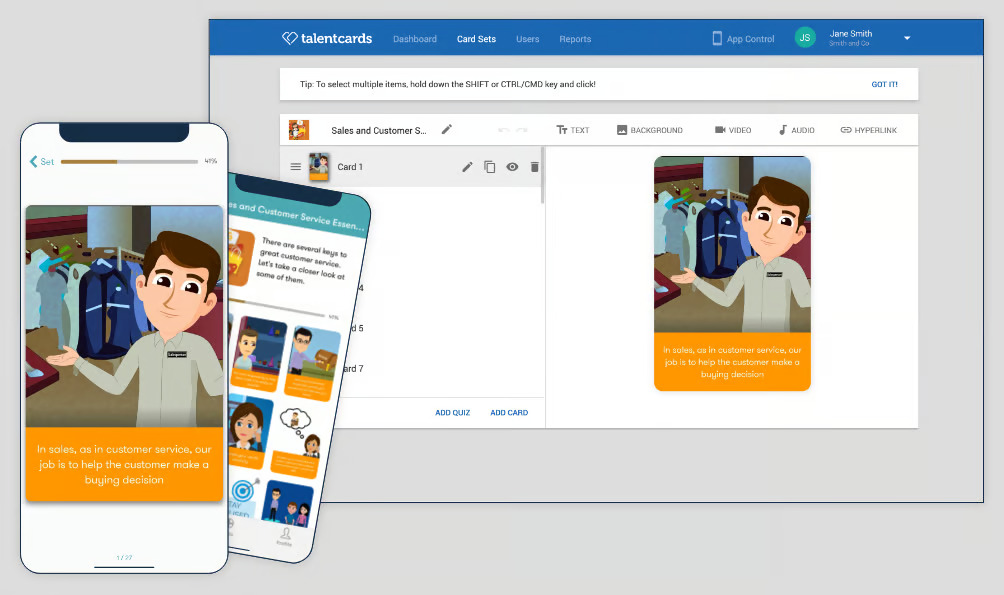
There’s no login friction that takes longer than the lesson itself, which is the specific problem that kills completion rates on traditional platforms in distracted environments. The gamification layer, points, leaderboards, and quiz completions keep it feeling competitive enough that people come back without being asked.
It isn’t the deepest analytics tool on this list, and the authoring side has limits if you need complex branching. But for high-turnover roles where engagement is the real obstacle, it reliably gets the job done.
Pros:
- Mobile-first flashcard format that employees actually use on their own phones
- Sessions complete in 5 to 10 minutes, designed for distracted or on-the-go environments
- Gamification with points, leaderboards, and badges drives repeat engagement without incentive programs
- Multiple-choice and game-based quizzes built directly into the card flow
- Highly rated on Capterra, Google Play, and GetApp for ease of use
Cons:
- Limited authoring depth for complex or scenario-based learning needs
- Analytics are lightweight compared to full enterprise LMS platforms
User Rating: 4.6/5 (Capterra)
Pricing: Starts at $49/month
3. TalentLMS – Best for Growing Teams That Need a Full LMS With Microlearning Built In
I’ve pointed a few L&D peers toward TalentLMS when they needed short-format learning as a native feature rather than a workaround bolted onto a traditional course platform. The mobile app handles offline access and syncs when connectivity comes back, which I’ve found essential for teams in areas with unreliable internet.
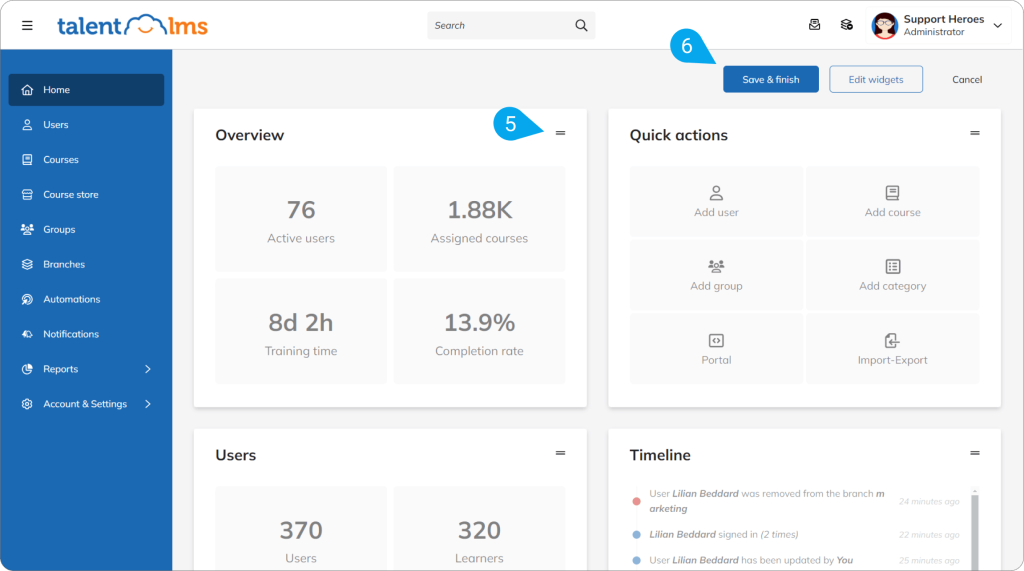
Learning paths let you sequence related micro-modules so learners move through a structured journey rather than drifting through a content catalog without direction. The gamification layer, levels, points, badges, and leaderboards keep engagement up without requiring any game design expertise on your end.
It scales reasonably well, and the interface is clean enough that non-technical managers can actually run it without needing L&D to hold their hand at every step. If you want microlearning alongside longer-form content on the same platform, this is the most balanced option I found.
Pros:
- Learning paths sequence micro-modules into structured, trackable journeys
- Offline course access via mobile app for teams in low-connectivity environments
- Gamification features built in natively, not added as an afterthought
- Responsive design that works across all devices and screen sizes
- Strong community and documentation for self-service setup and troubleshooting
Cons:
- Pricing increases meaningfully at higher user counts, which affects budget planning
- Customization options are limited on lower-tier plans
User Rating: 4.7/5 (Capterra)
Pricing: Starts at $119 /month
4. Docebo – Best for Enterprise Teams Needing AI Automation and Social Learning at Scale
Docebo is the platform I’d point large enterprise L&D teams toward when the primary constraint is operational overhead rather than content creation speed. The AI features automate the repetitive admin work that consumes L&D bandwidth at scale, course assignments, progress reporting, enrollment rules, so your team actually spends time improving content instead of managing the platform.
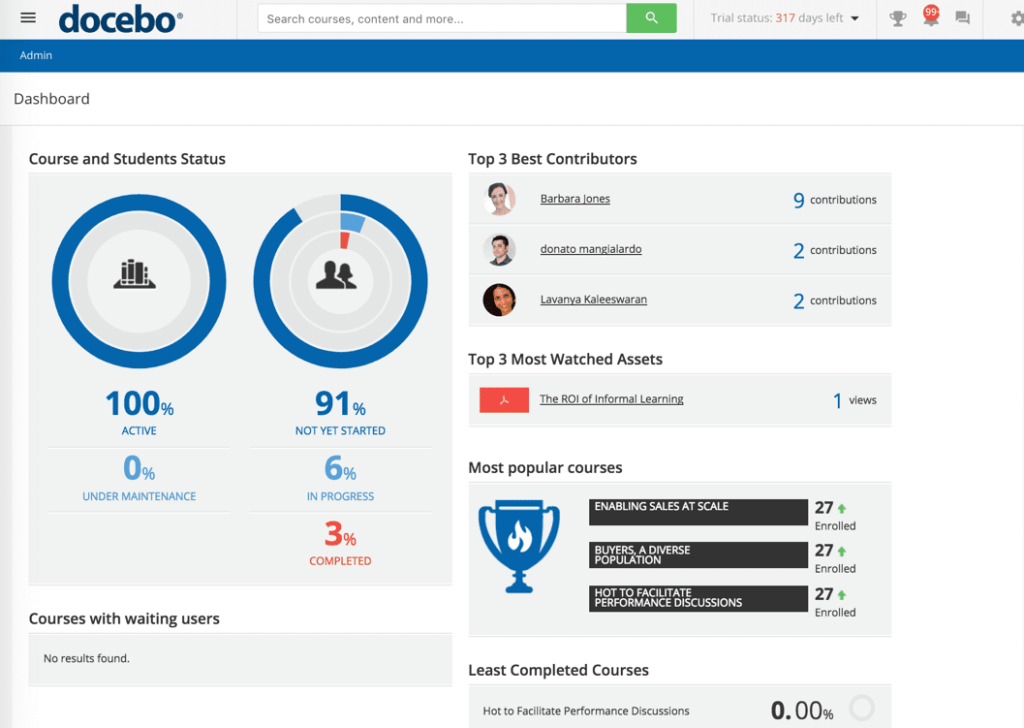
The social learning module, Discover, Coach and Share, lets employees create and share short videos with each other, which is peer-to-peer knowledge transfer that most platforms completely ignore. The offline player handles learners in low-connectivity environments without disrupting their progress.
Available in 40 languages and screen-reader accessible for inclusive delivery. You are trading simplicity for depth at this tier. Smaller L&D teams will find it overkill, but for organizations running training across thousands of employees in multiple countries, the depth earns its complexity.
Pros:
- AI automation handles repetitive admin tasks for large-scale deployments
- Social learning module supports user-generated short video content for peer learning
- Offline app keeps learners progressing without reliable internet access
- Screen reader accessibility built in for inclusive delivery
- Available in 40 languages including Portuguese, Brazilian, and Korean
Cons:
- Pricing is available on request only, which slows down initial budget conversations
- Complexity is better matched to enterprise teams than lean L&D operations
User Rating: 4.4/5 (Capterra)
Pricing: Custom Quote
5. SAP Litmos – Best for Compliance-Heavy Industries With High-Volume Mobile Training Needs
SAP Litmos came up repeatedly when I was researching tools for industries where compliance isn’t optional, healthcare, financial services, and manufacturing specifically. What stood out was the pre-built video course library: it covers compliance, HR, and sales topics, and SAP Litmos updates it regularly at no extra charge.
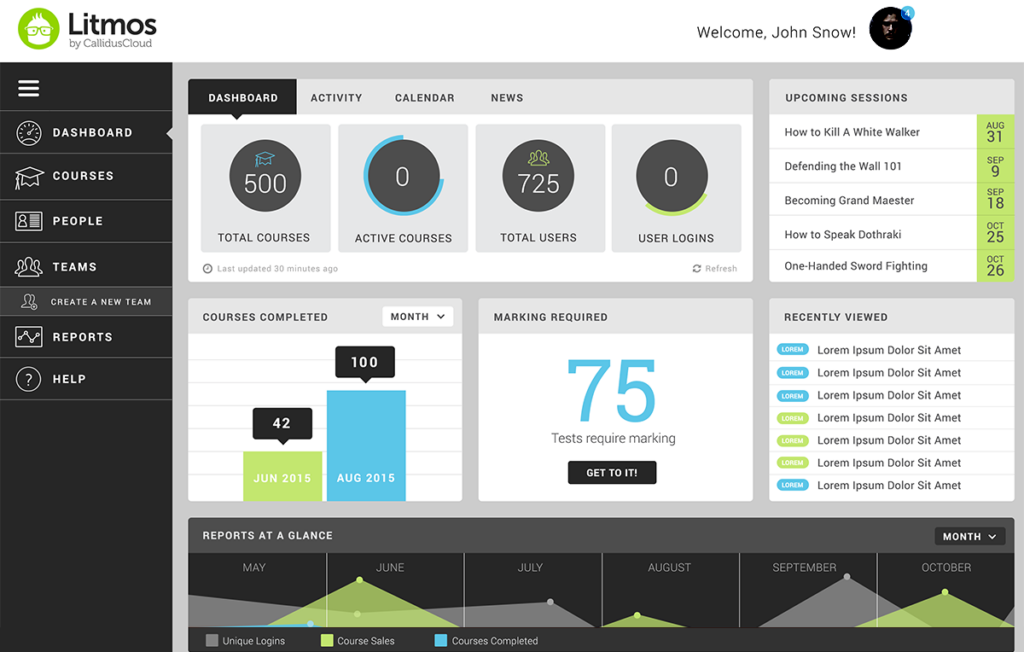
That removes the content maintenance burden that quietly crushes smaller L&D teams who are trying to keep compliance material current. The gamification features, points, badges, and levels, keep learners moving through required training that would otherwise feel like a box-ticking exercise.
Mobile training software means gig workers, contractors, and field employees can complete required training on their own devices and schedules. Trusted by IBM, Mercedes-Benz, and PepsiCo, the enterprise reliability track record is well established. For L&D managers whose compliance audit prep keeps them up at night, this one is worth a serious look.
Pros:
- Regularly updated compliance course library included at no additional cost
- Gamification features specifically effective for required or compliance-driven training
- Mobile training software designed for diverse, distributed workforces
- Strong track record with enterprise brands across regulated industries
- In-platform messaging tools to communicate with learners and keep them on track
Cons:
- Pricing available on request only, which makes initial evaluation slower
- Less flexible for teams that want to build heavily customized or branded content
Pricing: Custom Quote
6. OttoLearn – Best for Knowledge Retention Through Spaced Repetition and Adaptive Delivery
OttoLearn is the most scientifically grounded platform on this list, and I mean that in a practical way, not as a compliment for the sake of it. The algorithm-based adaptive delivery system actually measures what each learner knows, identifies the specific gaps, and re-surfaces content at the right interval to move knowledge from short-term to long-term memory.
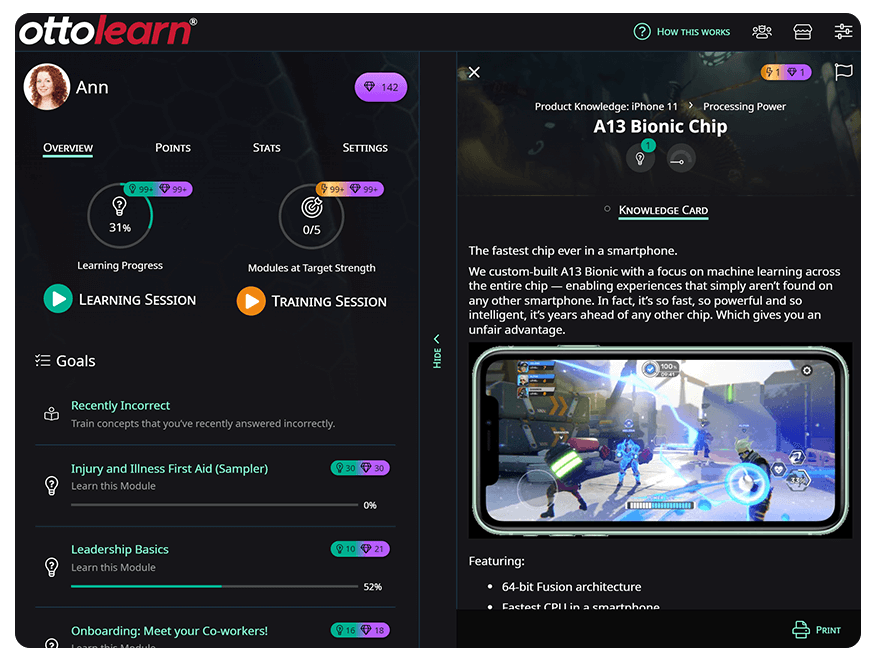
If retention is the core problem you’re trying to solve and not just completion, OttoLearn is built exactly for that. The micro-lessons are short enough to slot into a workday without disrupting the routine. Instructional scaffolding through learning paths takes learners from beginner to competent in a structured sequence.
The content translation tool makes multilingual deployment far less painful. For companies where skill degradation after training is the documented business problem, this addresses the root cause rather than masking it with a better-looking completion dashboard.
Pros:
- Adaptive delivery identifies and fills individual knowledge gaps per learner automatically
- Spaced repetition engine moves knowledge to long-term memory based on performance data
- Instructional scaffolding through sequenced learning paths from beginner to mastery
- Automatic content translation for multilingual workforce deployment
- Hosted on AWS for strong reliability and low latency
Cons:
- Interface and authoring tools feel less polished compared to several competitors
- Better positioned as a reinforcement layer than a primary onboarding platform
Pricing: $250/month, billed annually.
7. EduMe – Best for On-Demand Workforce Training Delivered Through Existing Communication Channels
EduMe is one of the few platforms I found that directly solves the workflow integration problem most microlearning tools ignore. Most learning fails because employees have to navigate to a separate app, which is one more barrier in an already fragmented workday.
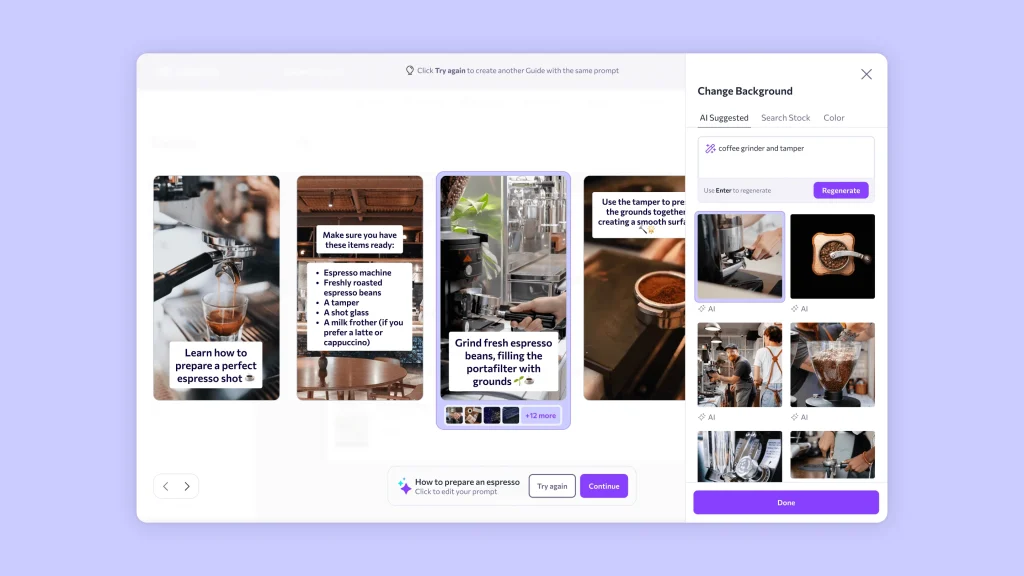
EduMe embeds learning into the communication channels your workforce already uses and sends content to people’s phones, so the friction disappears before it can kill engagement.
Companies like Uber, Vodafone, Airbnb, and Deloitte use it to train distributed workforces, which tells you something about its ability to reach non-desk employees at scale. The Content Studio handles content creation end to end.
Engagement surveys give you a real signal on whether your content is landing or just being tolerated. For L&D managers trying to reach a workforce that lives on their phones and moves fast, EduMe removes the barriers that would otherwise keep training theoretical.
Pros:
- Delivers content through existing communication channels, reducing login friction significantly
- Content Studio combines creation, testing, and instructional design support in one place
- Engagement monitoring via surveys to track whether learning is actually landing
- Dedicated learner portal for course access and assignment management
- Trusted by major brands with large distributed and frontline workforces
Cons:
- Pricing available on request only, which limits quick budget comparisons
- Reporting depth is moderate compared to full enterprise LMS platforms
User Rating: 4.7/5 (Capterra)
Pricing: Custom Quote
8. Cornerstone OnDemand – Best for Large Enterprises Aligning Microlearning With Skills, Performance, and Talent Strategy
I started paying closer attention to Cornerstone OnDemand when a senior L&D director I know described the specific problem it solved for her: she needed one platform where microlearning, compliance tracking, performance management, and skills intelligence could all talk to each other without manual reconciliation.
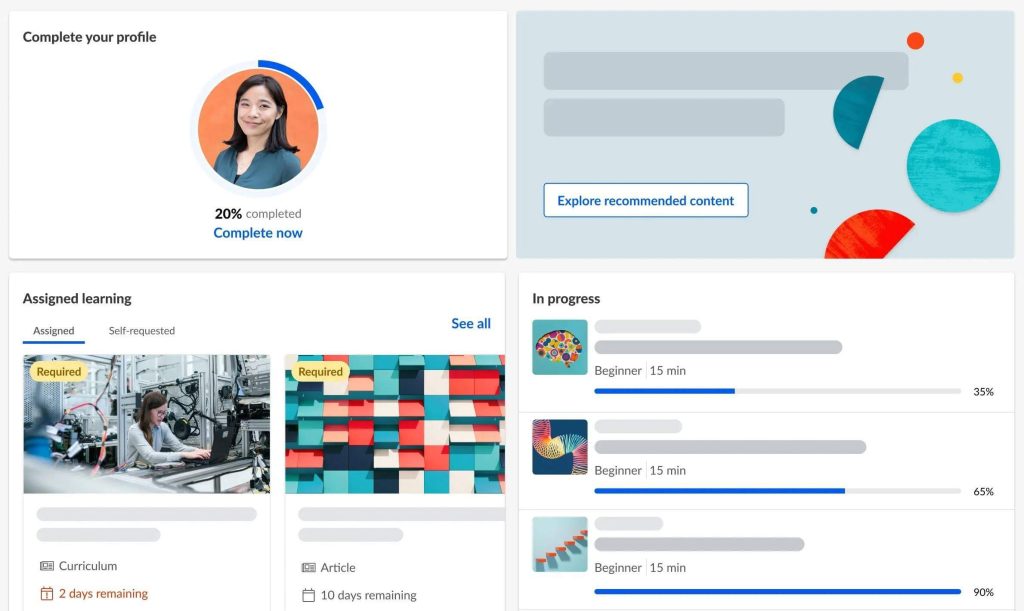
That’s not a problem a flashcard tool solves. Cornerstone Galaxy, the unified platform, connects learning with workforce skills data and performance outcomes so training decisions are informed by actual capability gaps, not just what someone requested last quarter. The Grovo integration drives microlearning course creation natively inside the platform.
AI-powered recommendations personalize learning paths per role and individual. Compliance workflows are automated with audit-ready reporting. The Immerse AI Companion even supports VR-based scenario training for roles where behavior practice matters. For enterprise L&D teams that need microlearning embedded inside a broader talent strategy rather than running as a separate tool, this is the most complete option available.
Pros:
- Cornerstone Galaxy unifies microlearning, skills data, performance, and talent management in a single system
- Grovo integration drives microlearning course creation natively inside the platform
- AI-powered personalized learning paths adapt continuously to individual skill gaps and role requirements
- Automated compliance workflows with audit-ready reporting for regulated industries
- Immerse AI Companion supports VR and desktop-based scenario learning for behavioral skill practice
- Trusted by large global enterprises across healthcare, financial services, and manufacturing
Cons:
- Implementation complexity and cost make it a poor fit for small or mid-sized L&D teams
- Admin interface has a steeper learning curve than most platforms on this list
User Rating: 4.3/5 (Capterra)
Pricing: Custom Quote
9. Axonify – Best for Frontline Workforce Enablement With Science-Backed Daily Reinforcement
I’ve been watching Axonify come up consistently in conversations with L&D managers who train large frontline workforces and need something that actually sticks past day three. What makes it different from most tools on this list is how deliberate the science is. The platform delivers short daily learning bursts paired with quiz reinforcement and adapts what it shows each person based on their individual knowledge gaps.
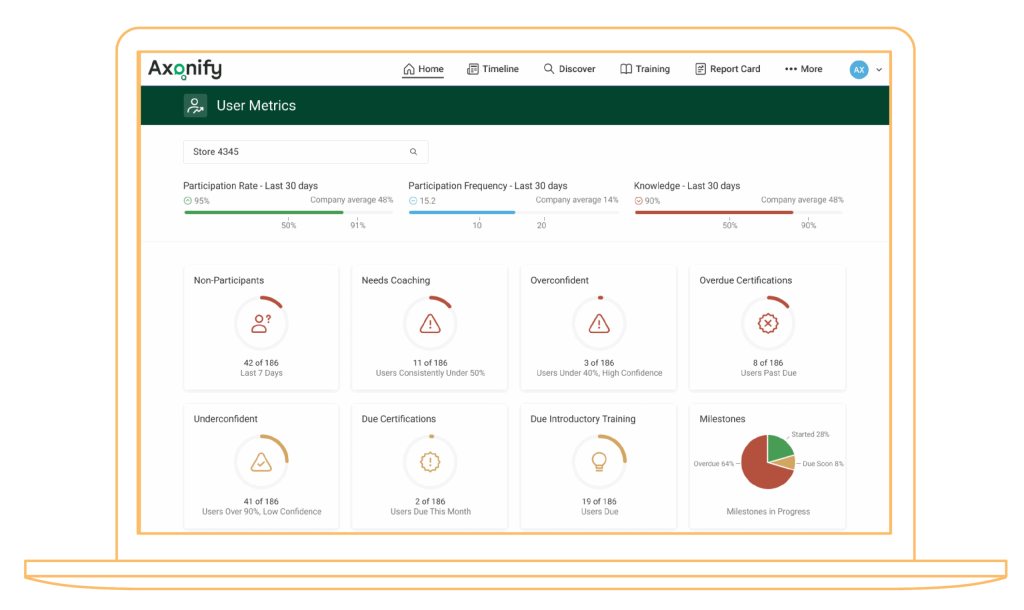
It also connects training outcomes to actual performance metrics, so you can show leadership a real ROI number, not just a completion rate. The content marketplace gives you access to 800-plus microlearning topics across industries, and 16 integrated game mechanics keep engagement high without your team having to build gamification from scratch.
Two-way communication tools mean frontline managers can push messages and updates through the same interface where learning happens. For organizations at serious scale with measurable performance goals tied to training, Axonify is purpose-built for exactly that problem.
Pros:
- Adaptive daily learning bursts target individual knowledge gaps, not a generic curriculum for everyone
- 800+ microlearning topics in a content marketplace ready to deploy across industries
- 16 integrated game mechanics drive engagement without requiring custom gamification builds
- Analytics link training completion directly to performance outcomes, making ROI calculable
- Two-way communication tools let managers push updates and messages through the same platform
- Integrates with existing LMS and HRIS platforms for seamless data exchange
Cons:
- Content creation tools are limited for complex or highly technical training needs
- Admin features have a steeper learning curve than the learner-facing side suggests
User Rating: 4.7/5 (Capterra)
Pricing: Custom Quote
10. SC Training (Formerly EdApp) – Best for Teams That Want Free AI-Powered Microlearning With Mobile-First Delivery
A former colleague who runs training at a fast-growing retail chain switched to SC Training when she realized she was spending more on the LMS than on the content inside it. The free tier was the entry point, up to a certain learner count at no cost, but what kept her was the AI course creation tool.
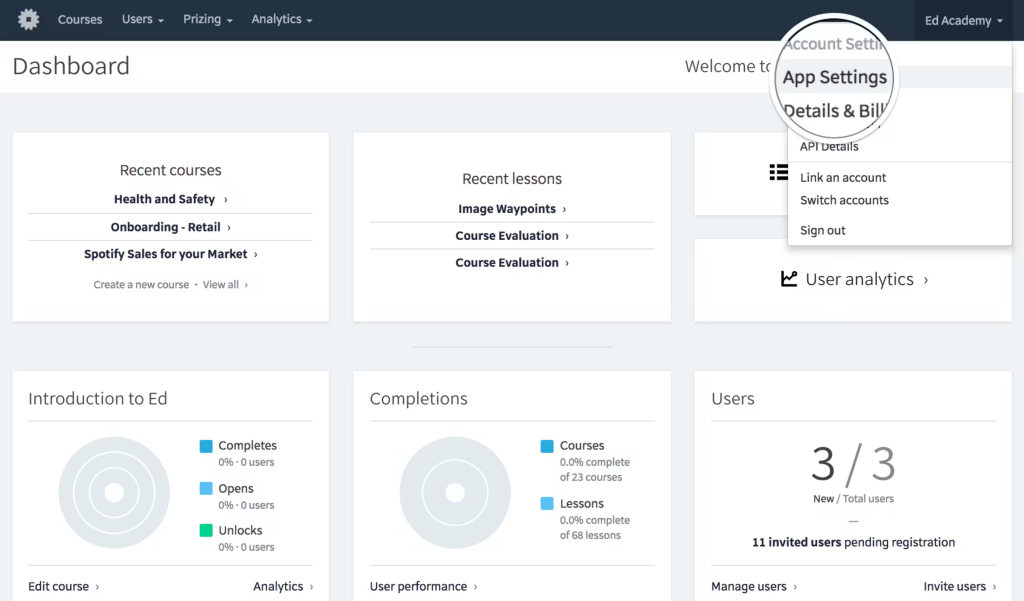
She uploaded a standard operating procedure document, and the platform converted it into an interactive mobile-first micro-course within minutes. The built-in authoring tool uses drag-and-drop with no coding needed, and the Canva integration meant her team could make lessons look genuinely branded without a designer.
Spaced repetition, push notifications, gamification, and real-time reporting are all included rather than being locked behind higher pricing tiers. For L&D teams at small to mid-sized organizations that need enterprise-level microlearning features without enterprise pricing, SC Training removes the budget objection entirely.
Pros:
- Free tier available with no time limit, making it accessible for teams evaluating without budget approval
- AI course creation converts documents and SOPs into interactive micro-courses automatically
- Canva integration gives access to millions of design assets for branded, polished lessons
- Spaced repetition and push notifications built into the base platform, not premium add-ons
- Mobile-first with offline access, supports Android and iOS with no company device required
Cons:
- Video upload size is capped at 10MB, which forces compression and can reduce quality
- Analytics can be slow to load and export, particularly on larger datasets
User Rating: 4.7/5 (Capterra)
Pricing: Starts at $5/learner/month, billed annually
My Top 3 Picks for L&D Managers
If you’re shortlisting microlearning LMS platforms, these are the three tools I believe stand out most for solving different L&D challenges, from scalable training delivery to frontline engagement and long-term knowledge retention.
1. ProProfs Training Maker
If you need to build, deploy, and track training at scale without a large content production team, ProProfs Training Maker is the strongest all-in-one option on this list. The AI course builder removes the biggest bottleneck in any L&D operation: starting from nothing. The combination of a ready-made course library, strong compliance tracking with audit trails, multilingual support across 70-plus languages, and genuine mobile functionality makes it the most practical choice for organizations that need microlearning.
2. TalentCards
For L&D managers whose primary challenge is reaching frontline, deskless, or high-turnover workers, TalentCards does one thing exceptionally well: it gets opened. The mobile flashcard format with built-in gamification removes the friction that kills training engagement in field and retail environments. If your analytics needs are straightforward and your training content lives in short, discrete units of knowledge, this is the most reliable option for the audience that traditional LMS platforms consistently fail to reach.
3. OttoLearn
If your problem is retention and not just completion, OttoLearn is the most purpose-built solution on this list. The adaptive algorithm does what most L&D teams wish they could do manually: identify exactly what each learner is forgetting and resurface it at the right moment based on their actual performance data. For organizations where skill degradation after training is a documented business problem tied to real costs, OttoLearn addresses the mechanism of forgetting rather than just counting how many people clicked through.
How I Chose These Microlearning LMS Tools
To identify the best microlearning LMS platforms, I evaluated each tool using a consistent set of criteria focused on learner engagement, content delivery, ease of administration, and overall training effectiveness.
1. User Reviews / Ratings
User reviews and ratings from trusted platforms such as Capterra, G2, and GetApp played an important role in this evaluation. Since learner engagement and adoption are critical for microlearning success, I paid close attention to feedback around ease of use, mobile learning experiences, content delivery, reporting capabilities, and overall satisfaction from L&D professionals and training teams.
2. Essential Features & Functionality
Each online microlearning platform was evaluated based on the microlearning features that matter most to modern training programs. This included AI-powered course creation, mobile learning, gamification, flashcards, quizzes, learning paths, spaced repetition, analytics, multilingual support, integrations, and content authoring capabilities. I prioritized tools that make it easy to create, deliver, and manage bite-sized learning experiences at scale.
3. Ease of Use
A microlearning LMS should simplify training, not add complexity. I assessed how easy it is for administrators to create courses, assign training, monitor progress, and manage learners. I also considered the learner experience, including navigation, mobile accessibility, and how quickly users can complete training sessions.
4. Customer Support
Reliable customer support is essential when rolling out training across teams. I evaluated the availability and quality of support resources, including onboarding assistance, knowledge bases, live chat, email support, training materials, and responsiveness to customer issues.
5. Value for Money
Pricing was evaluated against the features, scalability, and overall value offered by each platform. I looked for solutions that provide strong microlearning capabilities, learner engagement tools, reporting, and content creation features without requiring organizations to overspend on unnecessary functionality.
6. Personal Experience / Experts’ Opinions
In addition to product research, this evaluation incorporates insights from my own experience reviewing learning platforms, conversations with L&D professionals, and expert opinions from industry leaders. These perspectives helped identify which tools consistently deliver measurable learning outcomes, better engagement, and stronger knowledge retention.
Ways to Improve Training Completion Rates With a Microlearning LMS
Low completion rates are almost always a design and delivery problem, not a motivation problem. I’ve watched L&D managers blame their learners for months before realizing the content was being delivered in a way that made completion structurally unlikely. Here is what I’ve actually seen move the needle.
1. Cut the Login Friction First
This is the single highest-leverage fix, and most teams skip it entirely. If learners need to navigate to a separate URL, remember a username, and enter a password to open a 4-minute module, you’ve lost a significant portion of them before the content even loads.
The programs with the highest completion rates deliver content via a push notification that drops learners directly into the module in one or two taps. If your platform can’t do that, the conversation about content quality is premature.
2. One Module, One Idea, No Exceptions
Modules that try to cover three concepts because they’re only 5 minutes long still get abandoned. The cognitive load is the same as a long course, just compressed.
When I kept each module to a single actionable idea, completion in pilot programs went up noticeably. If you’re covering three things, build three modules. The learner can finish one and come back. They rarely come back to finish a long one they abandoned halfway.
3. End Every Module With a Retrieval Check, Not Just a Video
A 2-question quiz at the end changes how a person engages from the start. Learners who know they’ll be asked to recall something actually pay attention differently than learners who know they just need to let something play.
This single structural change improves both completion and retention at the same time.
4. Auto-Enroll With Real Deadlines and Automated Reminders
Learners who set their own pace reliably drift. Tie enrollment triggers to role, hire date, or a specific event. Add a deadline that shows up on the learner’s dashboard and let the platform send reminders automatically.
The automation your LMS provides for exactly this purpose is only useful if you actually configure it.
5. Make the First Module Under 3 Minutes Without Exception
The biggest drop-off in any learning program happens at session one. If learners complete the first module, they are far more likely to complete subsequent ones.
Build the habit before you build the depth. A 90-second intro module with one concept and one quiz question is a better first module than a comprehensive 8-minute one that loses people before they finish.
6. Match Delivery Timing to the Moment of Use
A module on handling sales objections is most effective when delivered the morning before a pitch cycle, not during onboarding three weeks earlier, when it has no context. Ask yourself: when does the learner actually need this? Then configure your delivery schedule to match that moment.
Just-in-time delivery consistently outperforms pre-scheduled catalog access for any time-sensitive skill.
7. Track Drop-off Points and Treat Them as Design Problems
Most platforms show you where learners exit before completion. If 40% of learners are dropping off at the 3-minute mark of a 5-minute module, that is a content design problem, not a motivation problem.
It’s usually a dense wall of text, an unexplained jargon term, or a topic shift that loses the learner’s sense of relevance. Fix the content. The completion rate follows.
6 Common Mistakes to Avoid When Implementing Microlearning
I’ve seen the same implementation failures repeat across organizations of different sizes and industries. Most of them are avoidable if you know what to look for before you start.
Mistake 1: Chunking Existing Long Courses and Calling It Microlearning
Simply breaking a long course into smaller sections doesn’t make it microlearning. The cognitive load remains the same, just divided into shorter segments.
The fix:
- Start with the behavior you want to change, not existing content.
- Focus each module on one retrievable idea.
- Include one knowledge check per module.
- Build delivery triggers around when learners need the information.
Mistake 2: Measuring Completion Rates and Stopping There
High completion rates don’t automatically mean training is effective. Learners can finish a course without changing their behavior or performance.
The fix:
- Define a business outcome before launch.
- Establish a baseline for performance metrics.
- Track outcomes alongside completion data.
- Review content if completion is high but performance remains unchanged.
Mistake 3: Buying the Platform Before Defining the Primary Use Case
Many organizations choose a platform based on features or demos before identifying their most important training need.
The fix:
- Identify your highest-priority use case first.
- Evaluate platforms against that specific requirement.
- Involve stakeholders who need reporting or compliance data.
- Prioritize functionality over feature quantity.
Mistake 4: Ignoring Content Maintenance From Day One
Microlearning content becomes outdated quickly, especially when processes, products, or regulations change.
The fix:
- Create a content review schedule before launch.
- Review compliance content quarterly.
- Review product and process content monthly.
- Assign ownership to a specific individual.
Mistake 5: Rolling Out to the Whole Organization Before Running a Pilot
Large-scale launches make it difficult to identify issues before they affect everyone.
The fix:
- Start with a small pilot group.
- Test three to five modules before scaling.
- Measure completion, assessment scores, and behavior changes.
- Use feedback to refine content and delivery.
Mistake 6: Treating Microlearning as a Complete Replacement for Other Training Formats
Microlearning is excellent for reinforcement and performance support, but not every skill can be learned through short modules.
The fix:
- Use microlearning for reinforcement and refreshers.
- Pair it with coaching and instructor-led learning when needed.
- Reserve longer formats for complex skills and decision-making.
- Build a blended learning strategy rather than relying on one format.
Ready to Build a Microlearning Program That Actually Sticks?
After reviewing these tools, I found that successful microlearning depends on more than delivering short lessons. The most effective platforms make training easy to create, accessible on any device, and engaging enough to improve retention, onboarding, compliance, and job performance.
Learning outcomes improve when content is focused on a single concept, delivered at the right time, and reinforced consistently. For organizations looking to scale training without adding complexity, ProProfs Training Maker stands out with AI-powered course creation, a large ready-made course library, multilingual support, mobile learning, and detailed analytics.
Start with a clear training goal, run a pilot, and measure results before expanding.
Frequently Asked Questions
What is the difference between a microlearning LMS and a traditional LMS?
A traditional LMS is designed for longer, structured courses and primarily tracks completion. A microlearning LMS focuses on short, focused lessons delivered in small bursts. It often includes features like mobile learning, spaced repetition, and personalized reinforcement to improve long-term knowledge retention rather than simply recording course completion.
How long should a microlearning module be?
Most effective microlearning modules last between 2 and 7 minutes and focus on a single concept, skill, or task. Modules under 2 minutes work well for reinforcement, while content longer than 10 minutes can reduce engagement and retention. The goal is to provide actionable learning that employees can apply immediately.
Can microlearning replace traditional instructor-led training?
No. Microlearning works best alongside instructor-led training and comprehensive courses. It is highly effective for reinforcement, onboarding, performance support, and knowledge refreshers. However, complex topics such as leadership development, strategic decision-making, and advanced compliance training often require deeper instruction and interactive learning experiences.
What is spaced repetition and why does it matter in a microlearning LMS?
Spaced repetition is a learning method that reviews content at strategic intervals based on how well learners remember it. Learners who struggle receive more frequent reviews, while those who retain information review less often. This approach combats the forgetting curve and helps improve long-term knowledge retention.
How do I measure whether my microlearning program is working?
Look beyond completion rates and track retention and business outcomes. Compare assessment scores weeks after training and monitor performance metrics such as reduced errors, faster onboarding, higher productivity, or increased sales. Establish baseline measurements before launch and evaluate results at regular intervals to measure impact.
What should I look for in a microlearning LMS for compliance training?
Choose a platform that offers detailed completion records, assessment tracking, role-based assignments, certificates, and audit-ready reporting. Automated enrollments and HRIS integrations can simplify compliance management. Most importantly, include knowledge checks to verify understanding rather than relying solely on content consumption.
Is microlearning effective for frontline or deskless workers?
Yes. Microlearning is often more effective for frontline employees because it fits naturally into busy work schedules. Mobile-first access, multilingual content, and short lessons allow workers to learn during breaks or between tasks. This makes training more accessible without requiring a desktop computer or lengthy sessions.
Let ProProfs AI create your training course

 We'd love your feedback!
What did you like & how can we make it even better?
 Thanks for your feedback!
 Ask Your Question
Have a question? Get expert help to make your decision easier.