Somewhere right now, an HR manager is three tabs deep into comparing learning management system features, cross-referencing options she’ll never use, trying to make a decision that will affect how 400 people learn for the next three years.
I know this because I’ve been that person. And if you’re reading this, there’s a good chance you are too.
The feature list won’t help you. This guide might.
Continue reading if you are:
- An HR manager or L&D professional evaluating LMS platforms for the first time
- A training lead who suspects their current system is costing more than it’s worth
- An operations or compliance manager who needs to prove training happened, not just hope it did
- Someone who has opened an LMS admin panel and thought, “Why is this so complicated?”
What Is a Learning Management System?
Most organizations start their training with a patchwork of PowerPoints, email follow-ups, and a shared folder that nobody can find. An LMS is how you get out of that. It replaces the scattered, manual process with one system where you can build content, assign it to the right people, see who’s actually completed it, and pull a clean report when someone from compliance or leadership asks.
What’s changed in the last few years is what a modern LMS handles beyond just content delivery. The better platforms now automatically manage enrollments, send deadline reminders without you having to touch anything, issue certificates upon completion, and surface skill gaps before they become performance problems. I’ve seen teams cut their training admin time in half just by moving from manual follow-up emails to automated learning paths. That’s not a feature upgrade. That’s a different way of working.
The challenge is that not all LMS platforms deliver on this equally, and the feature list on a vendor’s pricing page tells you almost nothing about the day-to-day reality of using it.
10 Key Features of a Learning Management System (LMS)
When you start comparing learning management system features, everything begins to feel equally important. It’s not.
Some features are non-negotiable. Others are simply nice to have
Before you get lost in long feature lists, it helps to separate what truly matters from what’s optional:
What Are the Must-Have LMS Features?
1. AI Course Creation and Expert-Built Ready-to-Use Courses
The ability to build and organize learning content is the core job of any LMS, and it’s where the quality gap between platforms is often the widest.
A solid course creation tool should let you:
- Build lessons with text, video, audio, PDFs, and interactive questions without needing a developer
- Import existing materials like PowerPoints, PDFs, and SCORM packages without breaking formatting
- Organize content into structured learning paths
- Update individual lessons quickly when something changes, without rebuilding the entire course
AI is now becoming part of this workflow as well. A growing number of platforms now let you type in a training topic and instantly generate a draft course outline, quiz questions, or even full lesson content.
Want to see how it works? Try it yourself with ProProfs. Just enter a prompt below and create a course in minutes.

Let ProProfs AI create your training course
The best implementations treat AI as a starting point, not a finished product. You should still have full control to customize and refine the content as needed.
Just as important is how quickly you can get started. Some platforms offer ready-to-use courses or templates on common topics, which means you’re not building everything from scratch every time.
The real test I use is simple. Can someone with no technical background build a usable course in under an hour? If the answer is no, your team will quietly stop using the platform within six months, and you’ll be back to emailing PDFs.
Real-World Success Story: How GLS Fixed Training Across a Distributed Team
Global Linking Solutions (GLS), a cybersecurity company operating in 122 countries, struggled with fragmented training and poor communication across teams working in multiple time zones.
After evaluating 15 LMS platforms, they chose ProProfs for its flexibility and ready-to-use content.
- Used pre-built management courses to quickly launch leadership training
- Built structured onboarding programs without starting from scratch
- Improved hiring with pre-employment assessments
- Automated training workflows that were previously manual
Result:
GLS moved from inconsistent training and 30% turnover to a structured, scalable onboarding system with real-time reporting across teams.
“I tried 15 different LMS, and none had the flexibility of ProProfs.” – Training Coordinator, Global Linking Solutions
2. AI-Enabled Assessments and Quizzes
Training without testing is just video watching, and most compliance frameworks require documented evidence of comprehension, not just completion. Built-in assessment tools should cover multiple question types (multiple choice, fill-in-the-blank, scenario-based, video responses), pre-tests and post-tests to measure actual knowledge change, randomized question order and question banks which are critical for compliance testing, anti-cheating controls like time limits, answer shuffling, and IP tracking, and automatic grading with customizable pass/fail thresholds so you’re not manually reviewing every result.
3. AI-Powered Reporting and Analytics
This is the feature most organizations undervalue until an auditor calls. According to the U.S. Department of Labor, employers must maintain records for OSHA-mandated training for at least 5 years. Without a reliable audit trail, you’re relying on spreadsheets that someone may or may not have updated last Tuesday.
Strong reporting capabilities should include real-time dashboards showing who completed what and when, timestamped completion records, skill gap analysis across teams or departments, grade books, and performance breakdowns by individual learner, and exportable reports you can hand to leadership or external auditors without reformatting them first.
4. User Management and Access Controls
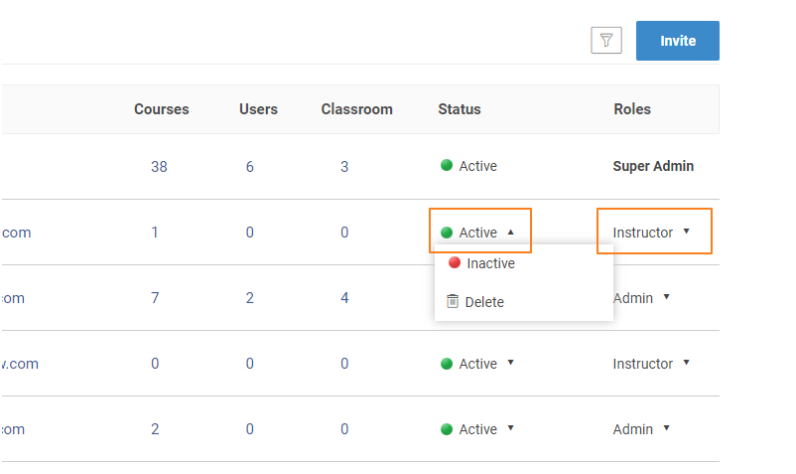
At any meaningful scale, manually managing who has access to what becomes a full-time job. The LMS should handle role-based permissions so administrators, managers, and learners each see only what’s relevant to them; group-level assignment so you can enroll an entire department in one step; Single Sign-On so your learners aren’t maintaining a separate login they’ll forget; and bulk user uploads with automated enrollment triggered by role or hire date.
The difference between doing this manually and automating it is between training being a quarterly scramble and training just running.
5. Mobile Accessibility
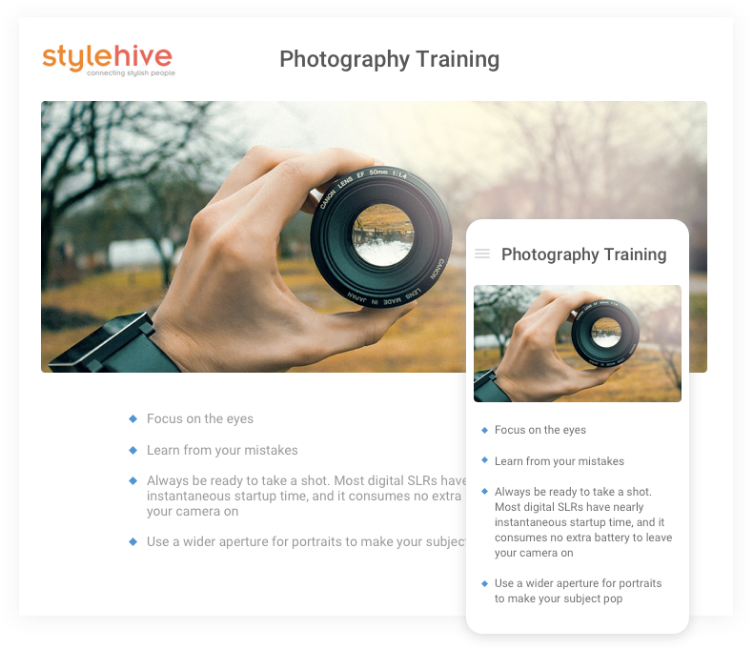
If your learners are on the floor, in the field, or distributed across time zones, desktop-only training is not really training. Mobile access needs to be genuinely responsive (not just “technically viewable” on a phone), support offline access for environments without reliable internet, and deliver a consistent experience across devices rather than a stripped-down version of the desktop app.
6. SCORM and xAPI Compliance
SCORM (Sharable Content Object Reference Model) and xAPI (also called Tin Can API) are open standards that allow content built in one tool to run in another. Without them, you can’t import third-party course libraries, you may not be able to migrate your existing content if you switch platforms, and detailed learning data like time-on-task or branching paths taken often won’t transfer or track correctly.
Any enterprise-grade LMS must support both. If a vendor hedges on this question, I’d treat that as a red flag.
Which LMS Features Are Nice-to-Have?
These features can genuinely improve outcomes, but they should only factor into your decision once the must-haves are solid. Buying a platform because it has great gamification but mediocre reporting is a trade-off you’ll regret.
7. Gamification
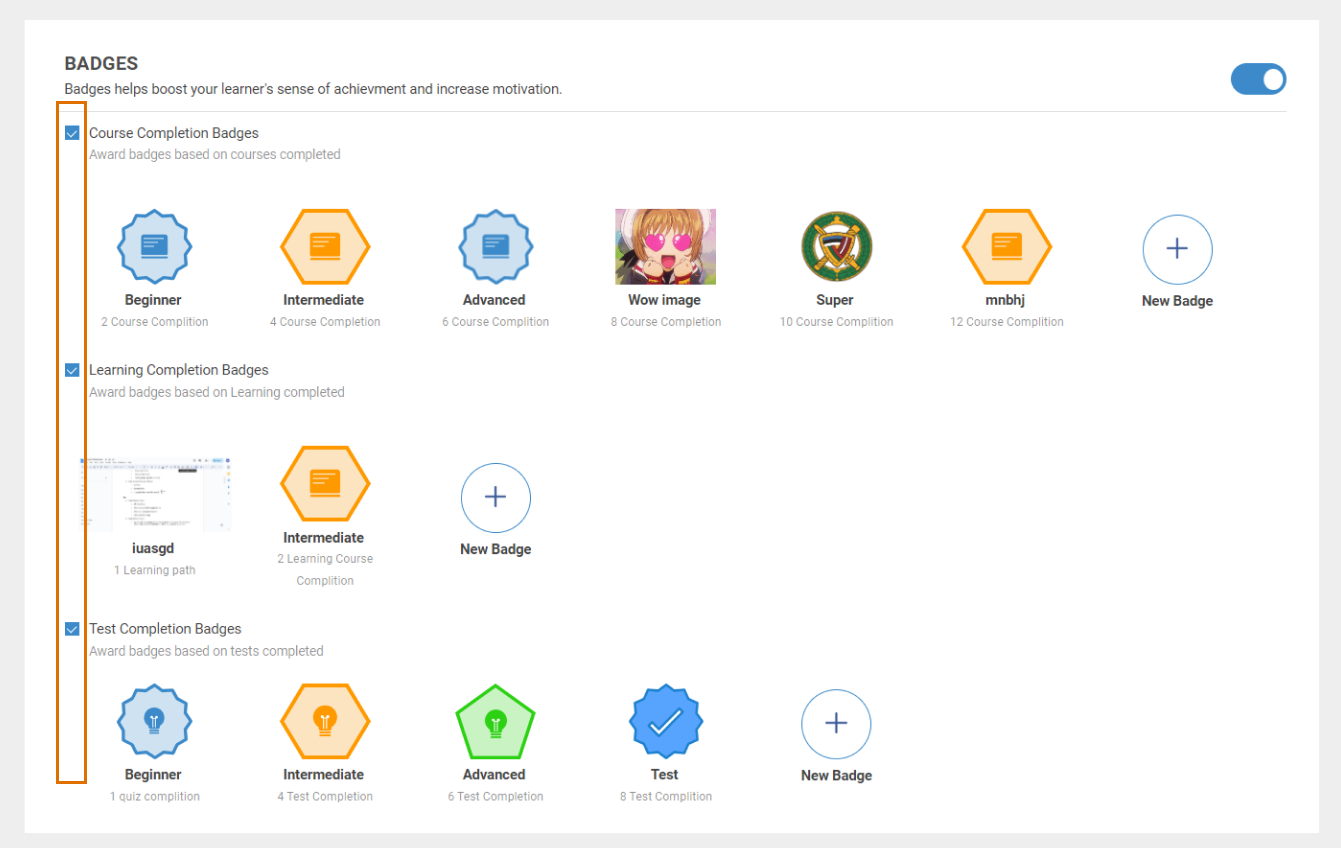
Points, badges, leaderboards, and completion streaks can meaningfully improve engagement for self-paced, voluntary learning. The honest caveat: gamification works better when learners have a choice in whether to engage. For mandatory compliance training, most people are completing the minimum required regardless of whether a badge is waiting at the end. It’s worth having; it’s not worth paying a premium for.
8. Branching Scenarios
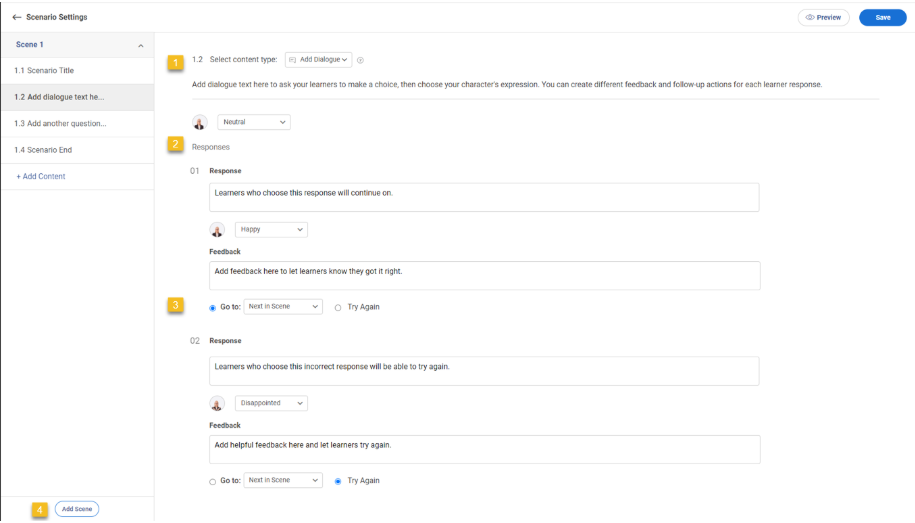
Scenario-based learning, where the learner’s choices affect what happens next, is genuinely more effective for behavioral training: customer service, conflict resolution, safety decisions. It does add meaningful complexity to course development, though. Only prioritize this if you have the bandwidth to use it effectively. A poorly built branching scenario is worse than a straightforward course.
9. Discussion Forums and Social Learning
Peer-to-peer learning through forums and comment threads can supplement formal courses, especially for knowledge-intensive roles. In practice, adoption varies widely. These features add real value in organizations with a strong internal learning culture; in others, they sit empty. An honest assessment of your culture is more useful than any vendor claim here.
10. White Labeling and Brand Customization
If you’re delivering training externally to partners, customers, or contractors who interact directly with your brand, white-labeling matters. For purely internal training, it’s a lower priority, though a professional-looking interface does affect how seriously learners take the content.
Must-Have vs. Nice-to-Have: A Quick Reference
| Feature | Priority | Why It Matters |
|---|---|---|
| Course creation tools | Must-Have | Foundation of everything else |
| Assessment and quizzes | Must-Have | Proves knowledge transfer |
| Reporting and audit trail | Must-Have | Compliance and performance visibility |
| Role-based user management | Must-Have | Scalability and security |
| Mobile access | Must-Have | Real-world learner coverage |
| SCORM/xAPI compliance | Must-Have | Portability and content longevity |
| Gamification | Nice-to-Have | Engagement boost, not a replacement |
| AI course generation | Nice-to-Have | Speed advantage when done well |
| Branching scenarios | Nice-to-Have | High impact, high production cost |
| Social learning/forums | Nice-to-Have | Culture-dependent |
| White labeling | Nice-to-Have | Matters most for external audiences |
What LMS Features Do You Need Based on Your Business Size?
The must-have list above applies universally, but priorities shift considerably depending on where your organization is right now.
What are the most important LMS capabilities for businesses?
The answer depends on your size, structure, and goals. What a 30-person company needs from an LMS and what a 3,000-person company needs are genuinely different problems.
1. Small Business (Under 100 Employees)
Your biggest need is simplicity and speed. You likely don’t have a dedicated instructional design team, which means the platform has to be usable by a generalist HR manager or ops lead who is also doing six other things.
- Prioritize: Ease of course creation, pre-built course libraries, mobile access, basic reporting
- Avoid paying for: Custom API integrations, enterprise SSO, and advanced branching logic until you’ve grown into them
- Watch for: Platforms that charge per feature, which can make costs unpredictable as you scale. Choosing per-active-learner pricing gives you better cost control and flexibility as your team grows.
2. Mid-Market (100 to 1,000 Employees)
You’re at the stage of formalizing informal processes. Training is inconsistent across managers and locations, and you need both consistency and auditability.
- Prioritize: Learning paths with auto-enrollment, compliance reporting with audit trails, HRIS/CRM integration, certificate management
- Nice to have: Gamification, AI course generation, and multilingual support if your team is geographically distributed
- Watch for: Platforms that require IT involvement to make basic content updates
3. Enterprise (1,000+ Employees)
Complexity is unavoidable at this scale, but it should be manageable, not something your L&D team spends most of their time working around.
- Prioritize: Role-based permissions that work across divisions, advanced analytics with custom report building, SSO, API integrations, multilingual delivery, and dedicated support with real SLAs
- Watch for: Platforms where initial setup requires a six-month implementation project and a third-party consultant
The LMS Feature Nobody Talks About (But Should)
When people evaluate learning management system features, they usually focus on what a platform can do.
But what matters just as much is how easy it is to actually use.
A simple way to judge this is what I call the five-minute test. Open the LMS and try to build a basic course. If you can do it in minutes, the system works. If you’re still figuring things out after twenty minutes, that friction doesn’t go away. It builds over time.
That’s how teams end up with powerful LMS platforms that nobody really uses.
You’ll notice the difference immediately in platforms that get this right:
- You can create a course quickly without overthinking the steps
- You don’t need prior L&D or technical experience
- You’re not starting from a blank screen
- The interface feels simple and predictable
From my experience, ProProfs Training Maker handles this well, especially for teams that need to move fast:
- AI course creation that builds structured training from a prompt
- 500+ ready-to-use courses so you can get started instantly
- Clear reporting for tracking completion and compliance
- Easy updates without relying on technical support
The takeaway is simple. Don’t just review feature lists. Run the five-minute test yourself. That’s what tells you whether an LMS will actually work for your team.
How to Evaluate LMS Features Before You Buy
Most LMS evaluations focus on the demo, which is a controlled environment optimized for looking impressive. Here’s what I’d actually test during a trial or vendor call, in order of importance:
- Can an L&D generalist build a course without a developer? Ask for a live, unscripted build during the demo. Not a pre-recorded walkthrough.
- Can you pull a compliance completion report in under two minutes? Ask the vendor to show you the steps, not describe them.
- What happens when you update a course that 300 people are already enrolled in? Version control is often an afterthought and a painful one when you discover the gap.
- How does the learner experience look on mobile? Test it on your own phone, not the vendor’s demo device.
- What does the data export look like? Your training records should be yours, fully readable without special software, if you ever need to migrate.
The Feature List Isn’t the Point
At the end of every LMS evaluation I’ve seen go well, the decision wasn’t made by whoever had the longest feature list. It was made by the team that asked the right question: Does this platform make it easier or harder for our people to actually learn?
The must-have features matter because they’re the infrastructure. Without solid course creation, real assessment, honest reporting, and mobile access, everything else is decoration. But even a platform that nails all five can fail if the experience is so friction-filled that your administrators quietly find workarounds and your learners click through without retaining anything.
Before your next evaluation or renewal, run the five-minute test. Build something. See what it actually feels like. That single experience will tell you more about a platform’s real capabilities than any comparison table, vendor demo, or feature checklist ever could.
Frequently Asked Questions

What LMS features do small businesses actually need?
Small businesses benefit most from ease of use, pre-built course libraries, basic completion reporting, and mobile access. Advanced features like custom APIs and branching scenarios add cost and complexity before most small teams are ready to use them. Start with a platform that works for a non-technical admin without a user manual.
What is SCORM, and why does it matter for LMS features?
SCORM is an open technical standard that allows e-learning content to work across different platforms. An LMS that supports SCORM can import courses built in tools like Articulate or Adobe Captivate, and your content can be migrated to a different platform if needed. Without it, you risk being locked into a vendor's proprietary format indefinitely.
What LMS features are most important for compliance training?
For compliance, the critical features are: timestamped completion audit trails, certificate generation and tracking, mandatory course assignment with deadline reminders, anti-cheating controls on assessments, and exportable reports you can hand to an auditor as-is. These are the features that actually protect your organization.
What are LMS capabilities vs. LMS functions?
These terms are often used interchangeably, but there's a useful distinction. Features refer to what tools exist within the platform. Capabilities are a broader measure of how well those tools perform at scale, how reliably they integrate with other systems, and how they hold up under real-world use. A platform can check every feature box and still underdeliver on capability once your team is actually in it daily.
What LMS features support remote or hybrid teams?
Remote teams specifically need full mobile accessibility, multilingual support if the team is globally distributed, asynchronous course delivery so learners aren't tied to a specific time, automated enrollment and reminder notifications, and reporting that lets managers track progress without relying on self-reporting or status update emails.
How do LMS features differ for employee training vs. customer training?
Employee training platforms prioritize compliance tracking, HRIS integration, and internal reporting. Customer training platforms prioritize white-labeling, self-service enrollment, and a consumer-grade learner experience. Some platforms handle both well, but it's worth probing this specifically during evaluation, because being "good at both" often means being excellent at neither.
What LMS functions are typically included in a free plan?
Free LMS plans typically include basic course creation, a limited number of learners, quiz functionality, and basic reporting. Features like custom certificates, advanced analytics, SSO, white-labeling, and API integrations are almost always reserved for paid tiers.
Let ProProfs AI create your training course

 We'd love your feedback!
What did you like & how can we make it even better?
 Thanks for your feedback!
 Ask Your Question
Have a question? Get expert help to make your decision easier.