If you’ve spent time managing employee training, you already know this: you log into your LMS, need to make a quick update to a course, and end up 45 minutes deep in a settings menu you didn’t know existed. That frustration is exactly why L&D managers and HR professionals look for Schoox alternatives.
I’ve evaluated dozens of LMS platforms for corporate training teams, and the truth is, Schoox works well for large enterprises with dedicated L&D staff. But if you’re a training manager at a mid-sized company, a CLO building from scratch, or an HR director who needs something that doesn’t require a six-week implementation, Schoox can feel like bringing a sledgehammer to hang a picture frame.
And the stakes are real: a study by Brandon Hall Group in 2023 shows that 55% of learning organizations are unable to measure learning’s impact on business performance, a problem that gets worse, not better, when your LMS is too complex to use consistently.
In this guide, I’m breaking down the 10 best alternatives to Schoox based on hands-on research, real user reviews from G2, Capterra, and community forums, and insights from L&D professionals in the field.
Whether you need better pricing, simpler course creation, stronger AI features, or more flexibility for frontline workers, there’s a better fit for you here.
Why Are Teams Looking for Schoox Alternatives?
Schoox is a learning management system (LMS) built for enterprise and mid-market companies with frontline employees. It connects training programs to business KPIs and supports onboarding, compliance, and talent development in industries like hospitality, restaurants, retail, and financial services.
It’s a solid platform. But it’s not the right fit for everyone. Here’s what teams consistently cite when they start looking for Schoox competitors:
Common reasons teams switch from Schoox:
- High cost – Schoox is priced at $8–11 per employee per month (PEPM), making it one of the more expensive LMS options in the market. For SMBs or teams on a budget, this adds up fast.
- Steep learning curve – Multiple user reviews describe Schoox as “not a software that can be learned casually by a novice.” For non-L&D admins, the backend is complex.
- Limited customization – Users on G2 and Capterra flag limited customization options for dashboards, reporting, and UI – a real issue when you need tailored workflows.
- Basic course creation tools – Schoox is great for delivering training, but its built-in authoring tools are considered basic compared to dedicated alternatives.
- Outdated interface – Several reviews describe the UI as functional but not as modern or engaging as newer LMS platforms.
- Primarily built for large enterprises – Schoox is designed for organizations with 10,000+ employees. Smaller teams often find it overkill.
If any of these sound familiar, the tools below are worth a serious look.
10 Best Schoox Alternatives in 2026
Here is a quick comparison of the top Schoox alternatives. For a deeper breakdown of how LMS pricing models work, this guide on LMS pricing is worth a read before you start collecting quotes:
| Tool | Best For | Starting Price |
| ProProfs Training Maker | Easy Employee Training & AI-Powered Course Creation | Forever free for up to 10 learners. Paid plans from $1.99 per active learner/month |
| TalentLMS | SMBs needing a flexible, scalable LMS | Free plan; paid from $69/month |
| Docebo | Enterprise-grade AI-powered learning | Custom pricing |
| 360Learning | Collaborative, peer-led learning | $8/user/month |
| Absorb LMS | Enterprise training with strong analytics | Custom pricing |
| Litmos | Quick deployment with a content library | Custom pricing |
| iSpring Learn | Course authoring + LMS in one | $3.66/user/month |
| Cornerstone Learning | Large enterprises, compliance-heavy orgs | Custom pricing |
| Tovuti LMS | Interactive, gamified learning experiences | Custom pricing |
| LearnUpon | Customer, partner & employee training | Starts at $599/month (billed annually) |
1. ProProfs Training Maker – Best for Easy Employee Training & AI-Powered Course Creation
ProProfs Training Maker caught my attention the first time I needed to get a compliance training program running without a dedicated L&D team behind me. What stood out immediately was how fast you can go from zero to a published course.
The AI course creator generates course content, quizzes, and images from a simple prompt, which is a genuine time-saver when you’re a training manager already stretched across five other responsibilities. But you don’t have to take my word for it. Type a prompt below and see what comes out.

Let ProProfs AI create your training course
What truly sets it apart is the library of 500+ expert-built courses spanning every dimension of workforce development from compliance training and employee onboarding to soft skills, sales enablement, leadership, and sexual harassment. These aren’t filler courses. Each one is structured, learner-friendly, and ready to deploy or let AI customize the moment you need it.
The automated tracking system then takes care of the rest, surfacing exactly who’s completed what, down to individual time-on-module data, with zero manual report pulling. For L&D and HR teams tired of wrestling with bloated platforms, ProProfs Training Maker is the rare tool that does more than you expect and asks far less than you’d think.
Pros:
- AI course creator generates full course content, images, and assessments from a text prompt
- 500+ pre-built compliance and skills training courses ready to deploy or customize
- Automated tracking, completion certificates, and learner progress reporting
- Role-based learning paths and virtual classrooms for branch-specific training
- 24/7 support via phone, chat, and email – even on standard plans
- 70+ language support for multilingual and global training programs
Cons:
- No downloadable or on-premise version available
- Dark user interface option is not yet available
How ProProfs Training Maker Compares to Schoox
Schoox is engineered for large enterprises with deep HR integrations, a complex backend, and pricing at $8–11 per employee per month that demands a dedicated L&D team just to keep it running. ProProfs Training Maker is the opposite experience: delightfully simple, yet surprisingly powerful. Any HR manager or department lead can log in, build a course using the AI course creator, pick from 500+ expert-built courses, and deploy to their team on day one. Automated tracking surfaces who completed what without any manual report pulling, and built-in quizzes, certificates, and multilingual support mean you’re never missing a feature that matters.
Pricing:
Forever free for up to 10 learners. Paid plans from $1.99 per active learner/month.
Rating: 4.8/5 (G2)
2. TalentLMS – Best for SMBs Needing a Flexible, Scalable LMS
TalentLMS came up consistently when I was evaluating Schoox alternatives with L&D professionals at growing companies who didn’t need enterprise complexity but had outgrown basic training tools. The free plan which gives you up to 5 users and 10 courses at no cost is one of the most genuinely functional free plans in the LMS market.
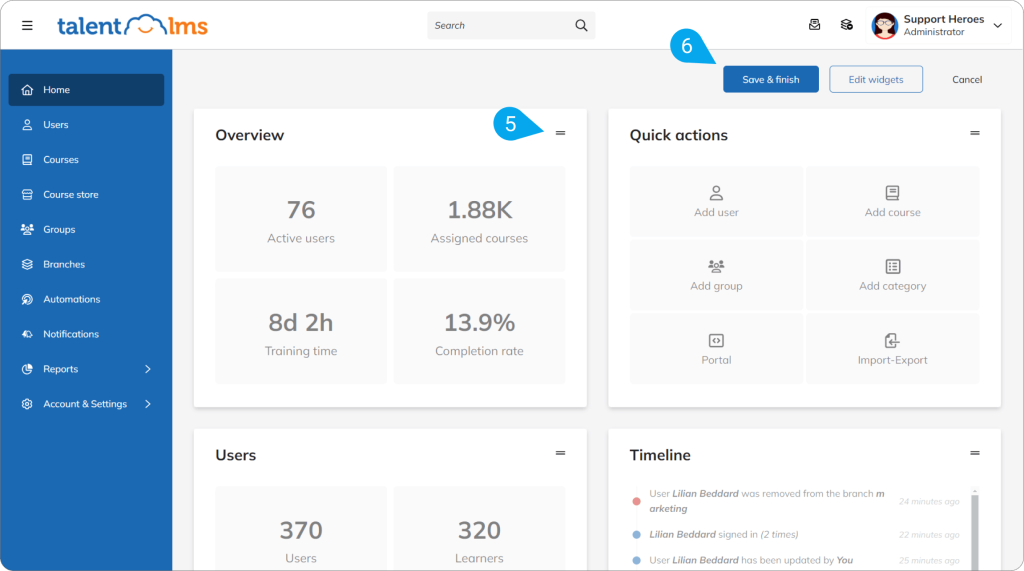
I found the admin dashboard clean and intuitive enough that a non-technical HR manager could run the platform without a dedicated LMS administrator. Course creation supports multimedia uploads, SCORM packages, and instructor-led training in the same workflow, which covers most of what mid-sized companies actually need.
Where TalentLMS hits its ceiling is in advanced features and support. Automation, custom reporting, and white-labeling are locked behind higher-tier plans, which can make the cost-benefit calculation tricky as you scale. Customer support response times have also drawn some criticism in user reviews on G2, particularly on the lower-priced plans. For companies that need complex organizational reporting or multi-audience training at enterprise scale, TalentLMS may feel like it’s holding them back.
Pros:
- Clean, modern admin interface with a low learning curve for non-technical managers
- Covers onboarding, compliance, and skills training from one platform
- Strong mobile app experience for learners on the go
- Broad integration library including HRIS, CRM, and video conferencing tools
Cons:
- Automation, custom reporting, and white-labeling require higher-tier paid plans
- Customer support response times can lag on entry-level plans
How TalentLMS Compares to Schoox
Schoox is designed for large organizations with complex organizational hierarchies and frontline workforce needs. TalentLMS targets SMBs and growing companies that need a clean, scalable training platform without enterprise pricing or complexity. Where Schoox can take weeks to implement and requires L&D expertise to manage, TalentLMS gets teams running in hours. For organizations that found Schoox too expensive or too feature-heavy for their size, TalentLMS is the more proportionate and practical alternative.
Pricing:
Free plan available (up to 5 users, 10 courses). Paid plans start at $69/month (Core plan, billed annually).
Rating: 4.6/5 (G2)
3. Docebo – Best for Enterprise AI-Powered Learning at Scale
Docebo stood out when I was helping a large organization evaluate LMS platforms that could do more than just deliver courses, they needed AI that actually personalized learning rather than just recommending a list of titles. What differentiates Docebo is how its AI engine works in the background: it analyzes learner behavior, maps skills to content, and surfaces recommendations that feel relevant rather than generic.
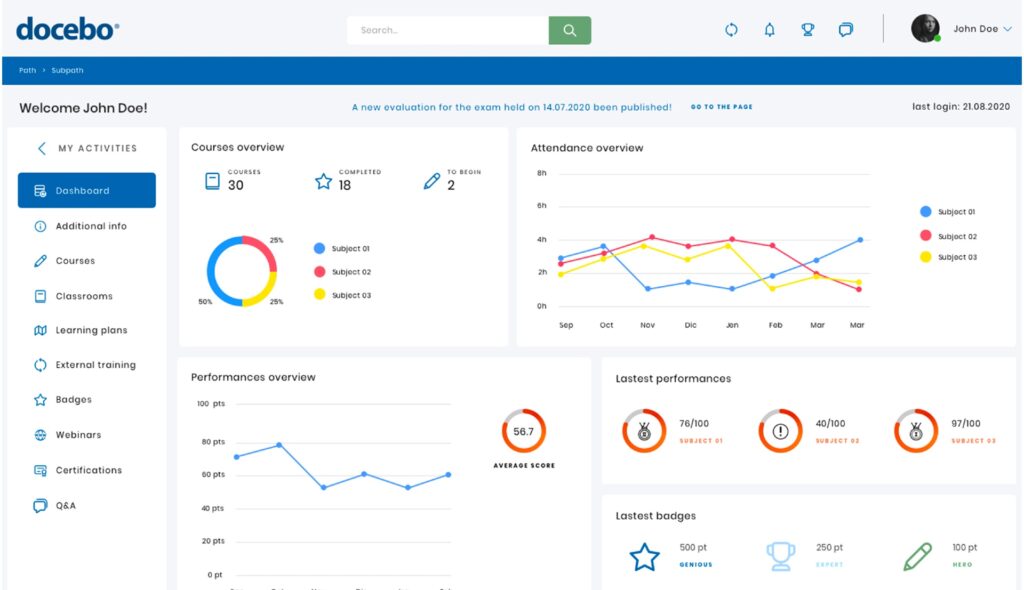
The multi-audience architecture means you can train employees, external partners, and customers from the same platform – with separate branded portals, different access controls, and unified reporting across all groups. The content marketplace adds 30,000+ pre-built courses you can assign without building anything from scratch.
Where Docebo shows its trade-offs is cost and implementation complexity. Pricing is custom and entirely opaque – you won’t find a number on the website, which creates friction in the evaluation process and can result in sticker shock in the quote stage.
Pros:
- Genuine AI personalization that maps skills to content and adapts recommendations per learner
- Multi-audience support for employees, partners, and customers from one unified platform
- Content marketplace with 30,000+ pre-built courses across compliance, leadership, and technical skills
- Deep HRIS, Salesforce, and HCM integrations for seamless data flow
Cons:
- Custom pricing with no public rates – evaluation process requires going through a sales cycle
- Implementation is complex and typically requires a dedicated project team or partner
How Docebo Compares to Schoox
Both Schoox and Docebo target enterprise organizations, but they serve different priorities. Schoox focuses on frontline worker training, compliance, and connecting L&D to business KPIs – particularly in industries like hospitality and retail. Docebo goes further on AI personalization and extended enterprise capability, making it stronger for organizations that also train external partners and customers. If you’re leaving Schoox because the AI feels surface-level or you need to train beyond your employee base, Docebo is a meaningful upgrade – at a meaningfully higher price point.
Pricing:
Custom pricing only. Contact Docebo directly for a quote.
Rating: 4.4/5 (G2)
4. 360Learning – Best for Collaborative, Peer-Led Learning Organizations
360Learning caught my attention because it approaches the LMS problem from a completely different angle than most platforms. Instead of top-down course delivery where L&D creates everything and pushes it to learners, 360Learning is built on the idea that the best training comes from the people already doing the work.
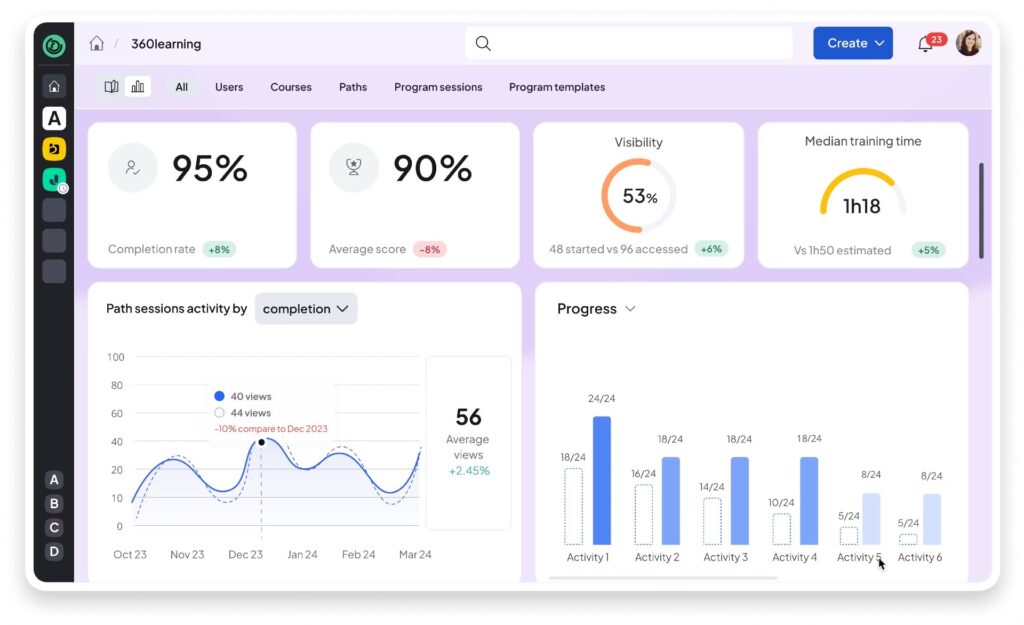
Subject matter experts across your organization like sales reps, customer success leads, technical specialists – can create and share knowledge with their peers in a fraction of the time it takes an L&D team to build a formal course. The collaborative authoring tools are fast, the AI layer adds learning recommendations, and the built-in discussion boards make courses feel more like active learning than passive consumption.
The honest trade-off with 360Learning is that the collaborative model only works if your organization has the culture to support it. In top-down, highly structured learning environments where L&D owns all content creation, the platform’s biggest strength becomes irrelevant. Some users also report an adjustment period as teams get used to contributing to training rather than just taking it.
Pros:
- Unique collaborative authoring model that activates internal subject matter experts
- AI-powered learning recommendations that improve with learner behavior data
- Built-in discussion boards and social learning features that drive genuine engagement
- Fast course creation – SMEs can build a course in under an hour
Cons:
- 100-user minimum makes it expensive for smaller teams ($800/month entry point)
- Users unfamiliar with collaborative learning may face an adjustment period
How 360Learning Compares to Schoox
Schoox is a traditional LMS – L&D builds the training, learners complete it. 360Learning challenges that model entirely by turning every subject matter expert into a potential course creator. For organizations that find Schoox too passive – good for delivering training but poor at building a genuine learning culture – 360Learning offers a fundamentally different approach. The trade-off is that it requires more organizational change management to implement successfully than simply switching LMS platforms.
Pricing:
$8/user/month (minimum 100 users). Contact 360Learning for enterprise pricing.
Rating: 4.6/5 (G2)
5. Absorb LMS – Best for Enterprise Training with Powerful Analytics
Absorb LMS came up repeatedly in my research when talking to training managers at mid-to-large organizations who needed something more polished and configurable than Schoox, without going all-in on a full talent management suite. What stood out most was the balance between power and usability, the admin experience is clean and the learner experience is genuinely modern, which isn’t something you can say about every enterprise LMS.
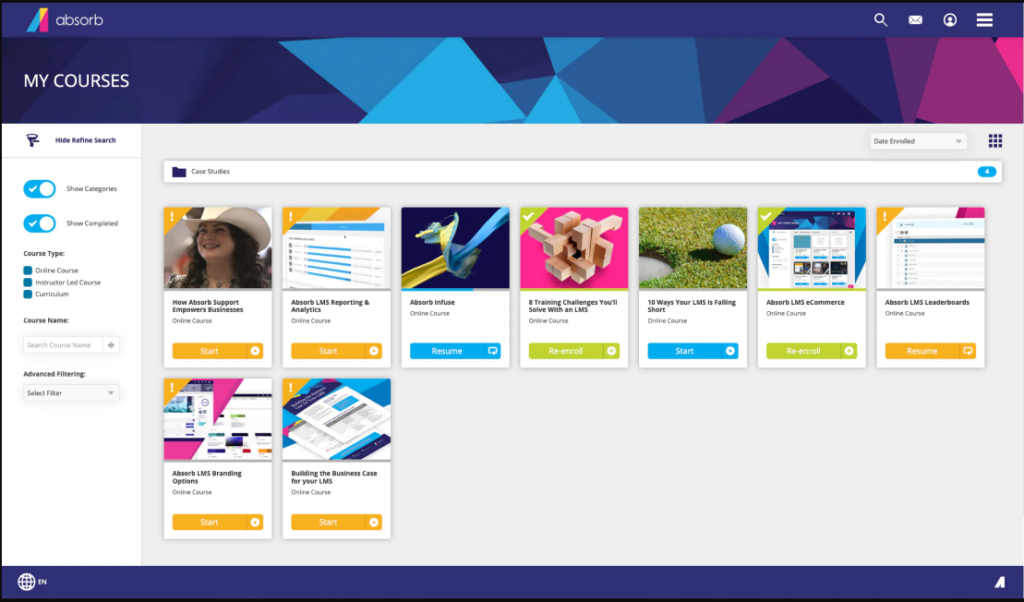
The AI-assisted course creation speeds up content production, the configurable dashboards surface the training metrics that actually matter, and the eCommerce module is one of the strongest on this list for organizations that want to monetize training externally.
Where Absorb shows its limits is pricing transparency and add-on costs. Like most enterprise LMS platforms, pricing is entirely custom and requires going through a sales process. Some features that feel like they should be standard, certain analytics capabilities and advanced integrations are available only as add-ons, which can push the total cost higher than initial quotes suggest.
Pros:
- Clean, modern learner and admin interface that drives higher adoption than most enterprise LMS platforms
- Highly configurable for complex organizational hierarchies and multi-department structures
- Strong eCommerce support for organizations that sell training to external audiences
- AI-assisted course creation reduces content production time significantly
Cons:
- Some advanced analytics and integration features are add-ons that increase total cost
- Smaller teams will likely find the platform more feature-rich than their needs require
How Absorb LMS Compares to Schoox
Schoox and Absorb LMS both target mid-to-large enterprises, but Absorb wins on interface quality and learner experience – two areas where Schoox consistently draws criticism. If your teams found Schoox’s UI dated or its learner-facing design disengaging, Absorb addresses both of those problems directly. Absorb also offers stronger eCommerce capabilities for organizations that need to monetize training. The pricing model is similarly opaque, but the overall product experience is more modern and learner-centric.
Pricing:
Custom pricing. Contact Absorb LMS directly for a quote.
Rating: 4.7/5 (G2)
6. Litmos – Best for Fast Deployment with a Ready-Made Content Library
Litmos stood out in my research specifically when evaluating which Schoox alternatives could get an organization up and running the fastest. Where most enterprise LMS implementations take weeks, teams using Litmos consistently report going live within days. The platform is clean, the admin onboarding is guided, and the pre-built content library covering compliance, leadership, soft skills, and customer service – means you can assign real training content before you’ve built a single course of your own.
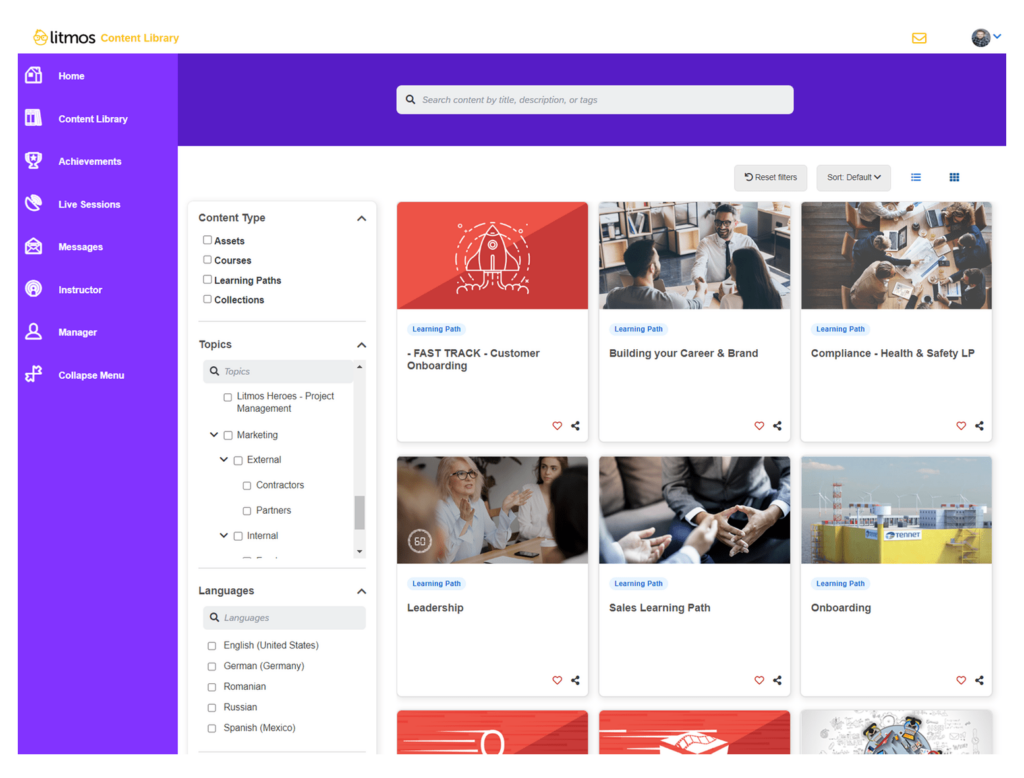
The deep Salesforce integration is a genuine differentiator for sales training use cases, and Litmos being part of SAP means enterprise security and reliability standards are built in.
Where Litmos falls short is pricing transparency and UI modernity. There are no public pricing figures; you need to go through a sales process to get a number, which is frustrating when you’re trying to do an honest cost comparison. The pre-built course library, while strong, requires a higher-tier plan to unlock fully – which means the pitch of “get started immediately with ready-made content” comes with a pricing caveat worth investigating before committing.
Pros:
- Fastest implementation timeline of any enterprise LMS on this list – teams go live in days, not weeks
- Substantial pre-built content library covering compliance, soft skills, and customer service topics
- Deep Salesforce integration that’s genuinely useful for sales enablement and customer-facing training
- Mobile-first design with offline access for deskless and frontline employees
Cons:
- Parts of the admin interface feel dated compared to more modern LMS platforms
- Full access to the pre-built content library requires higher-tier plan subscriptions
How Litmos Compares to Schoox
Schoox and Litmos both target organizations with frontline workforces, but they approach deployment very differently. Schoox is feature-rich and highly configurable – but that configurability comes with a setup investment that can take weeks. Litmos prioritizes time-to-value above all else, making it the better choice when you need training running immediately. For Salesforce-heavy organizations, Litmos also has a structural integration advantage that Schoox can’t match. The trade-off is that Litmos offers less organizational depth and configurability for complex enterprise structures.
Pricing:
Custom pricing. Contact Litmos directly for a quote.
Rating: 4.2/5 (G2)
7. iSpring Learn – Best for Teams That Create a Lot of Original Training Content
iSpring Learn came on my radar specifically because of how it solves a problem that Schoox doesn’t: what do you do when your training team creates a huge volume of original content and needs the authoring-to-delivery pipeline to be seamless? iSpring Learn pairs directly with iSpring Suite, which is widely considered one of the best PowerPoint-based course authoring tools available.
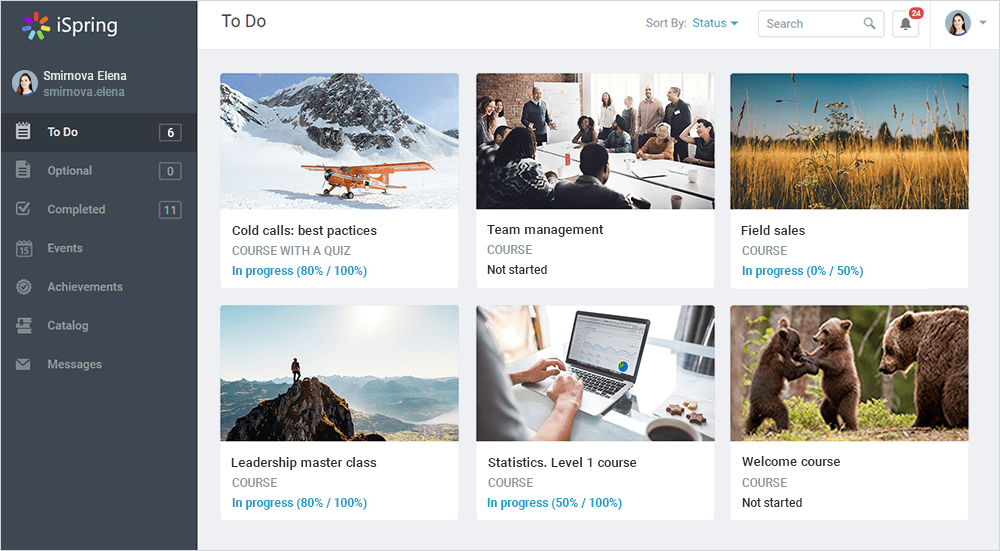
If your trainers live in PowerPoint – and many corporate training teams do – iSpring Suite converts those presentations into polished eLearning courses with branching scenarios, simulations, and role-play exercises, which then publish directly into iSpring Learn. The admin panel is intuitive, and the per-user pricing model is competitive, especially for teams in the 100–500 user range.
Where iSpring Learn shows its limits is scope. It’s built around content creation as the primary use case, which means the organizational management features – complex hierarchies, advanced compliance tracking, deep HRIS integrations – are less robust than other platforms. Teams that need sophisticated enterprise workforce management alongside their LMS will likely find iSpring too lightweight for those requirements.
Pros:
- Seamless PowerPoint-to-eLearning conversion through the iSpring Suite integration
- Best-in-class scenario and role-play simulation tools for soft skills and sales training
- Intuitive admin interface with a genuinely low learning curve
- Competitive per-user pricing that works well for mid-sized teams
Cons:
- Full authoring power requires purchasing iSpring Suite separately – combined cost is higher than the LMS alone
- Enterprise organizational management features are lighter than dedicated enterprise LMS platforms
How iSpring Learn Compares to Schoox
Schoox is a delivery-first platform – it’s built to manage, assign, and track training across large frontline workforces. iSpring Learn is a creation-first platform – it’s built to make producing original training content fast and high-quality. For training teams that spend most of their time building courses rather than managing complex learner hierarchies, iSpring offers something Schoox simply doesn’t have. For organizations that primarily need to deliver and track existing content across a large workforce, Schoox’s organizational depth is the better fit.
Pricing:
iSpring Learn starts at $3.66/user/month (billed annually, minimum 100 users). iSpring Suite authoring tool is priced separately.
Rating: 4.6/5 (G2)
8. Cornerstone Learning – Best for Large Enterprises with Complex Compliance Needs
Cornerstone Learning entered my radar when evaluating platforms for a large organization in a regulated industry that needed compliance training that was not just deliverable but auditable, certifiable, and trackable at scale. Cornerstone’s depth on compliance is hard to match – automated tracking, multi-step certification workflows, recertification reminders, and a global content library with 90,000+ courses including industry-specific compliance material.
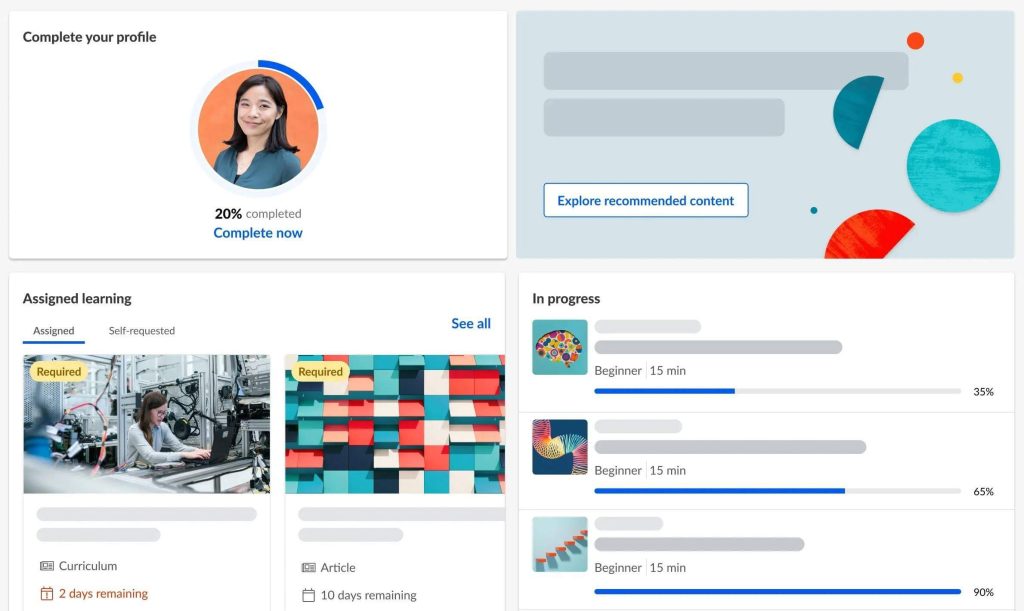
The talent management layer means training connects directly to performance reviews, succession planning, and skills frameworks – making it a genuine talent ecosystem rather than just an LMS. For organizations that already use major HRIS or HCM platforms, Cornerstone’s integration depth is substantial.
Where Cornerstone shows its real trade-offs is implementation time and cost. It is not a platform you deploy in a week. Most implementations require a dedicated project team, a partner consultant, and a realistic runway of several months before the platform is running at full capability. The cost is among the highest on this list.
Pros:
- Deepest compliance management capabilities on this list – automated tracking, certification, and audit trails
- Integrated talent management suite including performance reviews, succession planning, and skills frameworks
- Global content library with 90,000+ courses covering technical, compliance, and leadership topics
- Highly configurable for complex organizational structures with multiple regions and departments
Cons:
- Cost is among the highest on this list – difficult to justify for organizations that don’t need the full suite
- Admin complexity is significant; managing the platform requires dedicated L&D operations resources
How Cornerstone Learning Compares to Schoox
Both Schoox and Cornerstone target large enterprises, but Cornerstone goes significantly further on compliance depth and talent management integration. If Schoox’s compliance tracking felt insufficient for your regulatory environment, or if you need training to connect directly to performance and succession systems, Cornerstone addresses both. The trade-off is a substantially higher investment – in cost, implementation time, and ongoing administrative complexity. For organizations that need that depth, it’s worth it. For those that don’t, most other tools on this list will serve them better.
Pricing:
Custom pricing. Contact Cornerstone OnDemand directly for a quote.
Rating: 4.2/5 (G2)
9. Tovuti LMS – Best for Interactive and Gamified Learning Experiences
Tovuti LMS came onto my radar specifically when researching solutions for L&D teams that had a learner engagement problem – courses that nobody finished, completion rates that looked good on reports but didn’t translate to actual knowledge retention. What sets Tovuti apart is the breadth of interactive content types it supports: over 40 formats including simulations, branching scenarios, and interactive videos, which is more than most LMS platforms offer natively.
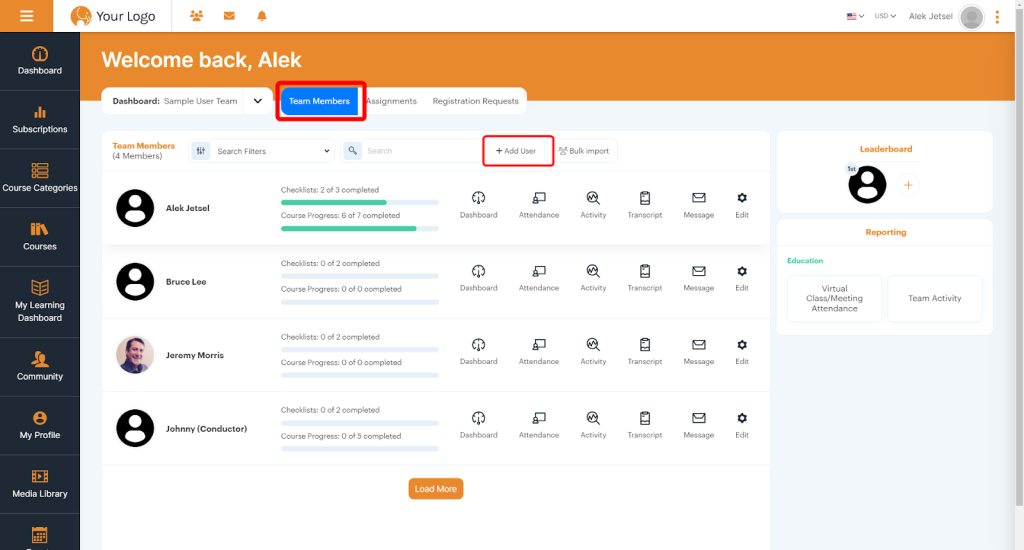
The AI assistant, Dizi, builds professional-looking courses from a topic prompt in minutes, and the gamification layer – badges, leaderboards, points – adds the behavioral incentive layer that makes people come back for more. Where Tovuti shows its limits is pricing transparency and setup complexity for advanced configurations. Like most enterprise-adjacent LMS platforms, pricing is entirely custom which makes apples-to-apples comparison with other tools harder during the evaluation process.
Some users report that complex configurations take time to set up correctly, and the platform can feel feature-heavy for teams that just need a simple training program without the gamification and interactivity overhead. It’s a tool built for teams that want to invest in learning experience quality – not for teams that just need to get mandatory training completed.
Pros:
- 40+ interactive content types including simulations, branching scenarios, and interactive videos
- AI course creator (Dizi) that builds polished courses from a text prompt in minutes
- Gamification features – badges, leaderboards, points – that measurably improve completion rates
- Built-in eCommerce and subscription tools for organizations that monetize training externally
Cons:
- Feature-heavy platform that may be more than necessary for simple internal training programs
- Complex configurations can require a longer setup period than simpler alternatives
How Tovuti LMS Compares to Schoox
Schoox focuses on delivering training efficiently to frontline workforces and connecting L&D to business KPIs – the engagement and interactivity of the learning experience itself is secondary. Tovuti flips that priority: the learning experience is the product. For organizations that found Schoox’s course experience too passive or saw low learner engagement despite high assignment rates, Tovuti’s interactive content tools and gamification layer address that problem directly. The trade-off is that Tovuti is a bigger investment in experience design – it’s best for teams that are ready to prioritize how training feels, not just whether it gets completed.
Pricing:
Custom pricing. Contact Tovuti directly for a quote.
Rating: 4.8/5 (G2)
10. LearnUpon – Best for Training Employees, Partners, and Customers from One Platform
LearnUpon kept surfacing in my research when talking with training managers at companies that needed to do something Schoox wasn’t designed for: train outside the organization. Businesses with franchise networks, distribution partners, reseller ecosystems, or customer onboarding programs need an LMS that can manage completely separate learner audiences, each with their own branded portal, content library, and reporting – from a single admin account.
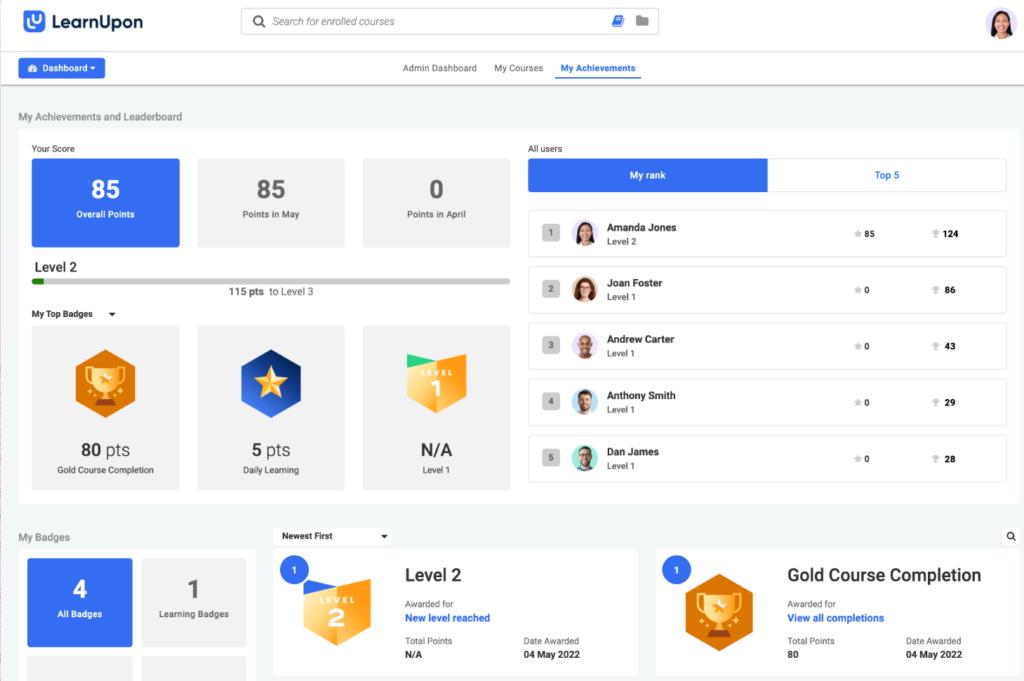
LearnUpon’s multi-portal architecture does exactly that. The platform is clean and intuitive for both admins and learners, the customer success team has a strong reputation for being hands-on during setup, and the integrations cover the tools most revenue-focused teams live in – Salesforce, HubSpot, BambooHR, and more.
Where LearnUpon shows its limits is on content creation. The built-in authoring tools are functional but not a strong point – teams that create a large volume of original training content will likely need a separate authoring tool like iSpring Suite or Articulate. Some users also note that advanced reporting has a learning curve, and the pricing – while reasonable for what you get – is on the higher end of the market for smaller organizations that only need one audience portal.
Pros:
- Clean, modern learner experience that doesn’t require training the people you’re trying to train
- Strong integrations with Salesforce, HubSpot, and BambooHR for revenue and HR use cases
- Dedicated customer success support that’s consistently praised in user reviews
- AI-powered content translation for multi-language program delivery
Cons:
- Built-in course authoring is functional but not a standout – high-volume content creators will need a separate authoring tool
- Pricing is on the higher side for organizations that only need a single-audience internal training program
How LearnUpon Compares to Schoox
Schoox is built for internal employee training in frontline-heavy industries – it was designed for the restaurant manager onboarding a new crew, not the SaaS company training 500 reseller partners. LearnUpon is built for exactly the latter. If your training program needs to reach audiences outside your organization – with separate branding, access controls, and reporting – LearnUpon solves a problem Schoox was never designed for. For organizations that only need to train their own employees, Schoox’s frontline-specific depth may actually serve them better.
Pricing: Custom pricing based on the number of users and portals required. Contact LearnUpon directly for a quote.
Rating: 4.7/5 (G2)
How Did I Evaluate These Schoox Alternatives?
I applied a consistent, six-factor evaluation framework across every tool on this list. No sponsored placements. No vendor-provided rankings. Here’s exactly what I looked at:
- User Reviews and Ratings: I reviewed verified user feedback from G2, Capterra, Software Advice, and community discussions on Reddit’s r/instructionaldesign and r/elearning. I focused on patterns – not just star ratings, but the specific praise and frustrations that kept appearing across multiple reviewers.
- Essential Features and Functionality: I assessed each platform against the core features that actually matter for L&D and HR teams: course creation, compliance management, reporting and analytics, learner management, mobile access, and integration capability. Tools that do a few things exceptionally well scored higher than tools that do many things poorly.
- Ease of Use: This one matters more than most vendors admit. I paid close attention to how quickly a non-technical training manager could build and publish a course without reading a manual. If your HR director can’t run the platform independently, it creates ongoing dependency and support costs.
- Customer Support: I evaluated the availability, responsiveness, and quality of support – including whether live chat, phone support, and onboarding assistance are available on standard plans or locked behind enterprise tiers.
- Value for Money: I compared pricing against what each tool actually delivers for a typical L&D or HR team – factoring in free plan limits, per-user costs, feature paywalls, and total cost of ownership. The goal was to identify tools where the price matches the real-world output, not just the feature list.
- Personal Experience and Expert Opinions: My own research and testing is combined with insights from training managers, HR directors, and L&D professionals who have evaluated or switched from Schoox. Where real practitioner conversations informed a recommendation, that’s reflected in the review.
What Are My Top 3 Picks for the Best Schoox Alternatives?
After evaluating all ten tools in depth, these three consistently came out on top for different but important reasons:
1. ProProfs Training Maker
If I had to recommend one tool to an HR manager or L&D lead who needs a powerful LMS without a complex setup, ProProfs Training Maker is it. It’s the easiest platform on this list to get running, the AI course creator is genuinely useful, and the built-in compliance course library means you’re not building from scratch. Over 15 million users in 150+ countries rely on it – and for good reason. The pricing is transparent, the support is responsive, and the free 15-day trial lets you test everything before committing.
2. Docebo
For large enterprises that need sophisticated AI-driven learning personalization, Docebo earns its spot. The AI recommendations are genuinely smart, the analytics go deep, and the multi-audience capability means you can train employees, partners, and customers from one platform. If Schoox felt too rigid for your L&D ambitions, Docebo gives you more room to build a real learning ecosystem.
3. TalentLMS
TalentLMS is the most practical choice for SMBs that want a clean, scalable LMS without paying enterprise prices. The free plan lets you get started with no financial commitment, and the platform scales smoothly as your team grows. It covers everything most mid-sized training programs need – without the feature overload that makes Schoox hard to manage for smaller teams.
What Features Should a Good Schoox Alternative Have?
Here are the features that actually matter when evaluating Schoox alternatives. Not every tool will check every box, but the more of these you can get in one platform, the less time you’ll spend patching gaps with workarounds.
1. AI-Powered Course Creation
If you’re a training manager juggling course updates, new hire onboarding, and quarterly compliance cycles all at once, manual course authoring is the first thing that breaks your schedule. You spend hours structuring content and formatting slides before a single learner has touched the material — hours you don’t have. The best LMS platforms now let you drop a topic into a prompt and walk away with a full course outline, drafted content, assessment questions, and suggested images in minutes.
A study by G2 Research in 2025 found that ease of use was the most praised aspect of LMS platforms, mentioned 273 times in recent reviews and AI-powered course creation is the single biggest driver of that. For CLOs building learning programs from scratch, this isn’t a productivity feature, it’s the difference between a 60-day launch and a two-week one.
2. Pre-Built Compliance Training Course Library
For an HR director managing mandatory training across 500+ employees, building every compliance, onboarding, and skills course from scratch is simply not a sustainable model.HR Director A strong pre-built library means your team can assign OSHA safety modules, sexual harassment prevention courses, or customer service training on day one without waiting for content to be developed.
The best libraries aren’t just big; they’re professionally structured, regularly updated to reflect regulatory changes, and customizable enough to carry your branding. If a platform doesn’t include this, you’re adding a significant ongoing content burden to a role that already has too much on its plate.
3. Mobile-First Design
Your warehouse manager doesn’t complete training at a desktop, she checks it on her phone between shifts. Your retail team lead runs through onboarding modules in the break room. For any CLO or HR director overseeing frontline, deskless, or field-based employees, a mobile experience that’s clunky or feature-limited compared to desktop isn’t just a UX problem, it’s a completion rate problem.
Look for platforms with native mobile apps, offline access for areas with poor connectivity, and a learner interface that was genuinely built for small screens, not just scaled down from desktop.
4. Automated Tracking And Reporting
For an HR director preparing for an audit, automated compliance reports and certification records aren’t a convenience feature; they’re the deliverable. Scheduled reports delivered to your inbox and exportable data for regulators should be standard, not locked behind the most expensive tier.
5. Learning Paths
Onboarding a new hire isn’t a single course, it’s a sequence. Sales enablement is a progression from product knowledge to objection handling to closing techniques. Compliance recertification follows a schedule. For a CLO designing structured training programs, learning paths let you chain courses together, enforce prerequisites, and guide learners from one stage to the next without requiring manual re-assignment at every step.
The difference between a platform with learning paths and one without isn’t a minor feature gap, it’s the difference between a training program that runs itself and one that requires constant administrative effort to keep moving.
6. Scorm And Xapi Compliance
If your instructional design team has spent months building courses in Articulate Storyline or Adobe Captivate, a platform that doesn’t support SCORM and xAPI means one thing: rebuild everything from scratch. For a training manager switching LMS platforms, that hidden cost can easily turn a “budget-friendly” alternative into a six-figure content migration project.
SCORM and xAPI support lets you import existing content directly into your new platform without rebuilding anything. One practical note: confirm which SCORM version your content was built in, the difference between SCORM 1.2 and SCORM 2004 matters more than most people realize until it doesn’t work.
7. Transparent Pricing
A training manager trying to compare five LMS platforms doesn’t have three weeks to sit through sales cycles just to find out whether a tool is in budget.Hidden per-module fees, opaque enterprise quotes, and pricing tiers that bury the features you actually need are genuine productivity killers during evaluation.
Prioritize platforms that publish their pricing clearly, explain what’s included at each tier, and don’t require a negotiation to understand the true cost of ownership. The time you save in the buying process is real, and it’s time better spent actually improving your training programs.
8. Integrations With Your Existing Tech Stack
For an HR director running BambooHR, a CRM, and Microsoft Teams, an LMS that doesn’t sync with any of them isn’t really saving you time, it’s just moving the manual work to a different step. Your LMS needs to talk to your HRIS to sync employee records, your payroll system to align headcount, your CRM for sales training workflows, and your communication tools for reminders and notifications.
A long integration list on a product page is not the same as integrations that actually work well in practice. Check whether the specific integrations you need are native, built-in and maintained by the vendor, or whether they require third-party connectors like Zapier, which add both cost and fragility to your setup.
Find the Right Schoox Alternative and Start Training Smarter
The right LMS shouldn’t feel like a second job. If you’re spending more time fighting your training platform than actually improving your training programs, that’s a problem – and one that has a clear solution.
The tools on this list cover every real-world scenario: compliance-heavy industries, collaborative learning cultures, extended enterprise training, frontline workforces, and teams that just need something simple that works. If you want a broader view beyond these ten, this roundup of the best learning management systems covers the wider market. The best Schoox alternative is the one that matches your team’s size, your training goals, and your budget – not the one with the longest feature list.
Start with your biggest pain point. If Schoox felt too complex, prioritize ease of use. If it felt too expensive, look at transparent flat-rate pricing. If learner engagement was the problem, go for platforms with AI-powered content and gamification built in.
And if you’re still not sure where to start, give ProProfs Training Maker a look. It’s one of the few platforms on this list where you can sign up, build your first course, and send it to your team in the same afternoon – no IT department, no implementation project, no guesswork. The 15-day free trial is genuinely free, and you’ll know within a week whether it’s the right fit.
Frequently Asked Questions
What is the best Schoox alternative for small businesses?
ProProfs Training Maker and TalentLMS are the top picks for small businesses. ProProfs offers a forever-free plan for up to 10 learners, with compliance courses and AI course creation included. TalentLMS has a free plan for up to 5 users that scales affordably as your team grows.
What are the top Schoox competitors for enterprise training?
ProProfs Training Maker, Docebo, Cornerstone Learning, and Absorb LMS are the strongest enterprise alternatives. All three offer advanced AI, deep HRIS integrations, multi-audience support, and the configurability that large organizations need. Pricing is custom across all three.
How much does Schoox cost compared to its alternatives?
Schoox is priced at approximately $8–11 per employee per month, making it one of the more expensive options in the market. ProProfs Training Maker starts at $59/month flat, TalentLMS offers a free plan, and iSpring Learn starts at $3.66/user/month all significantly more affordable for most teams.
What is the easiest Schoox alternative to set up?
ProProfs Training Maker is widely considered the easiest LMS to set up. Users consistently report creating and publishing their first training course on the same day they sign up - without any technical knowledge or LMS administration experience required.
Which Schoox alternative is best for compliance training?
ProProfs Training Maker is the most accessible option, with 500+ pre-built compliance courses — including HIPAA, OSHA, and sexual harassment prevention ready to deploy or customize on day one. Cornerstone Learning is the deeper choice for regulated industries with complex, multi-step certification requirements.
Can I migrate my existing courses from Schoox to another LMS?
Yes, most platforms on this list support SCORM and xAPI imports, the standard export format for Schoox content. ProProfs, TalentLMS, and Docebo all support SCORM imports, letting you transfer existing courses without rebuilding. Confirm your SCORM version (1.2 vs. 2004) before migrating.
What is the best Schoox alternative for frontline worker training?
ProProfs Training Maker and Litmos are the strongest picks for frontline and deskless employees. Both are mobile-first, support offline access, and make it easy to assign and track role-specific training for workers who aren't at a desk.
Which Schoox competitors offer a free trial?
ProProfs Training Maker offers a 15-day free trial with no credit card required. TalentLMS has a permanent free plan for up to 5 users. iSpring Learn offers a 30-day free trial. Docebo, Absorb, Litmos, and Cornerstone offer trials through demo requests only.Share
Let ProProfs AI create your training course

 We'd love your feedback!
What did you like & how can we make it even better?
 Thanks for your feedback!
 Ask Your Question
Have a question? Get expert help to make your decision easier.