If you manage training, you’ve probably noticed how little of your week actually goes into training.
I’ve seen most of it get eaten up by updating schedules after cancellations, emailing confirmations, cross-checking attendance, and pulling completion records before an audit, while hoping the spreadsheet is still accurate.
This is exactly what training management software is meant to fix.
Training managers report spending 3 to 10 hours a week on this kind of admin work. That’s not a personal failing. It’s a structural one.
In this guide, I’ll show you how a training management system helps you run training that actually works without getting buried in everything around it.
What Is a Training Management System?
A training management system is software built for the operational side of running training: scheduling sessions, coordinating instructors and resources, tracking completions and certifications, and automating the administrative communication that holds it all together.
The simplest way I can put it: if an LMS is the classroom, a TMS is everything it takes to get people into that classroom on time, with the right instructor, in the right room, and with a record that they showed up and completed what they were supposed to. Most organizations that start looking for one have already lived through some version of the same story: a patchwork of tools that were never meant to work together, held in place by one person’s institutional knowledge and a spreadsheet that only they fully understand.
A TMS replaces that patchwork with a single operational layer, not to make training faster exactly, but to make it reliable. According to the LinkedIn Workplace Learning Report, 94% of employees say they would stay longer at a company that invests in their learning and development. That investment only pays off when the infrastructure behind training actually works.
What Is the Difference Between a TMS and an LMS?
This is where most people get confused, and the software vendors don’t help. Almost everyone markets their platform as both things, which makes the distinction feel arbitrary. From what I’ve seen, it isn’t.
An LMS is where learning happens. A TMS is how learning gets organized.
Your LMS hosts the courses, delivers the content, tracks quiz scores, and gives learners a place to log in and do the actual learning. Your TMS handles everything upstream of that: who needs to attend, when the session is scheduled, which instructor is leading it, whether the room is booked, and what the records look like after it’s done.
| TMS | LMS | |
|---|---|---|
| Primary user | Training coordinators, HR, and L&D managers | Learners, instructors |
| Core function | Scheduling, logistics, resource allocation, and compliance tracking | Course delivery, content hosting, learner experience |
| Solves | "We can't coordinate who trains whom, when, and where" | "We have no way to deliver or track online learning." |
| Outputs | Audit records, booking confirmations, certification expiry alerts | Course completions, quiz scores, and learning paths |
| Failure without it | Scheduling chaos, compliance gaps, and fragmented records | No consistent way to deliver or measure learning |
Many modern platforms combine both into a single platform. If you’re evaluating training management software and a vendor claims to handle both, ask them specifically: Can I manage instructor scheduling, room bookings, and certification expiry tracking from this platform? That single question separates real TMS capability from marketing language.
Why Do Training Teams Start Looking for a TMS?
Usually, it’s not a decision. It’s a breaking point. The same breaking points show up consistently, across industries and team sizes, and if any of these sound familiar, you’re closer to needing a dedicated system than you might think.
The Spreadsheet Stops Being Manageable
There’s a version of this that every training coordinator knows. A master schedule spreadsheet. A few tabs for instructor availability. A separate doc for room bookings. A chain of emails confirming everything. It works until it doesn’t, and when it stops working, it usually stops all at once: a double-booked instructor, a room that wasn’t reserved, a session confirmed to 40 employees that quietly falls apart behind the scenes. Training teams report spending up to 10 hours a week on scheduling and coordination overhead alone, time that compounds as programs scale.
A Compliance Audit Reveals the Gaps
Someone asks you to prove that every employee in a specific role completed their mandatory safety training in the last 12 months. You know they did, roughly, because you ran the sessions. But the actual documentation is scattered across completion emails, sign-in sheets, and a spreadsheet that hasn’t been updated since March. This is one of the most common triggers for organizations to seriously evaluate a TMS: not because they failed the audit, but because they realized how close they came to failing.
Training Doesn’t Reach Everyone Consistently
When coordination is manual, delivery becomes uneven. Some locations get thorough onboarding; others get a folder of PDFs and a manager who did their best. Compliance programs get rolled out to desk-based employees and quietly skipped for field workers because the logistics are harder. The gap between “we have a training program” and “every relevant employee actually received it” is wider than most organizations realize until something goes wrong.
The Stack Gets Too Fragile
A separate calendar tool. A different system for certifications. An LMS for online modules. A spreadsheet stitches them together. Each connection between those tools is a potential failure point. Training vendors especially know this pain: trying to connect an LMS with e-commerce, a CRM, and video conferencing through automation chains that break every time one platform updates.
What Are the Key Features of a Training Management System Software?
Not everything matters equally for every organization. The right starting point is your actual operational failure, not a feature checklist. That said, here’s what to evaluate and why each capability matters in practice.
Scheduling and Resource Management
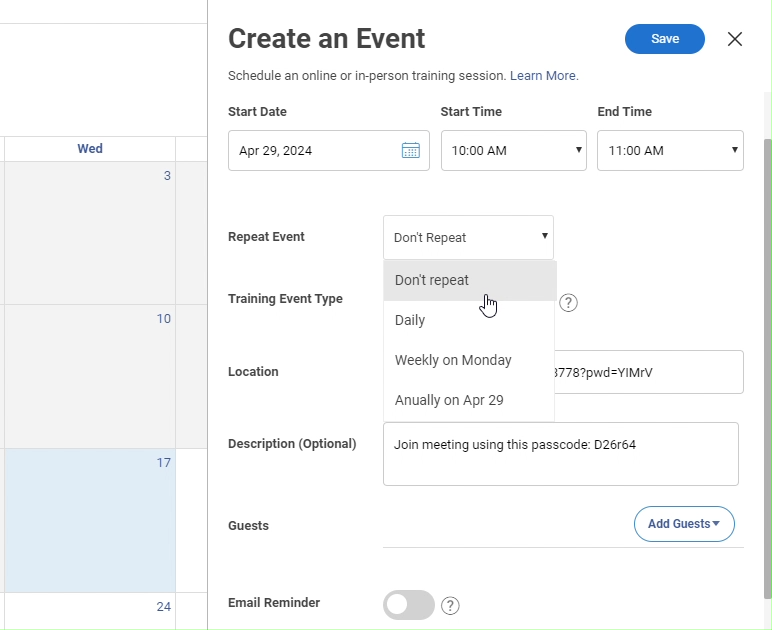
This is the core of any TMS. You need a centralized calendar that shows instructor availability, room bookings, and equipment allocation simultaneously, with automatic conflict detection before problems occur. For instructor-led training (ILT) and virtual instructor-led training (VILT), this means matching instructor qualifications to session requirements, handling last-minute facilitator swaps, and managing resources across time zones without rebuilding the schedule from scratch every time something changes. Resource allocation automation at this level is what makes a 10-hour coordination week manageable.
Compliance and Certification Tracking
A good TMS gives you automated alerts when certifications are approaching expiry, role-based training assignments so the right people get enrolled in what they’re actually required to complete, and audit-ready reports with timestamped records. For regulated industries, forklift certifications, medical licensing, OSHA compliance, and GDPR training, this isn’t about convenience. It’s about having documentation that holds up when scrutinized.
Automated Administrative Communication
Enrollment confirmations, joining instructions, session reminders, post-completion certificates: these should trigger automatically from scheduled events, not get composed manually by a coordinator with fifteen other things open. This is a significant part of where that administrative overhead lives, and it’s also where human error tends to concentrate when things are done by hand at scale.
Training ROI Metrics and Reporting
Completion rates are the floor, not the ceiling. What you actually want to know is whether the training moved the needle. Which sessions have the highest dropout rates? Where are people consistently getting stuck? Are employees who completed a specific program performing differently from those who didn’t? A TMS that only tells you who clicked “complete” is giving you a fraction of what you need to make training decisions with any confidence.
Watch: How to Analyze Training Reports
Mobile Access and Offline Functionality

This is often skipped in feature comparisons, and it’s a serious oversight if your workforce isn’t desk-based. For manufacturing workers, construction crews, and healthcare staff on rotating shifts, standard systems fail because they assume learners have reliable desktop access during working hours. Mobile-ready, offline-capable training isn’t a nice-to-have for those environments; it’s the baseline requirement for training to reach people at all.
Integration With HR and Business Systems
A TMS that doesn’t connect to your HRIS means double-entry and data drift. TMS integration with LMS platforms, CRM tools, and SCORM-compliant content libraries is what determines whether you have a unified training ecosystem or just another siloed tool. For training vendors running commercial programs, integration with e-commerce and CRM isn’t optional; it’s what makes the business model function.
How Does a Training Management Software Actually Work?
The best way to understand what a TMS does is to walk through what training administration looks like when you’re using one. Here’s a complete workflow, from scheduling a session to producing a compliance report.
- Program setup: You define who the training applies to by role, location, or department, how often it must be completed, and what constitutes valid completion.
- Scheduling: The system shows instructor availability and room resources simultaneously, flags conflicts before they become problems, and lets you confirm sessions without cross-referencing three separate tools.
- Enrollment and communication: Based on the rules you set, the system auto-enrolls eligible people and sends confirmations, joining instructions, and reminders.
- Delivery tracking: Attendance is recorded for in-person, virtual, or self-paced online sessions. Supervisors can verify hands-on skill completion on-site from a mobile device, without a stable internet connection.
- Certification and records: Completion triggers certificate issuance. Expiry dates are tracked. The audit trail is built automatically, not assembled the night before an inspection retroactively.
- Reporting: You can pull completion rates, identify who hasn’t completed required training, see which programs are underperforming, and export compliance documentation at any point, not just when someone asks for it.
Completion Rates Are Not a Measure of Training Success
I want to be direct about something, because the entire framing of most training operations is built around completion as the goal. Track who finished the course, pull the report, and move on.
That framing produces training programs where people click through slides at 1.5x speed to get the certificate and forget everything by Tuesday. It’s what the training community calls the check-the-box trap, and it’s common enough that you’ve probably seen it in your own organization. The scheduling is tight, the records are clean, and the actual skill transfer is minimal.
A TMS handles the logistics. But logistics alone don’t determine whether training works. What does:
- Scenario-based assessments that put learners in realistic situations rather than asking them to recall facts they just read
- Built-in quizzes with real accountability, including anti-cheating settings, randomized questions, and time limits, not bolt-on tests that can be retaken until someone passes
- Pre- and post-training skill measurement so you can see whether the training actually changed something
- Spaced repetition and follow-up that works against the forgetting curve after a session ends
Platforms like ProProfs Training Maker are built to address both sides of this. On the operations side, it handles automated enrollment, certification tracking, compliance reporting, and supports SCORM content uploads and integrations with HR and SSO tools.
On the learning side, it includes an AI course builder that can generate a full training program from a single prompt, along with a library of 500+ expert-made courses on topics such as safety, leadership, and compliance.
It also offers branched scenarios, gamification, and embedded assessments that are integrated directly into the learning flow rather than added at the end. The organizations that get real ROI from training management software are the ones that use it to run training efficiently and measure whether it’s actually working.
How Do You Choose the Right Training Management Software?
Before you sit through a single demo, I’d work through these questions honestly. They narrow the field faster than any feature comparison chart.
What is your primary operational failure right now?
Is it coordination chaos: scheduling, instructor management, resource allocation automation? Compliance gaps: no audit trail, expiring certifications you can’t track? Or learning outcomes: people complete training, but their behavior doesn’t change? Your answer should drive which features you weigh most heavily in evaluation.
Who is being trained, and where are they?
If a meaningful portion of your workforce is deskless, shift-based, or field-based, mobile and offline capability moves from nice-to-have to non-negotiable. Ask vendors specifically what the learner experience is like without an internet connection.
What does your compliance picture look like?
If you’re in a regulated industry or face regular audits, the quality of your audit trail matters more than almost anything else. Ask to see what a compliance report actually looks like in the platform, not a marketing screenshot.
What are you replacing, and will the new system scale?
If you’re moving off a spreadsheet stack, almost any dedicated system will feel like an improvement. The risk is choosing based on what feels better than your current chaos rather than what will still work when you double in size. Ask about admin overhead at 3x your current user count.
What pricing model fits your usage pattern?
Per-active-learner pricing works well for variable training volume or seasonal workforces. Flat-rate pricing is more predictable at high, consistent volume. Know which model fits your pattern before you compare costs.
Industry-Specific Use Cases
The features that matter most shift significantly depending on your industry and how training is actually delivered. Here’s where the priorities lie for the sectors with the highest TMS adoption.
Manufacturing
The non-negotiables here are equipment qualification tracking, safety certification management, and offline mobile access for on-site verification. Supervisors need to confirm that a worker has completed the hands-on component of a certification, not just the online module, and do so on a tablet on a factory floor with an unstable internet connection.
Healthcare
Strict regulatory requirements, timestamped completion records, and role-based assignment dominate. Nursing staff, technicians, and administrative roles often have entirely different required training, and the documentation standards are high enough that approximate records aren’t an acceptable answer when a regulator asks.
Commercial Training Vendors
If you’re selling training programs externally, you need e-commerce integration, multi-portal support for different client organizations, and CRM connectivity to manage the commercial side of delivery. The TMS needs to handle the business of training, not just the operations of it, from enrollment to invoice to completion record.
The Infrastructure Behind Training That Works
Your training program is only as reliable as the infrastructure running it. If that infrastructure is a spreadsheet and good intentions, it will eventually fail you, usually at the worst possible time: during an audit, after a compliance incident, or when the one person who understood the system leaves and takes their institutional knowledge with them.
A TMS doesn’t make your content better. What it does is make your operation dependable. It creates the conditions where good training can actually reach the right people, be properly documented, and give you the data to know whether it’s working. That shift, from reactive coordination to a system that runs consistently without you holding it together manually, is what training management software is actually built for.
Frequently Asked Questions

What is the difference between a TMS and an LMS?
An LMS (learning management system) hosts and delivers course content to learners. A TMS manages the operational infrastructure behind that delivery: scheduling, instructor coordination, resource allocation, and compliance tracking. Your LMS is where learning happens; your TMS is how you ensure it gets organized, delivered to the right people, and properly documented. Many modern platforms combine both capabilities into a single training management platform.
Who uses a training management system?
Training coordinators, L&D managers, HR professionals, and compliance officers are the primary users. These are the people responsible for ensuring training reaches the right employees, gets documented accurately, and holds up under audit. Training vendors who deliver commercial programs to external clients also rely heavily on TMS functionality to manage enrollment, communications, and certification records at scale.
How does a TMS support compliance training?
A TMS assigns required training by role, location, or department; sends automated alerts when certifications are approaching expiry; and generates audit-ready reports with timestamped completion records. The result is documentation you can pull in minutes when an inspection or audit happens, rather than something assembled manually under pressure.
What features should I look for in training management software?
Prioritize scheduling and resource management, compliance and certification tracking, automated communication workflows, and reporting that goes beyond completion rates. If you have deskless or field-based workers, mobile access and offline functionality are essential. TMS integration with your HRIS and other core systems determines whether the platform actually reduces coordination overhead or just moves it to a different interface.
Is a training administration system suitable for small businesses?
For teams under roughly 100 employees with simple compliance requirements, a basic LMS that handles both delivery and tracking is usually sufficient. A dedicated TMS becomes worthwhile when you're managing training across multiple locations, dealing with regulatory compliance requirements, or coordinating instructor-led sessions at a volume that can't be managed manually without significant time cost.
How much does training management software cost?
Per-active-learner pricing, where you pay only for users who engage in a given billing period, is common and works well for variable training volume. Some platforms, including ProProfs Training Maker, offer a free plan for growing teams, with paid plans starting at $1.99 per active learner per month. Flat-rate enterprise pricing is also available from most vendors at higher usage levels.
What is the difference between a training administration system and training administration software?
The terms are often used interchangeably. Training administration software typically refers to tools focused specifically on scheduling, enrollment, and record-keeping. A training administration system is broader, encompassing administration alongside compliance tracking, resource allocation automation, reporting, and in many modern platforms, learning delivery as well.

Let ProProfs AI create your training course

 We'd love your feedback!
What did you like & how can we make it even better?
 Thanks for your feedback!
 Ask Your Question
Have a question? Get expert help to make your decision easier.