If you’re reading this with the deadline close, here’s what matters most: EdApp access ends March 31, 2026. If you haven’t taken action yet, your courses may not be migrated.
After March 31, every course, every completion record, and every learner group gets permanently deleted. There is no recovery.
So before you read anything else on this page, open your EdApp account and export your reporting data. Right now. That CSV is the only backup you’ll have of your training history, regardless of where you go next.
Done? Good. Now let’s figure out the rest.
What’s Actually at Stake (Not Just the Courses)
Most of the anxiety I hear from EdApp admins isn’t about the courses themselves. It’s about the records. If you’ve been running compliance training, safety onboarding, or any program that requires showing who passed what and when, your completion data is irreplaceable. The courses you can rebuild. The historical records you cannot.
Here’s the honest breakdown of what EdApp’s migration actually preserves, and what it doesn’t:
What transfers if you move to SC Training:
- Your course content, including quizzes and practical assessments
- Branding elements like course tiles, logos, backgrounds, and custom CSS
What does not transfer, under any path:
- Users and user groups
- Learner progress and course completion data
- Custom completion rules or learning path logic
This means you’re not doing a migration in the traditional sense. You’re rescuing content and rebuilding program structure. The sooner you accept that, the more realistic your timeline becomes.
Do This First: Your Pre-Migration Export Checklist
Before you choose a destination platform, do all of this. It takes under an hour, and it protects you regardless of what you decide next.
- Export all learner reporting data as CSV – this is your compliance record. Don’t skip it.
- Download your course files individually – especially any SCORM packages you originally uploaded
- Export your user list with group assignments and roles
- Save your branding assets – logos, custom CSS, course tile images
- Screenshot or document your course completion settings – pass thresholds, attempt limits, due dates
If your courses were built natively inside EdApp’s Creator Tool, they’re in a proprietary format. They can only be migrated through EdApp’s official path to SC Training; they cannot be exported as SCORM for use elsewhere.
If your courses were originally authored in Articulate Storyline, Adobe Captivate, SCORM 1.2 or SCORM 2004, or a similar tool, and then uploaded as SCORM, go back to that authoring tool and re-export clean SCORM packages directly. That gives you portable, LMS-agnostic files you can take anywhere.
Your Options: What Each One Actually Means
EdApp is presenting paths, but the framing makes them sound simpler than they are. Here’s what you’re actually choosing between.
Option 1: Move to SC Training (New Account)
EdApp sets up a new SC Training account and copies your courses into it. You start with a free trial, then select a new billing plan. Your courses arrive intact. Your learners, groups, and completion history do not.
Right for you if: You don’t have deep compliance record requirements, your training is primarily mobile microlearning, and you want the path of least resistance.
Watch out for: SC Training’s pricing differs from EdApp’s. Review it before committing, because what felt affordable on EdApp’s plan may look different on SafetyCulture’s structure.
Option 2: Leave EdApp and Move to a Different LMS
Your EdApp account closes on March 31. You move your exported files, SCORM packages, and learner CSVs to an independent LMS such as ProPorfs Training Maker. More upfront setup work, but you end up with a platform actually built for the kind of training you need.
Right for you if: You’ve been frustrated by EdApp’s SCORM tracking limitations, you need defensible compliance records, you have structured multi-module programs, or you want better reporting than microlearning platforms typically offer.
Watch out for: Don’t underestimate the re-enrollment and program rebuild time. Budget at least a week of admin work for a mid-sized team.
How to Actually Migrate to ProProfs: The Step-by-Step Guide
I’ve seen migrations go wrong when teams rush into it without a plan. The steps below will help you move your courses cleanly while keeping your data and learner experience intact.
Step 1: Audit your course library before you move anything
Not every course deserves to be migrated. Go through your library and identify: which courses are actively in use, which ones are outdated or redundant, and which ones were SCORM imports versus natively built in EdApp. You’ll handle those two groups differently.
Step 2: Re-export your SCORM courses from the original authoring tool
If your courses were built in Articulate, Captivate, or another tool, re-export fresh SCORM packages directly from that tool rather than relying on EdApp’s per-lesson download. EdApp doesn’t support bulk SCORM export, and per-lesson files can be messy. A clean re-export gives you a reliable, portable package.
Make sure you’re exporting to SCORM 1.2 or SCORM 2004, since those are the standards most modern LMS platforms support.
Step 3: Upload your SCORM courses to your new LMS
On a platform like ProProfs Training Maker, which supports both SCORM 1.2 and SCORM 2004, the upload process is straightforward:
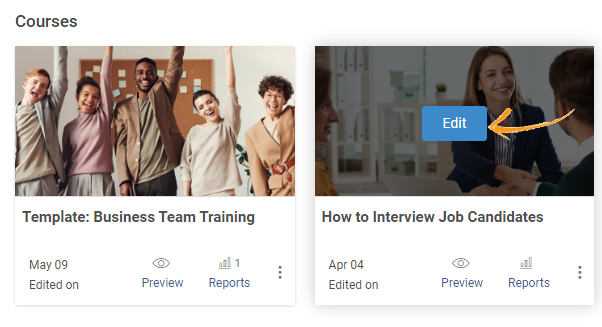
- In your account, hover over the course and click Edit
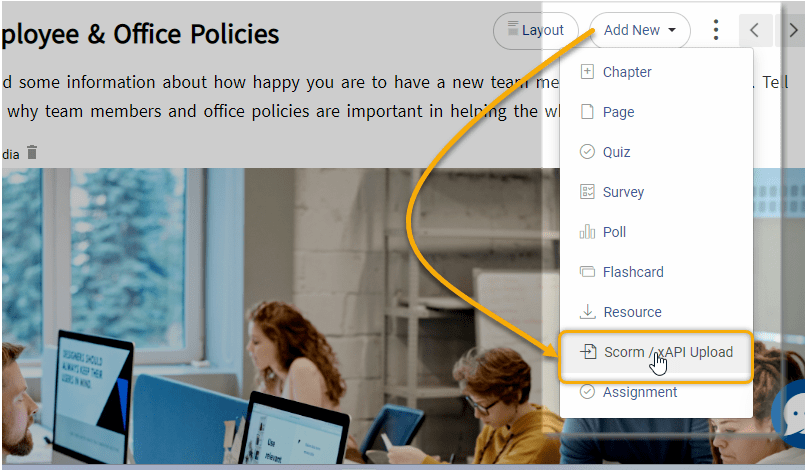
- In the course editor, click Add New and select SCORM/xAPI Upload
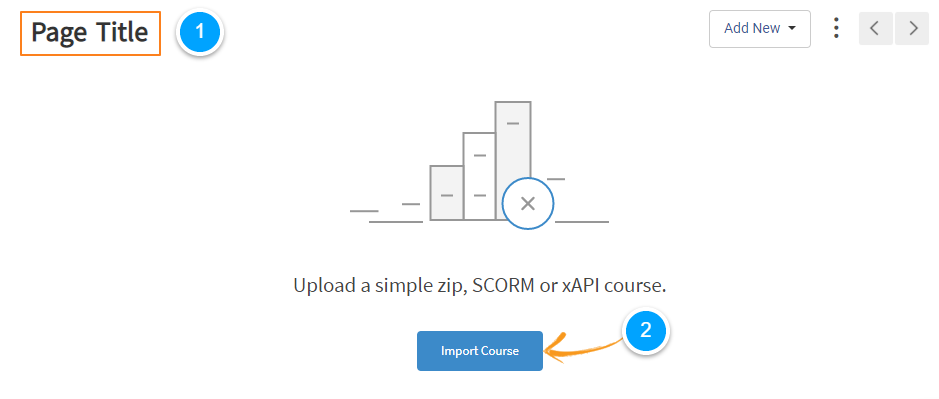
- Enter your page title and click Import Course
- Select your SCORM zip file and click Done
Once uploaded, the platform automatically reads and tracks your SCORM data, quiz scores, completion status, time spent, and pass/fail results, all of which get captured immediately. This matters because it closes the gap that EdApp never properly addressed: SCORM imports in EdApp didn’t reliably track test scores or pass/fail outcomes. Moving to a proper SCORM-compliant LMS means your compliance reports go from showing completions to showing actual score records with timestamps.
Watch: How to Upload SCORM Courses
Step 4: Rebuild your learner structure
Import your user CSV. Create your learner groups and classrooms. Assign courses and configure completion rules, pass thresholds, attempt limits, and due dates. Recreate any learning paths or course sequences you had in EdApp. This is the administrative work most people underestimate, so build time for it before you start re-enrolling learners.
Step 5: Test everything before going live
Run through at least one full course as a learner before you invite your team. Check that navigation works, quizzes score correctly, completion triggers are as expected, and certificates are generated if you use them. Fix issues in a clean test environment, not after your team is already enrolled.
Step 6: Re-enroll learners and communicate the transition
Once your platform is configured and tested, re-invite your team. Send a clear message explaining the change, what’s new, where to find their courses, and what happened to their previous records. Learners handle transitions much better when they understand what’s happening and why.
Get Free Software — All Features, Forever.
We've helped 567 companies train 200,000+ employees. Create courses in under a minute with our AI LMS or use 200+ ready-made courses on compliance, harassment, DEI, onboarding, and more!
The Mistake That Will Cost You the Most Time
The most common mistake I see in LMS migrations is treating content migration and program migration as the same thing. They’re not.
Copying a course over is the easy part. What takes time is recreating the training program around it: the enrollment logic, due dates, learner groupings, completion thresholds, and certificate rules. None of that is in the SCORM file. All of it lives in your LMS configuration.
If you wait until the last week of March to start this, you will not finish in time. Start the program rebuild at least 2 weeks before your go-live date, even if the content migration itself takes only an afternoon.
What to Look for in Your Next LMS If You’re Starting Fresh
If EdApp’s retirement is the push you needed to move to a platform that better fits structured training programs, here’s the honest checklist:
| Feature | Why It Matters |
|---|---|
| AI Course Generator | Let's you build training from a prompt instead of starting from scratch, critical if you're rebuilding a library after migration |
| SCORM 1.2 and SCORM 2004 Support | Non-negotiable if you have any externally authored content you need to bring over |
| Compliance Tracking | Captures pass/fail records, completion timestamps, and scores in a format you can actually use for audits |
| Gamification | Keeps learners engaged through points, leaderboards, and badges, especially important if you're moving a team that was used to EdApp's engagement features |
| Bulk Content Upload | You need to move an entire course library, not one file at a time |
| Group and Department-Level Reporting | Team-level visibility, not just individual completions |
| Certificate Generation | Required for most compliance and onboarding programs |
| Multilingual Support | Critical if you train across geographies |
You can also use our full LMS selection checklist if you want a deeper framework.
One thing worth naming directly: SC Training was built from the same microlearning-first philosophy as EdApp. It’s a good fit if your training is primarily short mobile refreshers for frontline teams. But if you’re running compliance programs that need defensible records, courses built in external authoring tools, or reporting by department and group, you’ll hit the same ceiling you may have already hit with EdApp.
That’s the scenario where platforms like ProProfs Training Maker are worth a serious look. You can type a prompt and have the AI generate a complete course, which matters a lot when you’re rebuilding a library under deadline pressure. Beyond that, it comes with a 500+ course library so you’re not starting from scratch, full SCORM compliance tracking, and structured reporting by group and department.
Don’t Let a Deadline Force a Bad Decision
The worst outcome here isn’t losing your EdApp courses. It’s panic-migrating to the default option, only to realize six months later that your compliance tracking is still broken and you’re rebuilding again.
Export your data today. Audit your course library this week. If SC Training fits what you actually do, use it. If you’ve been wanting a more structured LMS for a while and this deadline is finally the push, ProProfs Training Maker has a free plan you can test your SCORM content on before you commit to anything.
Either way, the decision is yours to make deliberately. You just need to make it before March 31.
Frequently Asked Questions

Will my learner completion data move to SC Training?
No. Only course content and branding elements transfer. User progress, completion records, and group assignments do not move. Export your completion data as CSV before migrating; that CSV will be your only audit-ready record.
Can I take my EdApp courses to a different LMS, not SC Training?
It depends on how the courses were built. Courses created natively in EdApp's Creator Tool are in a proprietary format and can only be migrated through EdApp's SC Training path. Courses that were originally authored as SCORM files in external tools like Articulate or Captivate can be re-exported from those tools and uploaded to any SCORM-compliant LMS.
Does ProProfs Training Maker support SCORM content migrated from EdApp?
Yes, ProProfs Training Maker supports both SCORM 1.2 and SCORM 2004. Once uploaded, it automatically tracks quiz scores, completion status, time spent, and pass/fail results, which EdApp was not reliably doing on SCORM imports. If SCORM tracking and compliance reporting matter to you, this is worth factoring into your platform decision.
What's the actual difference between SC Training and EdApp?
SC Training is EdApp rebuilt within the SafetyCulture platform. Most core features carry over, and SafetyCulture adds integrations with its inspections and issue management tools. The prizing and stars engagement features from EdApp have been discontinued. User management in SC Training works differently, with more access control via seats and permissions. Pricing plans differ from EdApp's previous structure, so review the SC Training pricing page before assuming your costs will be similar.

Let ProProfs AI create your training course

 We'd love your feedback!
What did you like & how can we make it even better?
 Thanks for your feedback!
 Ask Your Question
Have a question? Get expert help to make your decision easier.