

I’ve talked to enough HR managers at small and mid-sized companies to know what the real problem is. It’s not that you don’t have an onboarding process.
It’s that your onboarding process lives in five different places: a Google Sheet, a shared drive folder, a few Slack messages, and someone’s memory. New hires show up on day one, and you’re scrambling to pull it together.
Free employee onboarding software can actually fix this. Not perfectly, and not forever. But well enough to give you structure, save you real hours, and set new hires up to contribute faster.
I’ve pulled together the 10 best free options available right now, with honest assessments of what each one actually does and where it falls short.
What Is Employee Onboarding Software?
If you’re specifically looking for a free onboarding solution, it’s important to understand that not every “free” plan offers the same value.
“Free” means different things across these platforms. Some offer a permanent free tier with real usability. Others give you a 14-day trial and call it free. I’ve called both out clearly in each tool’s pricing section, so you won’t be surprised.
Here’s why it actually matters to start with a free plan rather than going straight to paid:
- Forces you to build the process first: Free plans are leaner, which means you have to decide what your onboarding flow actually needs before buying features you won’t use.
- Reduces the cost of a bad decision: If you pick the wrong tool, switching before you’ve paid anything is painless.
- Let your team test adoption: The biggest onboarding software failure isn’t a bad tool. It’s a tool nobody actually uses.
- Solves the “prove it to management” problem: You can run a real pilot with real results before asking for budget.
10 Best Free Employee Onboarding Software and Tools
I’ve evaluated each tool below based on real user reviews, honesty about the free plan, and how well it addresses the actual onboarding problems HR managers at SMBs face every week.
| Tool | Best For | Free Plan | Paid Plan | User Rating |
| ProProfs Training Maker | Training-Led Onboarding | Free plan available with access to most premium features (learner cap applies) | Forever free for up to 10 learners. Paid plans start at $1.99/learner/month, billed annually. | 4.8/5 (Capterra) |
| BambooHR | All-in-One HR and Onboarding at SMBs Scaling 50–500 | 7-day free trial | Starts at $10/employee/month | 4.6/5 (Capterra) |
| Connecteam | Mobile-First and Deskless Worker Onboarding | Free plan available for up to 10 users | Starts at $29/month | 4.6/5 (Capterra) |
| Rippling | Automating IT and HR Onboarding Together | No permanent free plan (free trial available) | Custom quote | 4.9/5 (Capterra) |
| Trainual | Documenting and Standardizing the Onboarding Process | 7-day free trial | Custom quote | 4.8/5 (Capterra) |
| Freshservice | IT-Led Onboarding and Internal Process Automation | 14-day free trial | Starts at $19/agent/month | 4.5/5 (Capterra) |
| Zoho People | Budget-Conscious SMBs Needing a Full HR System | Free plan available for up to 5 users | Starts at $1.50/user/month | 4.4/5 (Capterra) |
| WebHR | Small Teams Needing a Full HRIS at No Cost | Free for up to 5 users | Starts at $2/employee/month | 4.3/5 (Capterra) |
| Pipefy | Building Custom No-Code Onboarding Workflows | Free plan available (up to 5 processes) | Custom quote | 4.6/5 (Capterra) |
| Boardon | Structured Preboarding and First-30-Days Integration | Free plan available (1 active onboarding) | $58–$317/month based on total users | 4.6/5 (Capterra) |
1. ProProfs Training Maker – Editor’s Choice, Best for Easy AI-Powered Training Development and Scalable Employee Training
When I started using ProProfs Training Maker for onboarding, the first thing I noticed was how fast I could build something real.
I typed a basic prompt describing our program, and the AI generated a complete course structure I could edit right away. No blank-page paralysis, no waiting on an L&D team. Try it yourself. Paste a prompt like this into the AI course builder:
Create a 5-day employee onboarding course for a new sales representative covering company culture, CRM training, product knowledge, sales process, compliance, quizzes, and a final assessment.

Let ProProfs AI create your training course
I could assign role-specific learning paths the moment a new hire was added, set completion deadlines, and see exactly where someone was stuck without having to hunt down their manager. The 500+ pre-built course library meant I didn’t have to start from scratch on compliance topics like safety, harassment prevention, and GDPR.
What I found genuinely useful was the mobile compatibility. Frontline workers and remote hires aren’t sitting at a desk to do onboarding. They’re doing it from their phones. ProProfs handled that without a clunky experience. The analytics gave me real visibility into completions and performance gaps, not just checkbox data.
Pros:
- AI-powered course builder generates training content from a simple prompt
- 500+ ready-to-use courses on compliance, safety, soft skills, and leadership
- Integrates with Salesforce, Justworks, and SCORM-compatible tools
- Role-based learning paths so each hire gets only what’s relevant to their job
- Real-time progress tracking and completion reports with an audit trail
- Supports 70+ languages for global and multilingual teams
Cons:
- No dark mode for low-light environments
- No downloadable or on-premise version
User Rating: 4.8/5 (Capterra)
Pricing: Free plan available with access to most premium features (learner cap applies). Paid plans start at $1.99/active learner/month.
2. BambooHR – Editor’s Choice, Best for Onboarding at SMBs Scaling From 50 to 500 Employees
The thing that made BambooHR click for me was the self-onboarding portal. New hires log in, fill out their own information, sign required documents, and move through their preboarding checklist without HR manually entering anything on their behalf.
That single feature saves hours per hire, and at 50 to 200 employees, those hours add up fast.
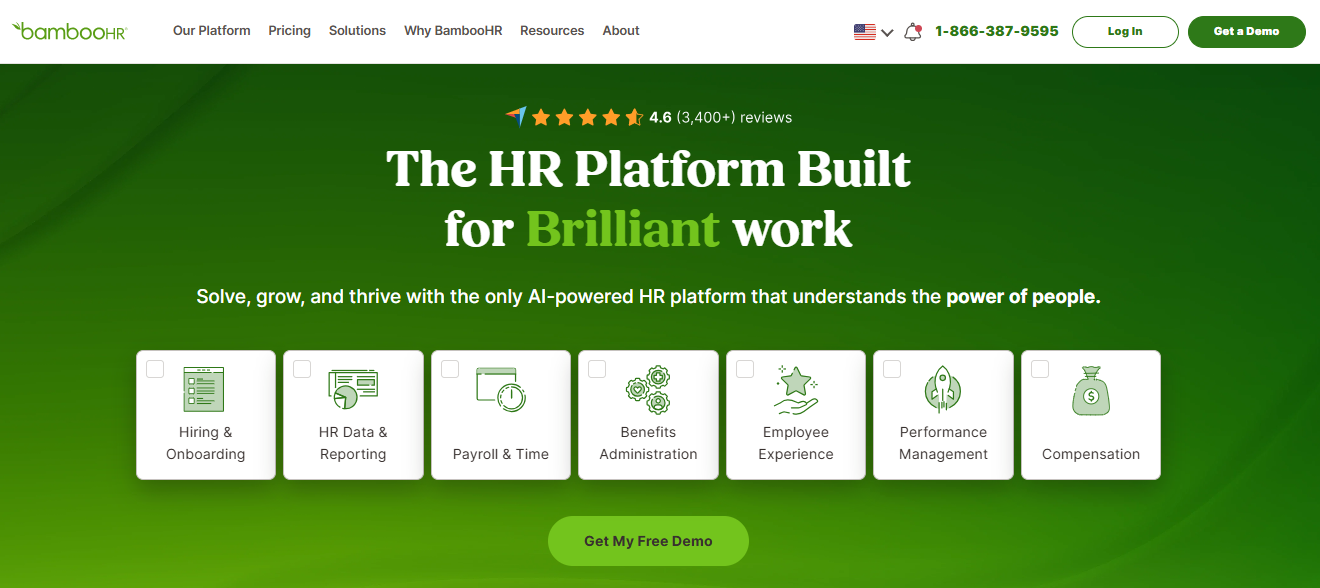
Preboarding access means new hires can complete paperwork before their first day, so day one is about the role, not the admin scramble. The reporting shows time-to-completion data by hire cohort, which is the kind of visibility that lets you tell leadership whether onboarding is actually working, not just whether the checkboxes got ticked.
Where BambooHR stops, ProProfs Training Maker picks up. BambooHR LMS Integration handles the HR workflow: document collection, e-signatures, records, and time-off. ProProfs handles the training side: role-specific learning paths, compliance courses, quiz-based comprehension checks, and completion audit trails. Together they cover the full onboarding picture without asking HR to manage a fragmented stack of separate tools.
4.6 ★
G2 rating (6,800+ reviews)
30K+
Companies using BambooHR
~2 wks
Average time-to-go-live
Pros:
- Self-service onboarding portal so new hires complete their own paperwork without HR data entry
- Preboarding access before the start date reduces day-one administrative chaos
- E-signature built directly into new hire document packets
- Full HRIS with PTO, performance management, and employee records in the same platform
- Mobile-accessible for new hires completing onboarding from any device
- Time-to-completion reporting gives actual visibility into onboarding performance
Cons:
- No permanent free plan; free trial only
- Pricing scales per employee, which adds up quickly at higher headcounts
User Rating: 4.6/5 (Capterra)
Pricing: 7-day free trial available. Paid plans start at $10/employee/month.
Streamline your HR processes with BambooHR
Get pricing, explore features, and see how BambooHR can simplify onboarding, employee records, and performance management.
3. Connecteam – Best for Mobile-First and Deskless Worker Onboarding
Most onboarding tools are built for desk workers. Connecteam is the exception, and I noticed the difference the first time I tested it from a phone. Everything runs through the mobile app: welcome messages, training checklists, document acknowledgment, and recognition badges when someone completes their first week.
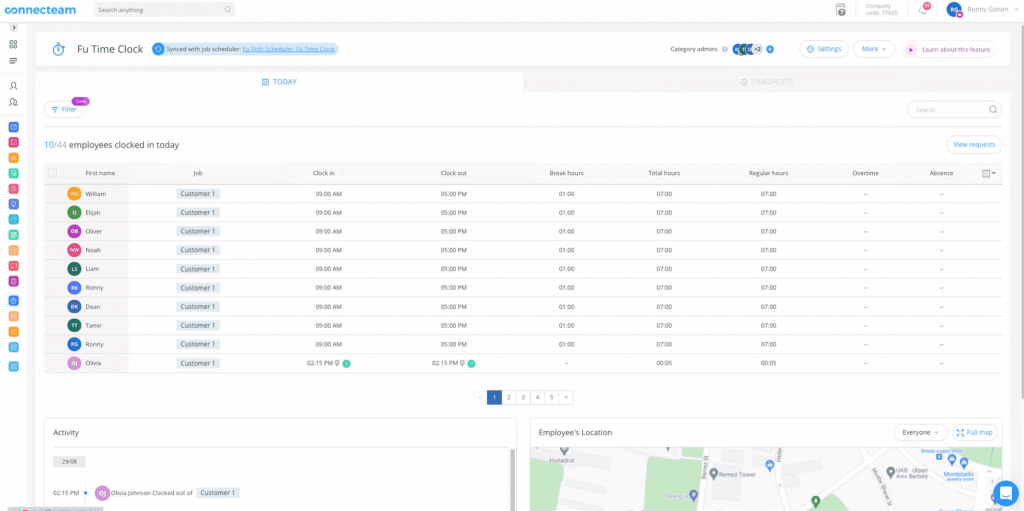
New hires don’t need a work laptop or a company email to get started. The communication features are woven into onboarding rather than bolted on separately. New hires can access the company feed, ask questions in team chat, and find policy documents in the knowledge base without ever touching email.
For distributed teams spread across multiple locations, such as hospitality, retail, or construction crews, this is the structure that actually gets used rather than ignored. The automated workflow builder handles task assignments, reminders, and approval flows, so HR doesn’t have to manually chase anyone down.
Pros:
- Mobile-first design built for deskless, frontline, and distributed teams
- Employee recognition and rewards are baked into the onboarding flow
- Secure business messaging, knowledge base, and company feed in one app
- Customizable onboarding workflows and automated task assignments
- Time tracking and scheduling are available alongside HR features
Cons:
- Free plan is limited to 3 automated reports, which restricts analytics visibility
- Advanced workflow automation requires a paid plan
User Rating: 4.6/5 (Capterra)
Pricing: Free plan available for up to 10 users. Paid plans start at $29/month for small businesses.
4. Rippling – Best for Automating IT and HR Onboarding Together
Here’s the gap that kills onboarding at tech-adjacent companies: HR finishes their side, but the new hire still doesn’t have a laptop provisioned, Slack access, or the ability to log in to the tools they need. I found Rippling to be the only tool on this list that closes that gap natively. HR onboarding and IT provisioning happen in the same automated workflow.
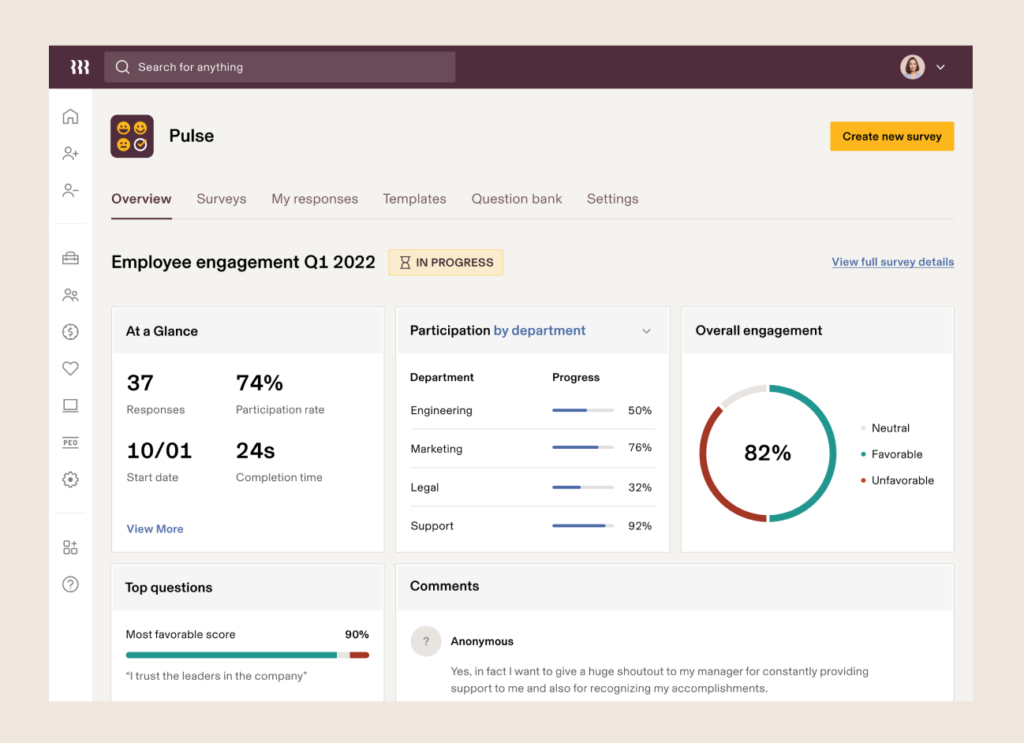
App access and device setup are triggered by the hire’s start date, without anyone having to manually request them. Setup takes longer upfront because you’re building a workflow that spans HR, IT, and payroll together. But once it’s configured, adding a new hire takes only minutes, not days.
The 500+ integrations and pre-built role templates speed up the initial build. If your onboarding failures are really IT failures in disguise, this is the tool that fixes the actual problem.
Pros:
- Combines HR onboarding and IT provisioning in a single automated workflow
- App access and device setup are triggered automatically by the hire start date
- Pre-built onboarding templates for common roles
- Integrates with 500+ tools, including Slack, Google Workspace, and Salesforce
- Compliance document management with e-signature built in
Cons:
- Pricing is modular and can get expensive as you add modules
- Setup and configuration require a meaningful time investment upfront
User Rating: 4.9/5 (Capterra)
Pricing: No permanent free plan. Free trial available. Paid plans are on custom quote
5. Trainual – Best for Documenting and Standardizing the Onboarding Process
Before I used Trainual, onboarding at my company lived in a Google Drive folder, three managers’ heads, and a Slack channel nobody could find. What Trainual changed for me was turning all of that scattered knowledge into a single, structured system that a new hire could actually follow on their own.
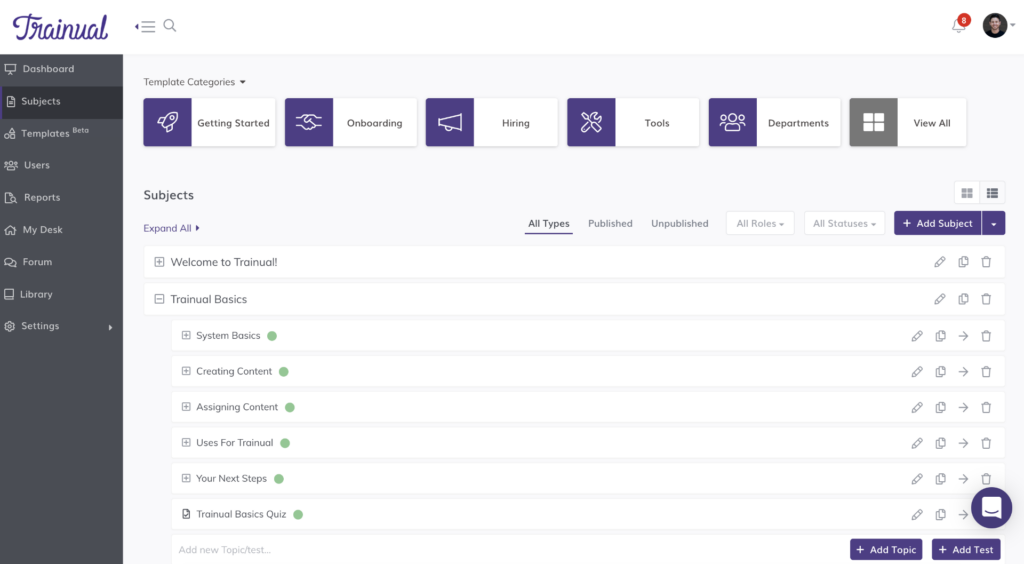
I built subjects for each role, assigned them to the relevant departments, and the moment a new hire joined, they automatically got every piece of training content relevant to their position. No manual assignment, no “ask Sarah, she knows how we do this.” The AI content builder helped me turn rough process notes into properly formatted training modules in minutes.
Quizzes sit inside each subject so I can verify comprehension before someone moves to the next step. Training paths let me sequence content so new hires move through onboarding in the right order rather than clicking randomly through a folder.
Pros:
- Role-based content assignment automatically routes training to the right new hire
- AI-assisted content builder turns rough notes into structured training modules fast
- Built-in quizzes verify comprehension before new hires progress to the next step
- Training paths sequence onboarding content so nothing gets skipped or done out of order
- Tracks who has read, completed, and acknowledged each piece of content with a full audit trail
Cons:
- No permanent free plan; 7-day free trial only
- Pricing starts at $249/month, which is a meaningful jump for very small teams
User Rating: 4.8/5 (Capterra)
Pricing: 7-day free trial. Paid plans are at a custom quote
6. Freshservice – Best for IT-Led Onboarding and Internal Process Automation
Freshservice approaches onboarding from the IT side, and for companies where onboarding delays are really IT failures, that perspective is the right one. What I found most valuable was the automated workflow: one onboarding form submission triggers hardware provisioning, software access grants, and manager notifications simultaneously.
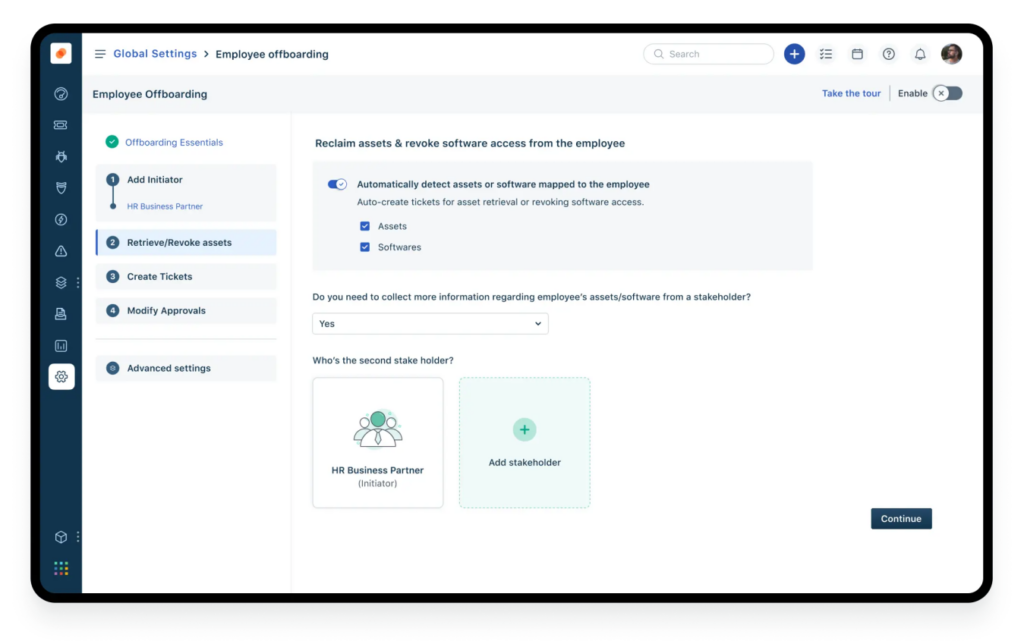
No one has to manually coordinate it. The knowledge base integration means new hires can self-serve answers to common questions instead of flooding HR and IT with the same requests every week. If a laptop hasn’t arrived or software won’t activate, the incident management layer already has a workflow for that.
For non-technical onboarding needs, such as culture integration or role-specific training, Freshservice isn’t the right fit. But for IT-heavy environments with predictable provisioning requirements, it removes a real operational bottleneck.
Pros:
- Automated password resets and software provisioning reduce IT workload during onboarding
- New hire onboarding workflows triggered from a single form submission
- Integrated knowledge base for self-service onboarding answers
- Asset management to track hardware assigned to each new hire
- Scales across IT, HR, and operations teams on the same platform
Cons:
- Free plan is a 14-day trial only, not a permanent free tier
- Not designed for non-IT onboarding needs like training or culture integration
User Rating: 4.5/5 (Capterra)
Pricing: 14-day free trial. Paid plans start at $19/agent/month.
7. Zoho People – Best for Budget-Conscious SMBs Needing a Full HR System
I looked at Zoho People from the perspective of an HR generalist at a company under 50 people that needs an actual HRIS but can’t justify a $300/month platform yet. What surprised me was how much the free plan actually includes: up to five users, employee records, document management, time-off tracking, and digital signatures in one place.
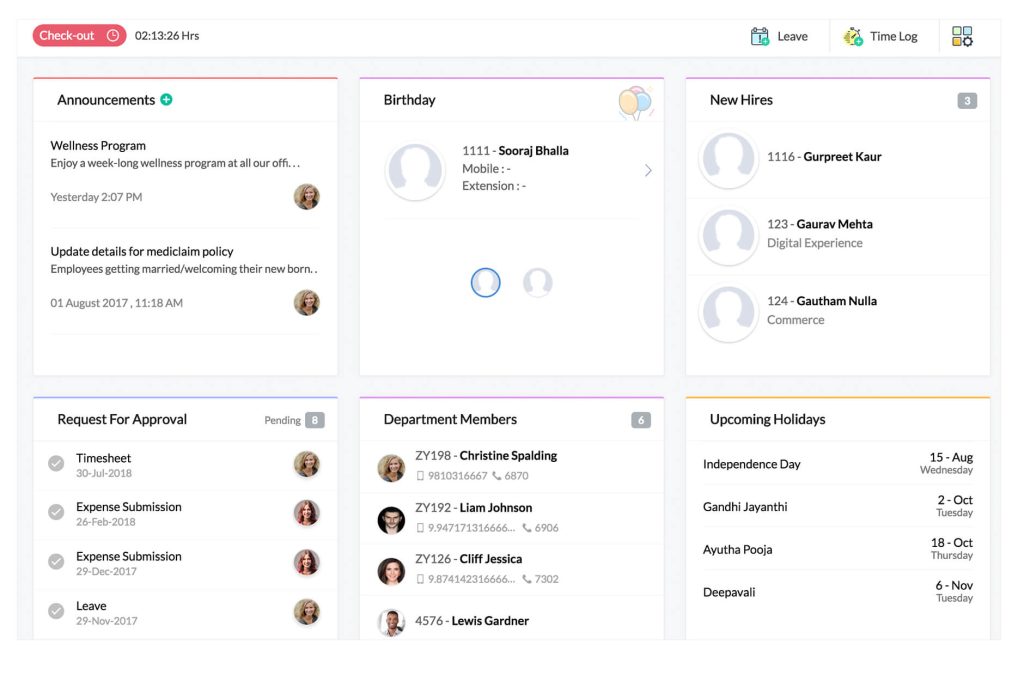
For a founding team or a very small HR operation, that’s a legitimate starting point with no expiration date. The onboarding module lets me create checklists, assign tasks to new hires, and set approval flows for document submission. The self-service portal means new hires can complete their own paperwork without HR manually entering anything.
If your company already uses Zoho CRM, Zoho Books, or Zoho Recruit, the integration between them is seamless, which is a real advantage over standalone onboarding tools that need separate connections for everything.
Pros:
- Genuinely free plan for up to 5 users with employee records, documents, and time-off management
- New hire self-service portal for paperwork completion without HR manual data entry
- Onboarding checklists and task assignment built into the HR platform
- Seamless integration with Zoho CRM, Zoho Books, and Zoho Recruit for existing Zoho users
- Mobile app lets new hires complete onboarding tasks from any device
Cons:
- Onboarding features are less robust than purpose-built onboarding tools on this list
- Initial configuration takes meaningful time before the platform feels intuitive
User Rating: 4.4/5 (Capterra)
Pricing: Free plan available for up to 5 users. Paid plans start at $1.50/user/month.
8. WebHR – Best for Small Teams Needing a Full HRIS at No Cost
WebHR is the most genuinely free full HRIS on this list for very small teams, and I mean that without qualification. The free plan covers up to 5 users and includes real HR functionality: employee records, attendance, leave management, recruitment, and onboarding in one system.
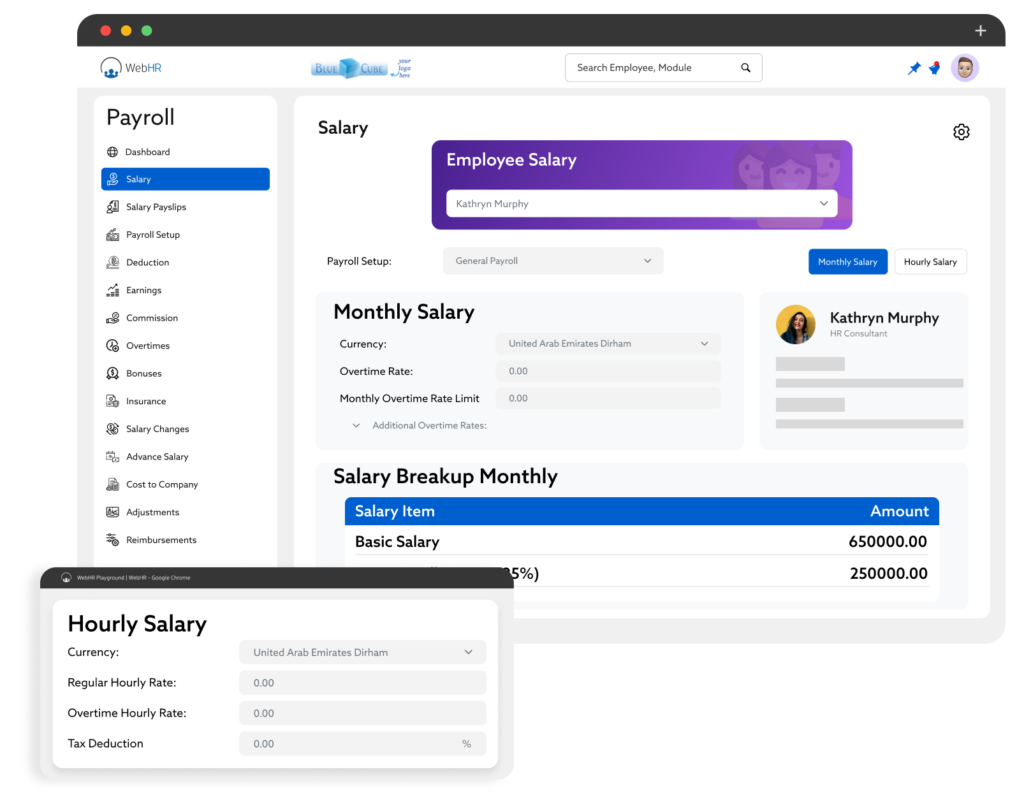
For a company with fewer than 5 people that needs more than a spreadsheet but can’t justify a paid subscription yet, this is an actual solution. The payroll module supports over 100 countries, which makes it useful even for small businesses with international contractors. The 360-degree feedback feature is more advanced than you’d expect at this price point.
The hard stop at five users is real, and there’s no workaround. The moment you hire a sixth person, you need a paid plan, and the pricing jump from zero to paid should factor into your planning before you build processes on the free tier.
Pros:
- Genuinely free for up to 5 users with full HRIS functionality
- Payroll in 100+ countries handles complex tax calculations and deductions
- 360-degree feedback is built in from the start, not locked behind a premium tier
- ATS integration for managing the pipeline from recruiting through onboarding
- Time and attendance, leave management, and org charts are included in the free plan
Cons:
- Free plan hard-capped at 5 users with no workaround
- Interface feels dated compared to newer platforms
User Rating: 4.3/5 (Capterra)
Pricing: Free for up to 5 users. Paid plans start at $2/employee/month.
9. Pipefy – Best for Building Custom No-Code Onboarding Workflows
Pipefy’s value is flexibility, and I found it most useful when onboarding involves handoffs across multiple departments. When a new hire joins, HR starts the process; IT receives a notification; the hiring manager gets a task; and facilities need to set up equipment. Most tools assume one team owns onboarding.
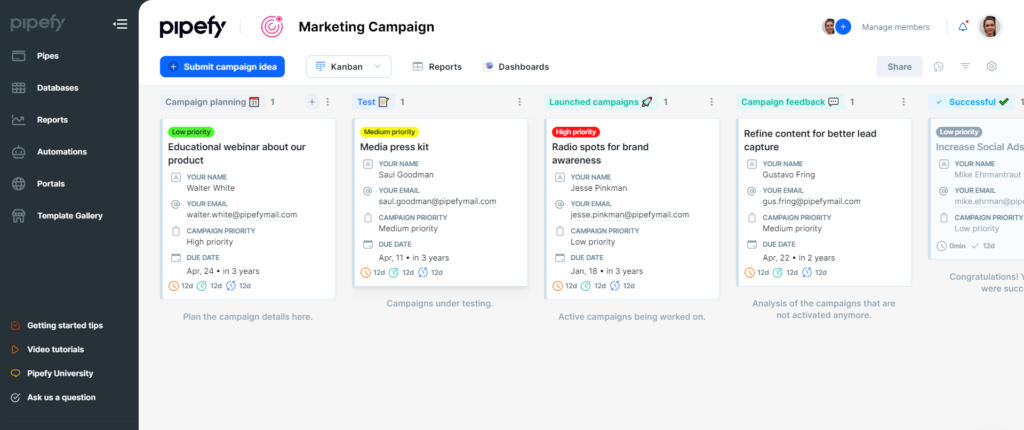
Pipefy lets you build the handoff chain without code, using conditional logic, automated triggers, and form-based data collection. I could configure it so that completing one step automatically assigned the next task to the right person without anyone manually routing anything.
The free plan limits you to 5 processes, forcing you to prioritize which onboarding tracks matter most before you hit that ceiling. For multi-department SMBs where onboarding failures are really coordination failures, this is the tool that fixes the root cause.
Pros:
- No-code workflow builder handles multi-department onboarding handoffs
- Conditional logic and automation for routing tasks to the right person at each step
- Centralized information so every stakeholder sees the same onboarding status
- Pre-built HR and onboarding templates to speed up initial setup
- Integrates with Slack, Google Workspace, and other tools already in your stack
Cons:
- Free plan limited to 5 processes, which may not cover a complex multi-track onboarding setup
- Learning curve for users who want to build complex conditional workflows from scratch
User Rating: 4.6/5 (Capterra)
Pricing: Free plan available (up to 5 processes). Paid plans are at a custom quote
10. Boardon – Best for Structured Preboarding and First-30-Days Integration
Boardon focuses on the period that most onboarding tools underserve: the time between offer acceptance and day 30. I found the preboarding module genuinely useful because it lets you engage new hires before they start, send structured welcome content, introduce team members, and complete administrative tasks before their first day.
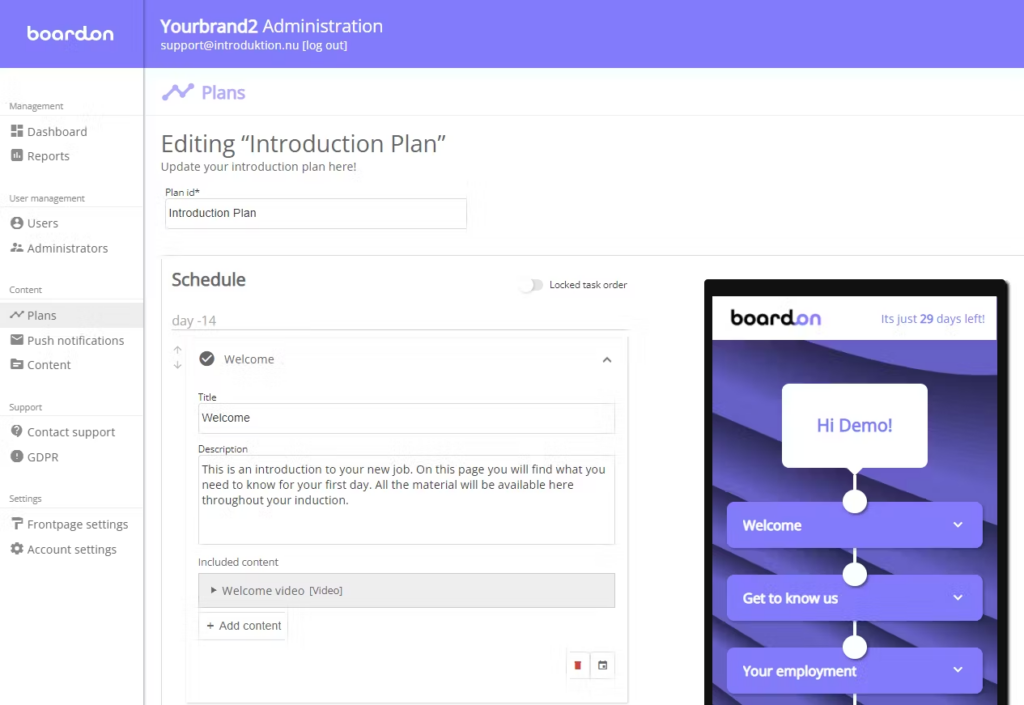
The 30-day milestone structure provides new hires with a clear roadmap rather than a fire hose of information. They know what’s expected in week one, week two, and through the end of the month. Automated reminders keep the onboarding owner and the new hire aligned without anyone having to manually follow up.
For small HR teams managing onboarding alongside 10 other responsibilities, automation is a real cognitive load-reducing tool. The free plan’s hard limit of one active onboarding at a time is the constraint to plan around, honestly, before committing.
Pros:
- Preboarding flow engages new hires between offer and start date
- 30-day milestone structure gives new hires a clear roadmap from day one
- Automated reminders and email sequences replace manual follow-up
- Centralized resource hub for documents, policies, and team introductions
- Org chart and team introduction features build belonging before the first day
Cons:
- Free plan is limited to one active onboarding at a time, which makes it unusable for companies hiring more than one person simultaneously
- Paid plans are priced by user volume and can be costly for fast-growing teams
User Rating: 4.6/5 (Capterra)
Pricing: Free plan available (1 active onboarding). Paid plans range from $58 to $317/month based on total users.
How I Chose These Tools
I did not build this list from feature pages. Here’s the actual framework I used to evaluate each tool.
1. User Reviews and Real Ratings
I started with G2, Capterra, and Reddit, specifically looking for reviews from HR managers and generalists at companies under 500 employees. If a tool had strong features but a consistent pattern of complaints about setup complexity or poor support during implementation, that weighed against it.
2. Core Onboarding Features That Actually Matter
The checklist I used: task management and assignment, document collection with e-signature, training or orientation delivery, new hire self-service access, progress tracking with reporting, and automated reminders. Tools that handled five of these six well made the list. Tools that handled two or three did not.
3. Ease of Use for Non-Technical HR Teams
I specifically evaluated whether an HR generalist at a 50-person company, with no IT support and no dedicated system admin, could get the tool running in a week without professional services. If setup required a consultant or an extended IT project, it wasn’t right for this list.
4. Free Plan Honesty
I distinguished between “free forever” plans and “free trial” options and called them out clearly. A 14-day trial is not the same as a free plan, and conflating them wastes your time when you hit day 15.
5. Online Presence and Platform Stability
I excluded tools that had limited review volume, poor responsiveness to support issues, or signs of stagnant development. Every tool on this list has an active user community and a verifiable online track record.
Editor’s Pick: Top 2 Free Onboarding Training Software
All ten tools on this list work. But if you’re an HR manager at an SMB and you need a starting point, these three are where I’d put my time first, based on fit, free plan quality, and how well they solve the problems that actually come up.
1. ProProfs Training Maker
ProProfs Training Maker is my first recommendation for any SMB where onboarding is primarily about getting new hires competent and confident in their role. The AI course builder is the fastest path from “we need a training program” to “here is a training program.” The combination of learning paths, compliance course library, and real-time tracking gives HR managers actual visibility into whether onboarding is working, not just whether forms were submitted.
2. BambooHR
BambooHR is the right call for SMBs that need the HR infrastructure side of onboarding handled properly. Document collection, e-signatures, preboarding access, self-service portals, and time-to-completion reporting sit inside one platform, which means less tab-switching and fewer things falling through the cracks. If your onboarding problems are really record-keeping and paperwork problems in disguise, BambooHR fixes the root cause. Pair it with ProProfs Training Maker for role-specific learning paths and compliance training, and you have both sides covered without stitching together a fragmented stack.
How to Build an Easy Employee Onboarding Checklist That Actually Gets Used
Most onboarding checklists fail for one reason: they’re written for HR, not for the new hire. They track what HR needs to complete, not what the new hire needs to understand and do. Here’s how I’d build one that works.
1. Start from the new hire’s perspective: What does a new hire need to know, access, and feel on day one versus day five versus day thirty? That sequence drives your checklist structure, not your internal HR admin sequence.
2. Break it into three phases:
- Before day one (preboarding): Send a welcome email, collect personal information, share the employee handbook, assign compliance training, and confirm equipment and access setup.
- Days 1 to 7: Complete system access setup, finish mandatory training modules, attend team introductions, meet direct manager, complete first role-specific task with guidance.
- Days 8 to 30: Complete remaining onboarding courses, attend first 1:1, submit any outstanding documents, and complete 30-day check-in survey.
3. Automate the reminders, not just the tasks: A checklist without reminders is a list. Platforms like ProProfs Training Maker, Connecteam, and Boardon let you trigger deadline reminders automatically so neither you nor the new hire has to remember what’s due when.
4. One owner per task: Every item on the checklist should have one person responsible for it, not “HR” generically. Ambiguous ownership is when onboarding items quietly fall through the cracks.
5. Track completion, not just submission: There’s a difference between a new hire clicking “acknowledged” on a document and actually understanding it. Build in a short quiz or confirmation step for anything compliance-critical.
How to Improve Employee Experience and Retention From Day One
The data on this is consistent and honest: a poor onboarding experience increases the likelihood of turnover within the first 90 days.
And the cost of replacing a single hire typically runs between 50% and 200% of their annual salary, including recruiting, training time, and lost productivity. The best free onboarding software can’t fix a culture problem. But it can address the structural failures that cause good hires to leave early.
1. Make the First Day Feel Prepared, Not Improvised
If a new hire shows up and their laptop isn’t ready, their access isn’t set up, or no one is expecting them at a specific time, that’s the signal you’ve sent about how your company operates. Rippling and BambooHR automate the IT and paperwork side, so day one starts with a conversation, not a scramble.
2. Introduce People Before the First Day
New hires who know at least one colleague’s name before they walk in are measurably less anxious and more likely to ask for help early. Boardon’s preboarding feature and Connecteam’s team feed both handle this without any manual effort from HR.
3. Give Them Early Wins, Not Just Mandatory Reading
The fastest path to engagement is competence. When a new hire completes a training module, passes a quiz, or finishes their first real task, that’s a signal to their brain that they belong here. ProProfs Training Maker’s gamification layer, including badges and course completion recognition, does this in a way that doesn’t feel forced.
4. Ask for Feedback in Week Two, Not Week Twelve
By the time a 90-day review rolls around, the new hire has already formed an opinion and decided whether to stay. A short check-in survey at the two-week mark catches problems while there’s still time to fix them. Both Connecteam and BambooHR have built-in pulse survey features.
5. Assign a Buddy, Not Just a Manager
Research on new hire retention consistently shows that peer relationships in the first 30 days are as predictive of retention as manager relationships. A buddy system doesn’t require software. It requires intentional assignment and one check-in reminder per week for the first month.
Build the Onboarding System Your New Hires Actually Need
The tools are not the hard part. Any of the ten free web-based employee onboarding systems on this list can deliver a structured, trackable onboarding experience for free or close to it. The hard part is building the process clearly enough that the tool can automate it.
Start with ProProfs Training Maker if your onboarding is primarily about getting new hires skilled and compliant. The free plan is real, the AI course builder removes the hardest part of building training from scratch, and the tracking data tells you what’s actually working.
You can run a full onboarding pilot for a cohort of new hires, see the completion data, and make a data-backed case for the paid plan to management. That’s a reasonable next step. Whichever tool you choose, use the first 30 days with it to fix your process, not just your software.
Ready to start? Start your search for free and set up your first onboarding course in under an hour.
Frequently Asked Questions
What is the difference between free employee onboarding software and a free HRIS?
Free employee onboarding software is designed specifically for the first few weeks of employment, helping HR teams manage training, paperwork, task assignments, and onboarding progress. A free HRIS goes beyond onboarding and supports employee records, payroll, time-off tracking, benefits, and performance management throughout the employee lifecycle.
Can free onboarding software support remote employee onboarding?
Yes. In fact, remote teams often benefit the most from structured onboarding software. Free onboarding tools can centralize training materials, automate task assignments, track completion progress, and provide anytime access to resources, helping remote employees get productive faster without requiring constant HR involvement.
Can free onboarding software collect legally binding e-signatures?
It depends on the platform. Some onboarding tools include legally binding e-signature functionality, while others only track document acknowledgments or confirmations. If you need signed employment agreements or compliance-related documents, verify that the software meets your legal and regulatory requirements before implementation.
How many employees can free onboarding software support?
The limit varies by vendor. Some platforms offer free plans for small teams, while others restrict the number of users, onboarding workflows, storage, or training content. Reviewing these limitations early helps ensure the software can support your hiring plans.
What is the biggest onboarding software mistake HR teams make?
Many HR teams start configuring software before documenting their onboarding process. This often leads to confusing workflows and missed steps. Mapping out your onboarding experience first makes it easier to choose the right tool and create a smoother experience for new hires.
Can free onboarding software help with compliance training?
Yes, many free onboarding tools allow organizations to deliver training, assign learning modules, track completions, and maintain training records. However, advanced compliance reporting, certification management, and audit-ready documentation are often reserved for paid plans or enterprise-level solutions.
When should I upgrade from a free onboarding tool?
Consider upgrading when user limits, reporting restrictions, storage caps, or manual administrative work begin slowing down your hiring process. For many growing organizations, the time saved through automation and advanced features quickly outweighs the cost of a paid plan.
Let ProProfs AI create your training course

 We'd love your feedback!
What did you like & how can we make it even better?
 Thanks for your feedback!
 Ask Your Question
Have a question? Get expert help to make your decision easier.