


I have spent years reviewing LMS platforms for businesses of all sizes, and I know how quickly a weak training tool can turn into a costly operational problem. When you are investing in employee training, onboarding, or compliance, the wrong LMS costs you time, clarity, and momentum.
Both SC Training (EdApp) and ProProfs Training Maker aim to simplify workplace training, but they are not built with the same level of depth, flexibility, or long-term value. Once you compare course authoring, reporting, SCORM, and xAPI support, integrations, compliance features, pricing, and support, the differences start to matter.
I put together this guide to give you a direct, side-by-side look at SC Training (formerly Edapp) vs. ProProfs Training Maker so you can decide which platform actually fits your training goals. If you need an LMS that does more than just deliver lessons, ProProfs Training Maker makes a strong case as the more capable and cost-effective choice.
⚠ Important deadline: According to SafetyCulture’s official retirement announcement, migration requests must be submitted by March 20, 2026, not March 31. If no action is taken by that date, your courses will not be migrated. After March 31, all SC Training data is permanently deleted.
See How ProProfs Compares Before You Decide →
1. Quick Overview
SC Training (EdApp) is a mobile-first microlearning platform that was originally launched as EdApp before being acquired by SafetyCulture, an Australian workplace operations company. The platform rebranded to SC Training to reflect SafetyCulture’s consolidation strategy.
It built its reputation on short, gamified lessons served through a mobile app, designed primarily for frontline and deskless workers who need quick, on-the-job refreshers.
ProProfs Training Maker has been in the e-learning space since 2006. It’s a full-stack LMS, meaning course creation, learner management, SCORM/xAPI standards support, compliance tracking, HRIS integrations, reporting exports, and even course selling are all handled in one place. It’s built for organizations ranging from a 10-person team onboarding new hires to an enterprise running multi-department compliance programmes across thousands of learners.
| Feature | SC Training (EdApp) | ProProfs Training Maker |
| Founded / Parent | SafetyCulture / formerly EdApp | ProProfs (since 2006), US-based |
| Primary Focus | Mobile-first microlearning for frontline teams | Full LMS + authoring: compliance, onboarding, employee training |
| Target Audience | Frontline & deskless workers | SMBs to enterprise, all industries |
| Platform Status | Rebranded to SC Training | Active, continuously updated |
| Free Plan | Yes – limited features | Yes – up to 10 learners, full features |
| Pricing Model | Per learner per month + separate admin seat fee | Per active learner, flat-rate/unlimited options available |
2. Course Creation & Authoring
Both platforms let you build courses without writing a line of code. But when I tested them side by side, the depth of what you can build, how flexibly you can structure it, and how it handles your existing content are very different stories.
ProProfs Training Maker: Full authoring freedom in a programme context
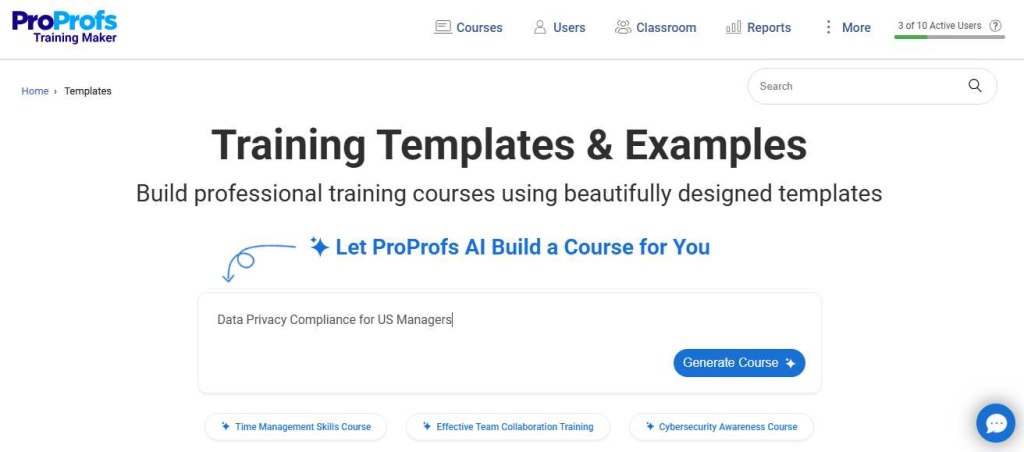
ProProfs Training Maker gives you a drag-and-drop builder that supports virtually every content type: videos, PDFs, PowerPoint slides, audio files, SCORM packages, quizzes, flashcards, surveys, and scenario-based branching, all mixable within a single course. Crucially, the authoring environment isn’t a standalone tool. It’s woven into the full programme context: the same interface handles course assignment, automation triggers, role-based access, reminders, and compliance tracking.
The AI-assisted course builder generates structured course outlines, lessons, topics, and assessment questions from a document you upload or a topic you describe. This is more than a content generator; it produces a deployable course skeleton that you can edit and assign immediately.
SC Training (EdApp): Fast microlesson creation, constrained for complex programmes
EdApp was purpose-built for microlearning: short, snackable lessons optimised for a phone screen. It has strong template variety (80+ microlearning templates), AI lesson generation, and even AI file conversion that turns a PDF or PPTX into a lesson. For a frontline team doing quick refreshers, the build speed is genuinely impressive.
The constraint surfaces when training complexity grows: branching scenarios are limited, multi-module programme management is less intuitive, and, as covered in detail in Section 3, the SCORM tracking story has real gaps that matter for compliance-heavy programmes.
| Feature | SC Training (EdApp) | ProProfs Training Maker |
| Course Builder (AI-Powered) | Drag-and-drop with templates; AI-generated microlessons + AI file conversion | Drag-and-drop, no coding needed; AI course creation from documents, PDFs, and topics |
| Content Types | Microlearning slides, video, SCORM, AI file conversion | Video, SCORM, PDF, PPT, audio, quizzes, flashcards, surveys, scenarios |
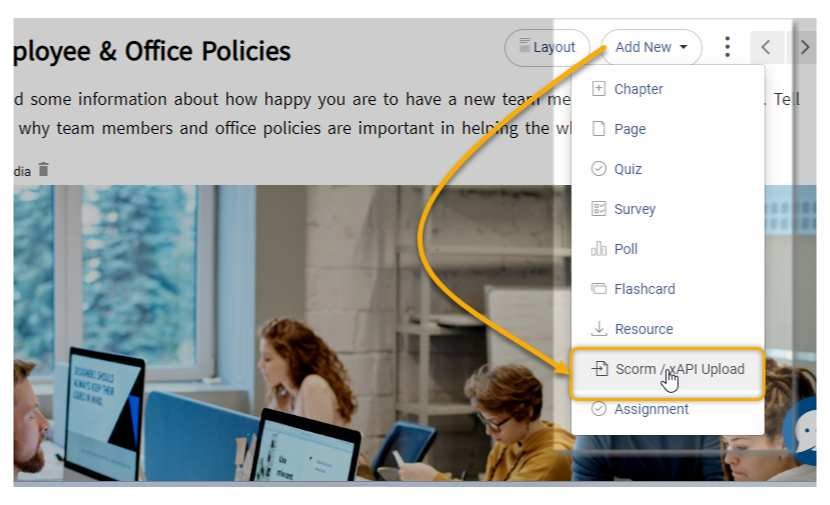
| SCORM Support | SCORM 1.2 import/export; SCORM scores NOT tracked on import | SCORM 1.2 & 2004 – import AND export, scores + time tracked |
| xAPI / Tin Can | Not specified as a learning standard | Full xAPI (Tin Can) support with LRS language |
| Branching / Scenarios | Limited branching in templates | Scenario-based learning with branching paths |
| Templates | 80+ microlearning templates + 1,000+ editable courses | Beautifully crafted course templates + large question bank |
| Certificates | Available; advanced certificates on paid plans | Custom-branded certificates, auto-generated on completion |
3. SCORM & xAPI Standards Support
Standards support is where this comparison gets most consequential in my view – and where ProProfs Training Maker has the clearest documented advantage. If you’ve built courses in Articulate Storyline, Adobe Captivate, or similar authoring tools, or if your compliance programme requires defensible score tracking, this section matters a lot.
The critical difference: SCORM score tracking
EdApp’s own support documentation is explicit about a major limitation: when you import SCORM content into EdApp, completions flow through, but quiz scores do not. That means you can see that a learner “completed” a SCORM course – but you cannot see whether they passed, failed, or what score they achieved. For a compliance programme where “passed the safety test” is the entire point, this isn’t a minor inconvenience. It’s a programme-breaking gap.
ProProfs Training Maker’s documentation is the opposite of vague here: it explicitly states that ProProfs tracks quiz scores, completion status, time spent, and pass/fail results from imported SCORM content, and that it supports both SCORM 1.2 and SCORM 2004. This means your legacy SCORM library works as intended – with full data fidelity.
xAPI (Tin Can): ProProfs wins outright
xAPI (also known as Tin Can) expands tracking beyond the browser-based LMS course, capturing learning statements from simulations, on-the-job activities, and blended programmes into a Learning Record Store (LRS). ProProfs explicitly positions itself as xAPI/Tin Can-compliant with LRS language in its documentation.
SC Training has a developer API for its SafetyCulture platform, but xAPI as a learning content standard is not specified in EdApp’s official product or help documentation. If your organization or its auditors require xAPI tracking, ProProfs is the only evidence-based choice between these two platforms.
| Why This Matters for EdApp Migrants If you’re migrating from EdApp and your SCORM content was only tracking completions (not scores), you may not have realised the gap exists. Migrating to ProProfs gives you the opportunity to close it – and finally get the full data picture your compliance reports should have been showing all along. |
4. Pre-Built Course Library
Neither platform expects you to build everything from scratch, which I appreciate. Both offer pre-built libraries, but the structure, cost, and what you actually get for your money differ more than you might expect.
SC Training’s free library of 1,000+ editable courses across 25+ industries is a genuine draw, and the breadth, including accredited courses built with partners, is hard to dismiss. If raw volume and industry variety are what you’re optimizing for, EdApp has the bigger number.
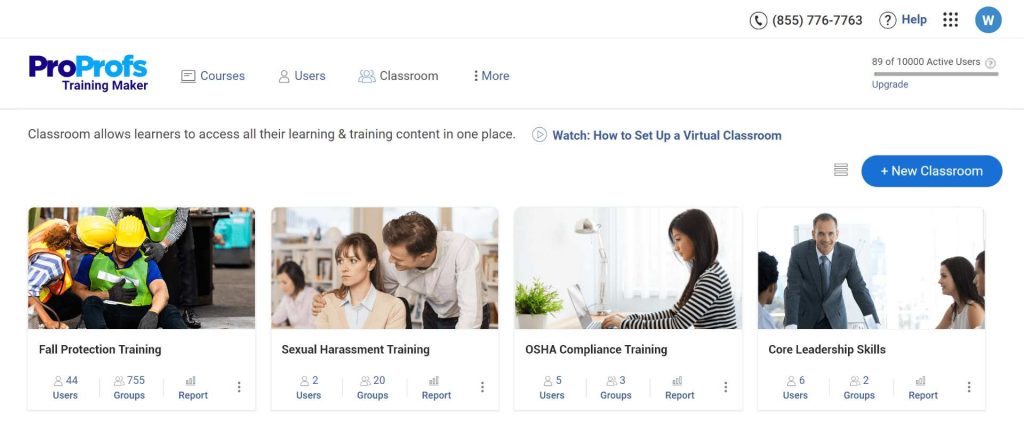
ProProfs Training Maker offers 500+ premium courses, with particularly strong coverage of compliance-critical topics: Sexual Harassment, HIPAA, OSHA, workplace safety, and HR policy. These courses come paired with ProProfs’ quiz engine and a question bank of over 1,000,000 ready-to-use questions, meaning the library isn’t just content to watch, it’s content with built-in assessment infrastructure.
The cost difference is significant: ProProfs’ course library access is included in all plans (except the free plan) at no additional charge. SC Training’s premium library content requires a higher-tier plan or an additional licensing fee.
What’s advertised as a “1,000+ course library” often becomes an upsell conversation when you go to actually deploy it.
“We needed a platform where we could either use ready-made courses or customize from scratch, and ProProfs gave us both without having to pay extra for the course library.” – ProProfs customer, onboarding call notes
Get Free Employee Training Software — All Features, Forever.
We've helped 567 companies train 200,000+ employees. Create courses in under a minute with our AI LMS or use 200+ ready-made courses on compliance, harassment, DEI, onboarding, and more!
5. Mobile Learning
I want to be upfront here: mobile is EdApp’s strongest card, and it’s worth being honest about that. The platform was designed mobile-first from day one: offline mode is a documented, first-class feature, with clear guidance on which lesson types download for offline completion and which don’t (SCORM and certain media files are excluded). For deskless workers in construction, logistics, or field services where connectivity is patchy, this is a genuine capability advantage.
ProProfs Training Maker has a fully responsive web experience. For most corporate training use cases, where learners are on work devices or personal smartphones with standard connectivity, the experience is clean and complete. The key nuance: ProProfs’ offline mode is not explicitly documented as a supported capability, as EdApp’s is.
Where ProProfs Training Maker pulls ahead is the admin experience. The full platform power, course building, group management, compliance configuration, reporting, is accessible on desktop with no compromises. EdApp’s mobile-first philosophy means some administrative functions feel constrained, and the platform’s design can push you toward microlesson format even when that’s not what the training programme needs.
Bottom line: If offline-first mobile delivery is a hard requirement for a deskless workforce, SC Training has a documented edge. For everyone else, ProProfs’ mobile experience is more than adequate, and you gain significant ground on standards, reporting, and admin capability.
| Feature | SC Training (EdApp) | ProProfs Training Maker |
| Mobile App | iOS & Android – native mobile-first design | Mobile-first experience on web |
| Offline Access | Offline mode with download + sync – first-class feature | Mobile-responsive web; works flawlessly even with basic internet access |
| Responsive Design | Mobile-first design philosophy | Fully responsive on all devices |
| Notifications | Push notifications via mobile app | Email + SMS reminders, automation workflows |
| Admin on Mobile | Course creation and management possible on mobile | Full admin capability on desktop; mobile is learner-focused |
6. Gamification & Retention
I will give credit where it is due: gamification is a genuine EdApp strength. Spaced repetition, leaderboards, star ratings, streak tracking, and “Rapid Refresh” reinforcement loops are baked into the platform’s DNA. For consumer-style training where the primary challenge is keeping people engaged in the habit, it’s effective.
ProProfs Training Maker offers leaderboards, points, badges, and streaks too, with the added advantage of configuring leaderboards at the group and department level.
A sales team’s board stays separate from engineering’s, keeping competition relevant. The platform also handles “soft” retention through automation: email and SMS reminders, deadline notifications, and certificate expiry alerts keep learners moving without requiring a gamification habit.

One important technical note: according to EdApp’s own API documentation, leaderboard scores are not accessible via the SC Training API. If your programme depends on pulling gamification data into a data warehouse or BI tool, that’s a hidden constraint worth surfacing before you commit to the platform.
| Feature | SC Training (EdApp) | ProProfs Training Maker |
| Leaderboards | Yes – strong gamification suite; leaderboard data not in API | Yes – group and org-wide leaderboards |
| Badges & Certificates | Badges + advanced certificates on paid plans | Fully customizable badges + custom-branded certificates |
| Points & Streaks | Points, stars, spaced repetition, Rapid Refresh | Points, streaks, and rewards |
| Leaderboard Scope | Team and global leaderboards | Group-level and org-wide |
| Reinforcement Tools | Purpose-built spaced repetition + Rapid Refresh | Notifications + gamification + programme automation |
7. Assessments & Certification
This is the section I pay closest attention to in any LMS review. Training without a verified assessment is just content delivery. The ability to test comprehension, enforce pass scores, and issue defensible certificates is what turns a training platform into a compliance system, and Training Maker centres assessments in its product story.
ProProfs Training Maker: Assessment depth at the core
- 20+ question types, including Multiple choice, true/false, fill-in-the-blank, matching, sequencing, hotspot, essay, and more
- Question bank of over 1,000,000 ready-to-use questions across topics
- Randomized question draws from a bank; each learner gets a different quiz
- Configurable pass scores, attempt limits, and time limits
- Instant feedback with explanations after each question
- Auto-generated custom-branded certificates delivered to the learner’s email on passing
- Certificate expiry tracking and renewal reminders are built into automation workflows
- Advanced proctoring features on the Enterprise plan
SC Training: Functional quiz tooling with practical limitations
EdApp supports practical assessments, assignments, and on-the-job competency checks, which are genuinely useful for frontline skills verification. One widely-cited workflow: quizzes can be set up from an Excel spreadsheet, which speeds up bulk creation. The limitation noted in user reviews is that post-setup editing in that workflow can be constrained.
The harder constraint: because SCORM-imported content doesn’t pass scores through (as covered in Section 3), any assessment built inside a SCORM module loses its data value inside EdApp. If your training programme is built on SCORM-packaged compliance courses with embedded tests, this gap is programme-critical.
8. Reporting & Analytics
Reporting is the area where I have seen many LMS purchases look fine on day one and start causing real pain at month six. The right reporting setup means compliance stakeholders can pull what they need without asking IT, and audit evidence is a few clicks away rather than a manual export project.
ProProfs Training Maker: Explicit, audit-ready reporting mechanics
ProProfs Training Maker is unusually specific in its documentation about what you can measure and export: real-time dashboards, time-on-page and time-per-module tracking, individual learner histories, group reports, gradebooks, and exports to Excel, PDF, and CSV. The CSV format is explicitly noted as compatible with HRIS and analytics systems.
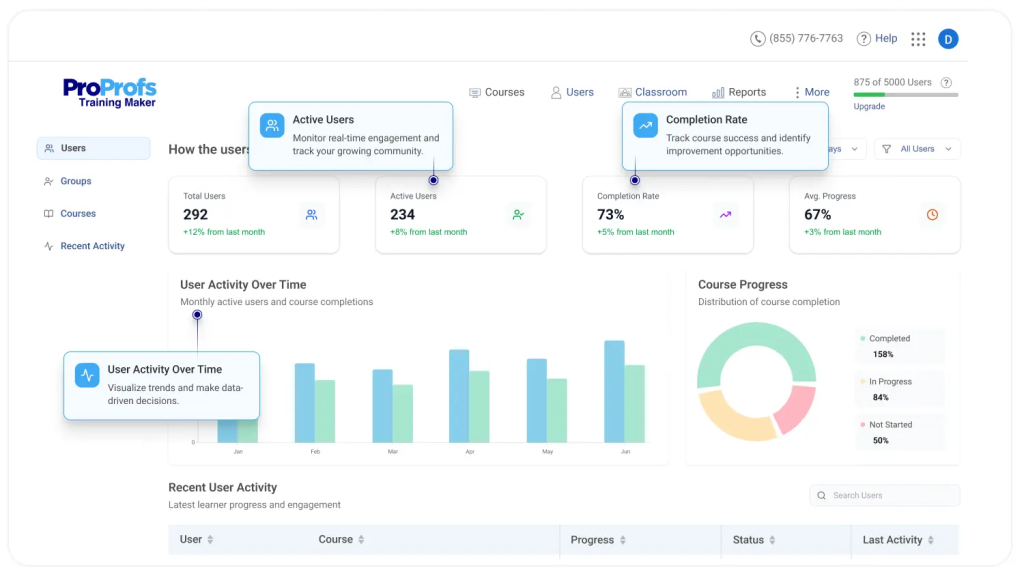
Audit logs and time-spent tracking at the learner and page level are also documented features, the kind of detail that compliance teams and external auditors actually ask for. Scheduled report delivery to email means you don’t have to log in to get your weekly compliance snapshot; it arrives automatically.
SC Training: Strong BI story, some user-reported limitations
SC Training advertises “advanced analytics” on higher plans and BI integrations with PowerBI and Tableau, which is a genuinely useful story for data teams that already live in those tools. The Training matrix view gives managers a structured overview of team completion status.
The caveat: G2’s SC Training review summary explicitly notes that some users see limitations in analytics and content customisation. And the SCORM score gap (no test scores from imported content) means a portion of your reporting data is structurally missing before you even start. For compliance-driven organizations that need defensible, complete records, that’s a foundational problem.
“The reporting issue – the master report only reflects courses that are 100% completed. We needed to track progress across the whole team, not just completions.” – ProProfs customer, onboarding call notes
| Feature | SC Training (EdApp) | ProProfs Training Maker |
| Learner Progress | Advanced analytics – higher paid plans; some users note limitations | Real-time dashboards, individual + group reports, time-on-page |
| Completion Reports | Completion tracking per lesson | Detailed completion %, time spent, pass/fail, gradebook |
| Quiz Performance | Quiz analytics; SCORM import scores not captured | Quiz scores, attempt data, time spent – including SCORM scores |
| Export Options | BI integrations (PowerBI, Tableau); CSV on higher plans | Excel, PDF, and CSV exports are clearly documented |
| Scheduled Reports | Not specified | Automated report delivery to email |
| Compliance Reporting | Training matrix + compliance automation on paid plans | Audit-ready exports, audit logs, and deadline tracking |
Get Free Employee Training Software — All Features, Forever.
We've helped 567 companies train 200,000+ employees. Create courses in under a minute with our AI LMS or use 200+ ready-made courses on compliance, harassment, DEI, onboarding, and more!
9. Integrations
In my experience evaluating LMS platforms for enterprise buyers, modern training doesn’t happen in a silo. Your LMS needs to plug into the tools HR, IT, and ops already use, without requiring a developer to wire it together.
ProProfs Training Maker has a long list of explicitly named, documented connectors: BambooHR, isolved, Dayforce HCM for HR systems; Salesforce for CRM; Zoom for live blended sessions; Okta and Azure AD for SSO. These aren’t “contact us to find out”, they’re named connectors on the integrations page. During enterprise procurement, being able to point to a specific connector is often the difference between a smooth sign-off and a months-long IT review.
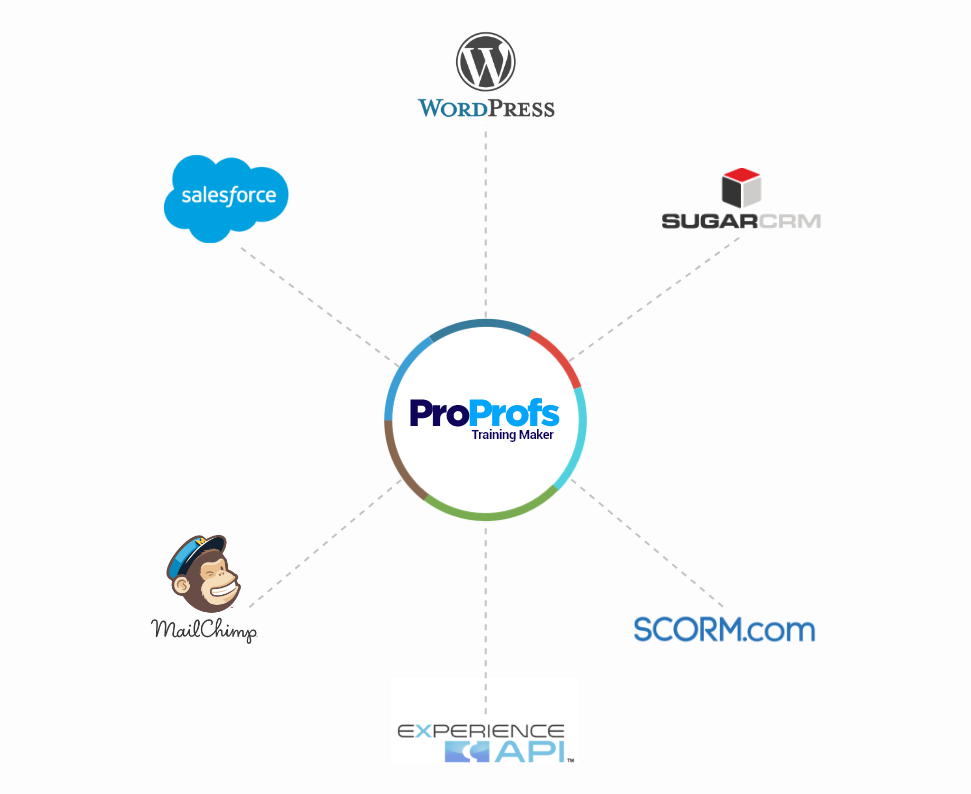
SC Training has a developer API that covers Training endpoints (course metadata, progress, results), and SafetyCulture’s developer docs include SCIM provisioning. This is strong if your organisation is already in the SafetyCulture ecosystem and has developer resources. For teams that want named HR and CRM connectors, they can configure them. ProProfs is the easier path by a significant margin.
One standout ProProfs Training Maker differentiator: the built-in Sell Courses feature with Stripe integration. If your business model involves selling training to external clients, ProProfs handles it natively. EdApp requires API configuration plus an external payment gateway, a meaningful implementation burden for non-technical teams.
| Feature | SC Training (EdApp) | ProProfs Training Maker |
| SSO (Single Sign-On) | SSO available; SCIM provisioning via developer docs | SAML 2.0, Okta, Azure AD, Google, Microsoft – no-code setup |
| HRIS Connectors | Limited; SafetyCulture API can be used by developers | BambooHR, isolved, Dayforce HCM and more |
| CRM / Sales Tools | Via API/Zapier | Salesforce integration |
| Zoom / Webinar | Not natively available | Zoom integration for live blended sessions |
| Microsoft Teams | Microsoft Teams integration | Microsoft Teams integration |
| API Access | Training API: course metadata, progress, results; leaderboard data excluded | REST API: users, assignments, learning paths, progress |
| E-Commerce | Requires API + external payment gateway setup | Built-in Sell Courses with Stripe |
10. Pricing Breakdown
Let’s talk money, because pricing is consistently one of the top reasons I see people start looking for EdApp alternatives, and the difference between these two platforms in a typical ‘100 learners’ scenario is stark.
SC Training: Per-user pricing plus a separate admin seat fee
SC Training’s Premium plan is priced at $5 per learner per month (billed annually), with a minimum requirement of at least one admin seat at $24/seat/month on top of that. So 100 learners costs $500/month in learner fees plus $24 for the admin seat, totalling approximately $524/month. Scale to 300 learners and you’re at $1,524/month before any premium library or advanced feature add-ons. The costs compound linearly with headcount.
ProProfs Training Maker: Per active learner, all-in pricing
ProProfs’ Essentials plan starts at $1.99 per active learner per month (billed annually, up to 100 learners). That’s 100 learners at $199/month, less than half the SC Training equivalent, with SSO, SCORM, Tin Can/xAPI, and API access all included at that price point, not tiered to higher plans.
ProProfs Training Maker also positions its pricing as charging on active learners, not total registered users. If you have 500 employees but only 100 take training in a given month, you pay for 100. For organizations with large rosters but variable training cycles, seasonal workers, project-based teams, and annual compliance refreshers, this is a meaningful cost structure advantage.
| Feature | SC Training (EdApp) | ProProfs Training Maker |
| Free Plan | Up to 10 learners – limited features | Up to 10 learners – full feature access – View Pricing |
| Paid Entry Price | ~$5/learner/month (annual) + $24/month admin seat | ~$1.99/active learner/month (Essentials, annual) |
| 100-Learner Cost | ~$524/month ($500 learners + $24 admin seat) | ~$199/month (annual billing) |
| Flat Rate Option | No – always per user + admin seat | Yes – unlimited learner plans available |
| All-Inclusive Pricing | Features tiered across plan levels | SSO, SCORM, Tin Can, API, all in one price |
| White Labeling | No white labelling per EdApp’s own docs; alternatives offered | Custom domain + branded portal (Business plan) |
| Course Library Cost | Premium library is an additional cost | Included in all plans (except Free) |
| The Real-World Cost Difference (100 Learners, Annual Billing)SC Training Premium: 100 learners × $5 = $500 + $24 admin seat = $524/month ($6,288/year).ProProfs Essentials: 100 active learners × $1.99 = $199/month ($2,388/year). That’s a saving of approximately $3,900/year on list pricing – for a platform that gives you more features. |
11. Ease of Use
Ease of use is the single most commonly cited reason I see customers choose ProProfs in onboarding conversations, and it shows up consistently even among first-time LMS buyers who have nothing to compare against.
“It’s the first time they were using an LMS. He chose us due to price and simplicity.” – ProProfs customer onboarding notes
“The customer selected ProProfs primarily due to its perceived user-friendliness. They found the platform to be more intuitive and easier to navigate compared to other LMS they considered. This ease of use was crucial, as they did not want to invest significant time and resources in training their team on a complex platform.” – ProProfs customer onboarding notes
EdApp’s learner experience is genuinely polished, the mobile app is clean, the lesson feed feels intuitive, and new learners adapt quickly. But the admin experience tells a different story.
Setting up course libraries, configuring user groups, managing notifications, and generating reports requires navigating a more fragmented interface. Multiple users switching from EdApp describe an administrative learning curve that wasn’t anticipated when they first signed up, based on the learner-side demo.
12. Compliance Training
Having reviewed compliance workflows across dozens of LMS platforms, I can tell you this: for HR managers, safety officers, and compliance teams, training isn’t just about learning, it’s about proving that learning happened, when it happened, what score was achieved, and when it needs to happen again. A defensible compliance record requires four things: assigned training, tracked completion, verified assessment, and archived evidence.
ProProfs Training Maker is built for all four:
- Mandatory course assignment with due dates, escalation reminders via email and SMS
- Auto-enrollment rules by department, role, or group, new hire joins, training starts automatically
- Full quiz attempt history with timestamps, every attempt logged, every score stored
- Audit-ready reports exportable for legal and regulatory review
- Certificate expiry tracking and automated renewal reminders
- Compliance dashboard showing overdue, at-risk, and completed learners at a glance
- SCORM 2004 and xAPI support for full data capture from imported compliance modules
SC Training offers compliance-adjacent features: completion certificates, recurring certifications, and automation for credential expiration are all listed in its plan comparison. But the SCORM score gap is a systemic problem for compliance use cases: if your compliance courses are SCORM-packaged (as most third-party compliance content is), you cannot capture test scores inside EdApp. Completions without scores are not a sufficient compliance record in most regulated environments.
“They want to centralise all the information, keeping officers up to date and in compliance with state law-mandated training certifications, licenses. If there is an issue, we’re able to quickly pinpoint who it is by a glance.” – ProProfs customer in the security sector, onboarding call
Get Free Employee Training Software — All Features, Forever.
We've helped 567 companies train 200,000+ employees. Create courses in under a minute with our AI LMS or use 200+ ready-made courses on compliance, harassment, DEI, onboarding, and more!
13. Customer Support
When something breaks, or when you’re trying to configure a compliance workflow for the first time, the quality of support you can actually reach makes a real operational difference. I test this in every LMS review.
ProProfs Training Maker assigns a dedicated account manager for onboarding – not just a welcome email and a help centre link. Customer records show account managers walking through course creation, user management, SSO setup, reporting configuration, and more in live sessions tailored to each customer’s specific use case. Live chat and email support are available on all paid plans; Business and Enterprise customers get phone support.
SC Training offers 24/7 live chat, daily onboarding bootcamps, and a well-structured help centre – and the bootcamp format is genuinely useful for teams who prefer structured group onboarding over one-on-one calls. The trade-off: more personalised support is reserved for Premium and Enterprise tiers. For SMBs on lower plans, the experience skews more self-serve.
| Feature | SC Training (EdApp) | ProProfs Training Maker |
| Live Chat | 24/7 live chat on Premium plans | Yes – all paid plans |
| Email Support | Yes | Yes – all plans |
| Phone Support | Not widely advertised | Yes – Business/Enterprise |
| Dedicated Onboarding | Personalised onboarding on Premium/Enterprise | Yes – dedicated account manager assigned |
| Help Center | Help centre + daily onboarding bootcamps | Extensive knowledge base + video tutorials |
| Success Manager | Account management on Enterprise | Dedicated success manager on higher plans |
14. Security & Data
In my experience with LMS procurement, security evaluation usually comes down to three things: third-party certifications, identity management, and what happens to your data if you leave.
On third-party certifications, SafetyCulture has the clearer published position: ISO 27001:2022 and SOC 2 Type II are explicitly stated on its security page, along with encryption at rest and in transit. If your procurement process requires named certifications to pass a security review, SafetyCulture’s documentation satisfies that gate more cleanly.
ProProfs Training Maker takes an “operational transparency” approach: the Trust ProProfs initiative provides live uptime reporting (Pingdom-backed), detailed documentation of encryption (TLS in transit), WAF, DDoS mitigation, backup procedures, and data exportability. GDPR commitment is explicitly framed. It doesn’t claim blanket HIPAA or GDPR certification, but documents the controls that let you meet your own requirements.
On data portability, ProProfs Training Maker has the stronger story: report exports in PDF and CSV, HRIS-compatible formats, and a clear API for automating data extraction. EdApp’s SCORM export is per-lesson (bulk download is explicitly unavailable per its own documentation), which is a meaningful constraint if you ever need to migrate content at scale.
| Feature | SC Training (EdApp) | ProProfs Training Maker |
| Third-Party Certifications | ISO 27001:2022 + SOC 2 Type II (SafetyCulture) | GDPR commitment; operational transparency focus |
| Encryption | Encryption at rest and in transit (stated) | TLS in transit; WAF + DDoS mitigation; backups |
| SSO / Identity Mgmt | SSO + SCIM provisioning via developer tools | Okta, Azure AD, SAML 2.0, Google, Microsoft |
| Uptime Visibility | Public status page with Training component uptime | Trust ProProfs: live uptime + Pingdom-backed reporting |
| Data Portability | SCORM export per lesson; bulk export unavailable | Report exports (PDF/CSV); HRIS-compatible CSVs documented |
15. Why ProProfs Training Maker is the Best EdApp Alternative?
After going through every section of this comparison, my conclusion is clear. If you are looking to find an EdApp alternative, the question isn’t whether to migrate; it’s where to go. There’s no shortage of LMS options, but here’s why ProProfs Training Maker stands out as the best migration destination, not just a generic alternative.
1. It fixes EdApp’s biggest compliance gap immediately
The moment you move your SCORM content to ProProfs, test scores start being captured; something EdApp was structurally unable to do on SCORM imports. Your compliance reports go from showing completions to showing pass/fail records with scores and timestamps. For organizations in regulated industries, this upgrade alone justifies the switch.
2. You pay less for more
On published list pricing, ProProfs costs less than half what SC Training charges for the same number of learners, and includes SSO, SCORM, xAPI, and API access at the entry-tier price, not tiered to a premium plan. Growing teams don’t get penalised; the active-learner pricing model means you only pay for who’s actually training in a given month.
3. Migration from EdApp is straightforward
ProProfs supports importing the content types EdApp users work with: PDFs, PPTXs, videos, and SCORM packages. The AI course builder can accelerate rebuilding anything that doesn’t transfer cleanly. Learner records and group structures can be rebuilt via bulk import and API. The platform’s own onboarding team handles this process with customers; it’s not a DIY migration. Your users migrate via bulk upload from Excel, Google Contacts, or Outlook Contacts, so user migration is sorted alongside your course migration.
4. You get a complete LMS, not just a microlearning app
ProProfs handles the full training programme lifecycle: author, assign, track, certify, report, automate renewals, and sell externally. EdApp was a great tool for one specific delivery pattern (short mobile lessons). ProProfs is the tool for organizations whose training needs grow beyond that pattern, which, based on EdApp’s own user base trajectory, is most of them.
5. HRIS and SSO integrations that actually plug in
Named connectors for BambooHR, isolved, Dayforce, Salesforce, Okta, and Azure AD mean ProProfs fits into your existing HR stack without a developer project. New employees get auto-enrolled in onboarding training the moment they appear in your HRIS. That’s the kind of automation that saves L&D teams hours every week.
6. The pricing model scales without surprises
EdApp’s per-user model punishes you for hiring. ProProfs’ active-learner model doesn’t. A security company that onboards 50 new officers in Q1, then trains them quarterly for the rest of the year, isn’t paying for 50 inactive users in months 2 through 12. The pricing follows the training, not the headcount.
7. Consistent praise for simplicity from first-time LMS buyers
ProProfs is the rare platform that is praised for ease of use by users who have also used complex enterprise LMSs, and by first-time LMS adopters who had no prior reference point. That breadth of positive experience across the spectrum is unusual, and it matters when you’re planning a migration where your team’s patience for a learning curve is already stretched.
| The Migration Case in One Sentence Moving from EdApp to ProProfs Training Maker gives you lower pricing, better SCORM/xAPI compliance, stronger reporting, deeper integrations, and a stable platform with a long track record, from a vendor that isn’t in the middle of sunsetting its own product. |
Important: Why SafetyCulture’s Own Migration Path May Not Be Enough
SafetyCulture is positioning itself as the natural next step for SC Training users. Before you accept that path, consider what their own migration page confirms:
- Courses transfer, but users, user groups, and completion data do not transfer on the free plan.
- To preserve your training records, you need to upgrade to a paid annual SafetyCulture plan.
- The deadline for migration requests is March 20, 2026, not March 31.
- Gamification features (prizing and stars) have been discontinued in SafetyCulture.
- SafetyCulture is an inspections and audit platform. Training is a secondary feature, not the core product.
If you do nothing by March 31, all data is permanently deleted.
With ProProfs Training Maker: your courses transfer via SCORM import. Your users transfer via bulk upload from Excel, Google Contacts, or Outlook Contacts. You get 24/7 human support during your migration. No paywall. No strings. Training is the entire product, not a sidebar feature inside an inspections tool.
Get Free Employee Training Software — All Features, Forever.
We've helped 567 companies train 200,000+ employees. Create courses in under a minute with our AI LMS or use 200+ ready-made courses on compliance, harassment, DEI, onboarding, and more!
What SC Training Users Were Already Frustrated With
The shutdown is forcing a migration, but many SC Training users were already dealing with limitations. Here is what real users reported:
Limited customization and restrictive templates. A G2 reviewer described SC Training as “very opinionated”, noting it was “only good if you are willing to do things the way THEY think you should do them.” PowerPoint imports were restrictive, with no ability to change page types or import audio and video. ProProfs Training Maker addresses this with 500+ fully editable courses and templates, full white-label branding, and the ability to embed courses on your own website.
Inaccurate training records. An HR Manager at a CARF-accredited agency gave SC Training 5 stars overall but noted: “It doesn’t track staff’s training records as accurate as we would like.” ProProfs Training Maker provides AI-powered real-time reporting with per-page time tracking, grade books, IP tracking, AI-generated summaries, and multi-format export.
Frustrating support experience. A Trustpilot reviewer rated SC Training 1 out of 5 after spending “3 hours trying to access what is I know a free app” with help that “kept me going in circles.” ProProfs provides phone, chat, and email support 24/7 at every plan tier. Not a chatbot. Not a weekly bootcamp. A real person on the phone who can help you right now.
16. The Verdict
Here’s my honest summary after comparing these two platforms across every dimension that matters. SC Training (EdApp) built something genuinely good for a specific context: mobile-first microlearning for frontline teams, delivered through a polished app with strong gamification and offline capability. In that specific scenario, it earned its reputation.
And even before it, the platform had real documented gaps, SCORM score tracking, xAPI absence, limited white labelling, per-user pricing that compounds with growth, and admin complexity that surprises new users, which made it a poor fit for the majority of organizations doing compliance, onboarding, or structured employee development at scale.
ProProfs Training Maker answers the broader buyer checklist more completely: SCORM 1.2 and 2004 with full score tracking, explicit xAPI/Tin Can support, HRIS and SSO integrations with named connectors, audit-ready reporting with export mechanics documented in detail, active-learner pricing that doesn’t punish growth, and a track record of simplicity that spans nearly two decades.
The real-world customer data says the same thing:
- First-time LMS buyers choose ProProfs Training Maker for simplicity and price
- Growing teams choose ProProfs Training Maker because the pricing doesn’t punish growth
- Compliance-driven organizations choose ProProfs Training Maker for audit-ready, score-inclusive reporting
- Multi-industry companies choose ProProfs Training Maker for the flexibility to train everyone from warehouse staff to executives in one platform
- EdApp migrants choose ProProfs Training Maker because it solves the gaps they were working around
Whether you’re migrating from EdApp or evaluating platforms for the first time, the decision comes down to this: do you want a tool built for one narrow delivery pattern, or a platform that handles the full training programme lifecycle as your organization grows? For most organizations, ProProfs Training Maker is the clear answer.
See How ProProfs Compares with SC Training Before You Decide
Frequently Asked Questions:
When is SC Training (EdApp) shutting down?
SC Training (formerly EdApp) is shutting down on March 31, 2026. SafetyCulture requires all migration requests by March 20, 2026, not March 31. After March 31, all EdApp accounts will be deactivated and all data, including courses, users, and completion records, will be permanently deleted, according to SafetyCulture’s official retirement announcement.
Why would someone pick ProProfs instead of staying with SC Training?
Because many teams are not just looking for continuity. They are looking for an upgrade in LMS capability. ProProfs offers stronger official support for SCORM 1.2 and 2004, Tin Can or xAPI, branded portals, custom domains, report exports, advanced assessments, and business integrations. That makes it more attractive when training has compliance, HR, or operational consequences.
Which platform is better for frontline mobile learning?
SC Training is better for that specific use case. Its official product and help pages clearly emphasize frontline learning, short lessons, Rapid Refresh, and offline lesson downloads in the mobile app.
Which platform is better for compliance training?
For most organizations, ProProfs is the better compliance LMS because it combines assessments, certificates, reporting exports, role-based administration, integrations, and standards support in a more complete package. SC Training can support compliance workflows, but ProProfs is better documented for audit-style reporting and formal learning records.
Does ProProfs support SCORM and xAPI?
Yes. ProProfs’ official help pages say it supports SCORM 1.2 and SCORM 2004, and its Tin Can pages describe xAPI-style tracking with Learning Record Store reporting.
Does SC Training support SCORM?
Yes, but with more limitations. EdApp’s help pages say it is compatible with SCORM 1.2, and that imported SCORM cannot use EdApp’s peer learning features and analytics suite, with completions flowing through but scores not.
Is ProProfs better for branding and white labeling?
Yes, in most cases. ProProfs explicitly promotes white labeling, custom domains, branded certificates, themes, and custom landing pages. EdApp supports a range of branding options, but its own help page says it does not provide a white-labelling capability.
Which platform is more affordable?
ProProfs uses active-learner pricing, starting at $1.99 per active learner per month on Essentials. SC Training’s Premium plan is listed at $5 per learner per month, billed annually, with at least one full seat required for management, and the search snippet showing a minimum admin cost. Final contract cost depends on your setup, but ProProfs looks more flexible on paper for many organizations.
Should I choose SC Training or ProProfs Training Maker?
Choose SC Training if your top priority is frontline microlearning with strong offline mobile delivery. Choose ProProfs Training Maker if you want a better all-around LMS for compliance, onboarding, assessments, standards support, integrations, branding, and reporting. For most broad business LMS needs, ProProfs is the better long-term choice.
Can I migrate my users from SC Training to ProProfs?
Yes. ProProfs Training Maker supports bulk user upload via Excel spreadsheet, Google Contacts, and Outlook Contacts. Export your user list from SC Training in CSV format and upload it directly into ProProfs. You can organize users into hierarchy-based groups with role-based permissions. Unlike SafetyCulture’s free migration path, which does not transfer users or groups, ProProfs lets you bring your full team across.
Does my data transfer if I move to SafetyCulture instead?
Only partially. On SafetyCulture’s free plan, courses transfer but users, groups, and completion data do not. To transfer users and historical training records, you need a paid annual SafetyCulture plan. The deadline for migration requests to SafetyCulture is March 20, 2026. After March 31, all SC Training data is permanently deleted.
See How ProProfs Compares with SC Training Before You Decide

Let ProProfs AI create your training course

 We'd love your feedback!
What did you like & how can we make it even better?
 Thanks for your feedback!
 Ask Your Question
Have a question? Get expert help to make your decision easier.