I’ve sat through more than one Slack thread this year that starts the same way: someone asks if anyone’s actually planning their myTrailhead migration yet, and half the replies are people admitting they haven’t started. That’s not a knock on those admins. Salesforce didn’t send up flares when Sales Enablement, the product everyone still calls myTrailhead, landed on the retirement list.
There’s no single shutdown date: your access holds until your own contract term ends, and only then does it stop. Salesforce recommends exporting everything about 90 days before that, and your content, learner records, and years-of-completion data need a new home either way.
New sales stopped a while back. I’ve moved training data off a dying platform before, and myTrailhead’s specific quirks make this one its own kind of puzzle. Here’s what I’d actually do.
This is for:
- Salesforce admins who inherited an enablement site and now own the exit plan
- L&D managers and enablement leads deciding where training content goes next
- RevOps and sales enablement teams worried about losing badge and completion history
- Anyone who got a renewal quote or stop-sell notice mentioning Sales Enablement, myTrailhead’s official name now
What is a myTrailhead Migration, Exactly?
People throw the term around loosely, so let’s be precise before going further. A myTrailhead migration isn’t just clicking export on a few files and calling it done.
It typically involves exporting published and archived trails through Trailmaker (built-in content authoring tool for myTrailhead), evaluating what data can realistically transfer, and rebuilding the training experience inside a replacement system.
In practice, that breaks down into three separate jobs people tend to lump into one:
- Content migration: courses, trails, modules, and the media inside them
- Data migration: learner profiles, completion records, quiz scores, certifications
- Everything else: branding, custom domains, SSO configuration, integrations tied to the old site
I’ve found the mistake most teams make is treating this as one migration when it’s really three, running in parallel, each with its own failure mode. Lose the content, and you rebuild slower. Lose the data, and you can’t prove who completed what. Lose the configuration, and your new system won’t behave the way your old one did. Whether you call it a Salesforce myTrailhead migration or just “that Salesforce thing we have to deal with,” the three-part breakdown above holds either way.
Let Us Handle This Migration for You
Why is Salesforce Retiring Sales Enablement (myTrailhead) in the First Place?
I won’t spend long here, because the reasons matter less than the timeline. But context helps you explain this upward without sounding like you’re guessing.
Salesforce lists Sales Enablement, the product almost everyone still calls myTrailhead, on its active product and feature retirement page. The retirement follows an order-end date model, meaning your access continues until your current subscription term ends, rather than on a fixed calendar date across all orgs. New sales of the product stopped before that, and development has effectively paused. If you migrate from myTrailhead ahead of your renewal date, you’re ahead of the curve. Wait for the renewal notice to tell you, and you’re behind it. I’ve seen that gap cost people weeks they didn’t have.
What Actually Gets Lost If You Don’t Plan Your myTrailhead Data Migration Right?
This is the part that actually keeps admins up at night, and for good reason. It’s not the export button people fear. It’s what doesn’t survive the trip. Get your myTrailhead data migration wrong, and you usually don’t find out until months later, when someone asks for a record that no longer exists anywhere.
Talk to enough people who’ve gone through this, and the same complaints surface. Buggy behavior between orgs. Authentication headaches when partner or external users try to log in. myPlaygrounds sandboxes with no equivalent anywhere else. None of that is content, technically. All of it is still training infrastructure you built and now have to replace.
Here’s what tends to actually break during a myTrailhead data migration:
- Badge, point, and gamification history, which usually doesn’t transfer at all
- Granular completion timestamps, as opposed to a simple pass or fail flag
- SSO and permission mappings for external partner or customer users
- Integrations that assumed myTrailhead would always be the system of record
I think most teams focus their planning on the content and treat the data as an afterthought. That’s backwards. Content is replaceable with enough hours. Historical completion data, the kind an auditor or a customer success lead might ask for eighteen months from now, is not. That’s part of why I keep telling people to prioritize a replacement platform with built-in real completion reporting, rather than one that just claims to track progress.
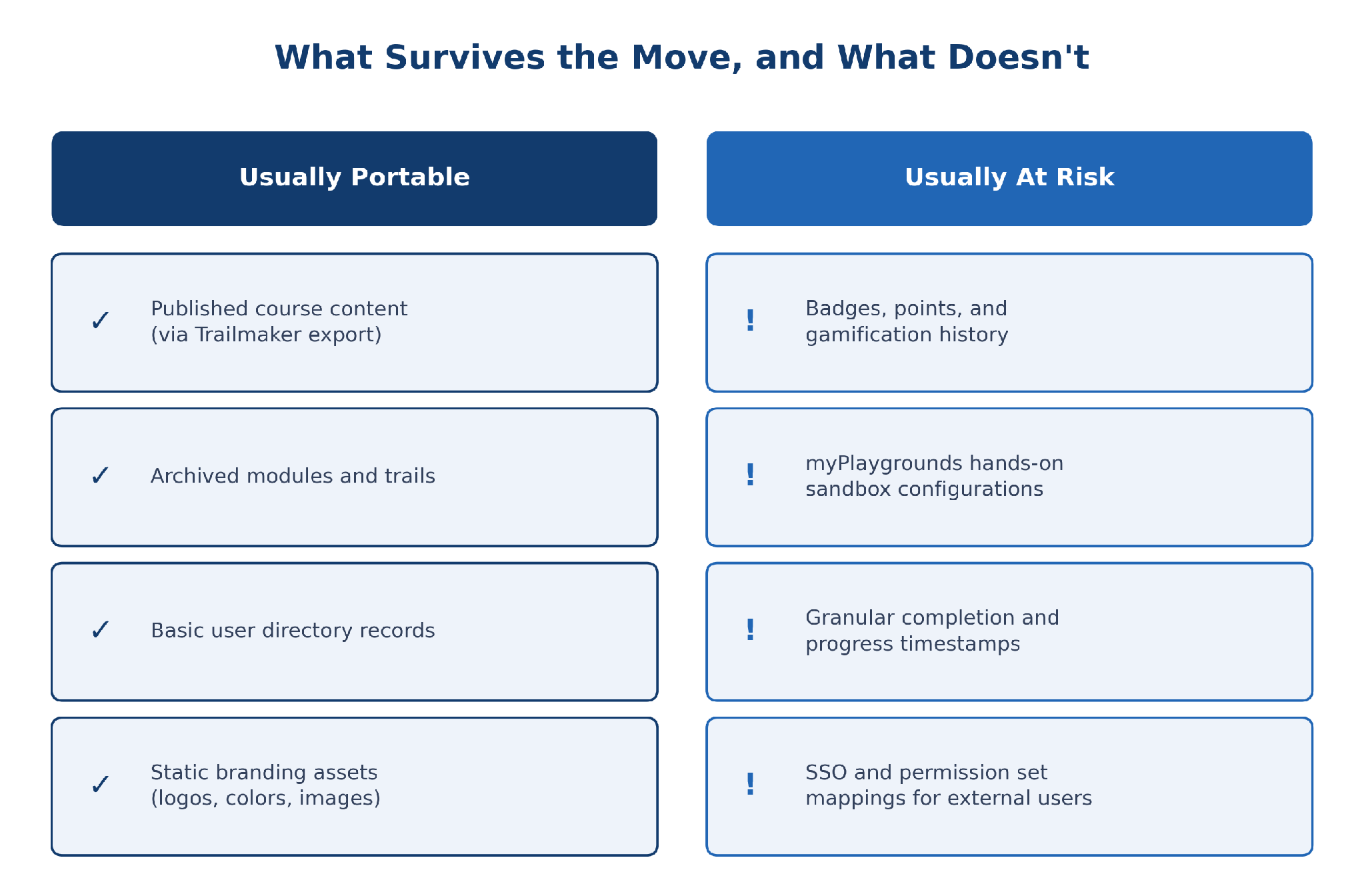
What tends to move cleanly, and what tends to get left behind.
Why Does myTrailhead Content Migration Feel Simpler Than It Actually Is?
Here’s where I’d push back on how most planning docs frame this. People treat myTrailhead content migration as an export problem: get the files out, drop them into the new tool, done. That’s not where the real risk sits.
The export itself is usually fine. Trailmaker gives you access to published and archived content, and for most orgs, that covers the bulk of what’s live. The harder part is what happens after the export lands on your desk. A trail built for myTrailhead’s specific structure (modules, units, and quizzes tied to Salesforce’s own taxonomy) doesn’t just slot into another LMS. Someone has to rebuild the sequencing, re-tag the content, and decide what’s even worth keeping.
And here’s the blunt version: gamification doesn’t migrate. Points, badges, and leaderboard history live in myTrailhead’s data model and don’t have a clean equivalent on the other side. I’ve stopped telling people to “preserve” their gamification and started telling them to rebuild it, on purpose, in whatever system they land on. That reframe alone saves a lot of wasted effort.
We’ll Build Your First Course for You
Skip the manual rebuild. Our team turns your existing content into a finished course.
How Do You Actually Migrate From myTrailhead Without Losing Anything That Matters?
Once you’ve accepted that this is three migrations wearing one name, the sequence gets simpler. I’ll walk through what I’d prioritize, not a generic checklist you’ve seen a dozen times.
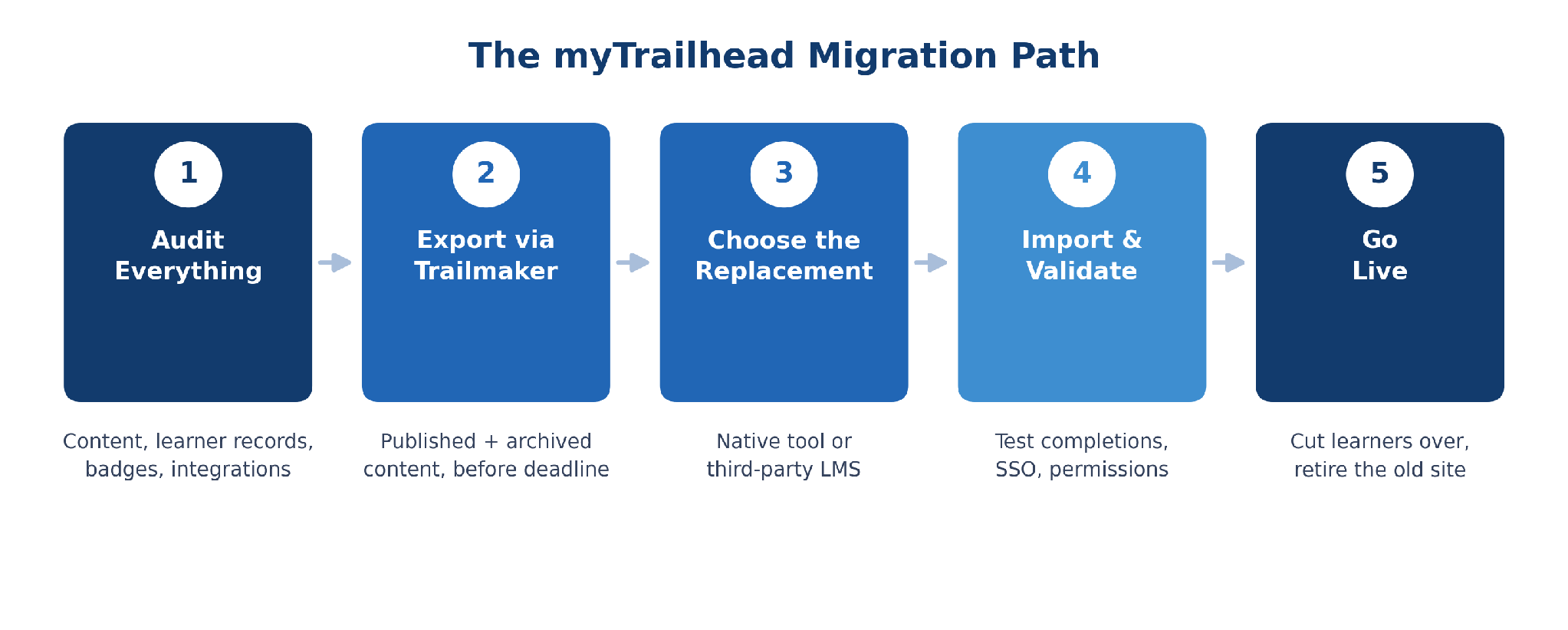
The order I’d actually work through, from audit to go-live.
1. Start With an Honest Inventory, Not a Guess
Before you export anything, list every trail, module, quiz, and badge definition currently live, plus who has access to what. Most admins underestimate how much sits in “archived” status and forget it exists until someone asks for it six months later. This is also when you flag integrations tied to the enablement site domain, since those break quietly and nobody notices until a report comes back empty.
2. Export Through Trailmaker Before You Touch Anything Else
Salesforce suggests starting exports around 90 days before your contract ends, and I’d push that further: start the moment you know migration is happening, not when the renewal reminder shows up.
The actual process is short, which is part of why there’s no excuse to wait on it:
- In Trailmaker Settings, open Content Exports
- Click New Export
- Once it’s ready, go to the Actions column and click Download
What you get is a Backpack file, which is just a ZIP containing your modules, trails, units, text, and images. It’s Salesforce’s own portable format for moving custom learning content, built to import into Trailmaker Content or, with some rework, a replacement platform. Published and archived content is exported separately, so pull both and don’t assume archived material is safe just because it’s no longer customer-facing. Once the file’s downloaded, open it and check that everything you expected is in there before you mark this step as done.
3. Decide What Actually Deserves to Survive the Move
Not everything you built needs to come with you. This is your chance to cut content nobody’s touched in a year and rebuild what’s actually working, instead of dragging every module across out of habit. This step is really the heart of any myTrailhead content migration, more than the export itself.
You don’t have to rebuild everything from a blank page either: ProProfs’ library of 500+ expert-built, ready-to-use courses covers much of the standard compliance and onboarding ground, so you’re only building what’s specific to your org. I’d rather see a smaller, cleaner library on day one than a full replica of a system you were trying to leave in the first place.
4. Validate Everything Before You Cut Learners Over
Run a pilot group through the new system before flipping the switch for everyone. Check that completions map correctly, that certificates generate the way they’re supposed to, and that SSO actually authenticates external users, not just your internal team. Most modern platforms import content via SCORM and xAPI rather than a proprietary format, so that’s usually the compatibility layer to test first. A lot of teams skip this step because they’re racing the deadline. That’s usually a mistake. Better to launch two weeks late with clean data than on time with broken reports.
That’s the sequence I’d follow for almost any myTrailhead migration, big or small. If you want the broader mechanics of a platform switch that apply beyond this one, I’ve laid those out in a general LMS migration guide as well.
Should You Replace myTrailhead With a Native Salesforce Tool or a Third-Party LMS?
This is usually where the internal debate happens, and it’s worth having openly instead of defaulting to whatever’s fastest to spin up.
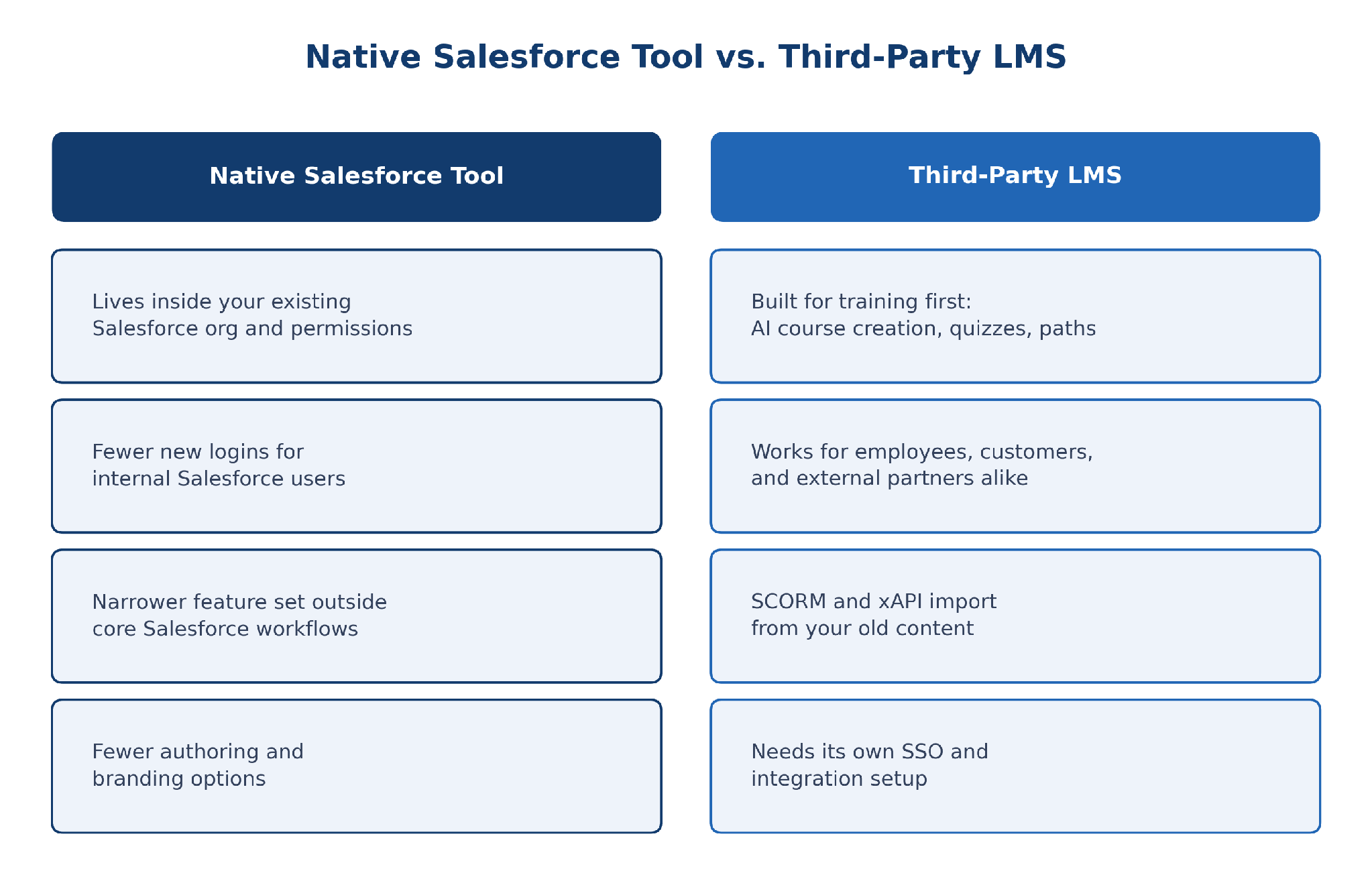
Neither option is universally right. It depends on who you’re actually training.
Salesforce points customers toward native alternatives like Appinium, which runs inside your existing org and keeps things closer to your current permission model. That’s a real advantage if your primary use case is internal sales enablement and you don’t want another login for your reps to manage.
But if your training footprint reaches beyond internal sales reps into employee onboarding, compliance, customer education, or partner certification, the calculus changes. Platforms built specifically for training, rather than as an extension of a CRM, tend to have deeper course authoring, assessment, and reporting built in from the start.
Platforms like ProProfs Training Maker include an AI course builder that turns a prompt into a structured course, built-in quizzes and assessments so you’re not stitching together a separate tool just to test what people retained, and SCORM and xAPI import so your exported myTrailhead content actually has somewhere to land instead of sitting in a folder.
I don’t think there’s a universally right answer here. Your situation may genuinely call for staying native. But I’d be skeptical of any recommendation that skips straight to “which tool” without first asking what your training actually needs to do. Whatever you land on, a Salesforce myTrailhead migration works best when the decision follows where your training actually happens, not which system was easiest to bolt on.
What Should You Actually Do First If Your Deadline Is Already Closing In?
If you’re reading this with your myTrailhead migration deadline already circled on a calendar, skip the perfect plan. Export your content and learner data today, even before you’ve picked a destination platform. Trailmaker access won’t wait for you to finish evaluating vendors, and having the export sitting safely somewhere buys you time to think.
What can wait: rebuilding gamification, perfecting your new course structure, chasing every last integration. None of that needs to be solved before your subscription ends.
What’s a trap: trying to build a full one-to-one replica of your old enablement site inside the new system. I’ve watched teams burn their entire runway trying to recreate every module exactly as it was, instead of shipping something workable and iterating from there.
One thing worth knowing before you assume this is entirely a DIY project: if your team doesn’t have the internal bandwidth to rebuild trails and modules by hand, ProProfs also offers instructional design assistance, where their team builds the courses out for you instead of leaving you to do it solo. If you can only do one thing today, export everything. You can sort the rest out once the pressure’s off.
The Deadline Isn’t the Hard Part, the Rebuild Is
A myTrailhead migration looks like a data problem from the outside and turns out to be a change management problem once you’re actually inside it. The export is mechanical. Rebuilding trust in a new system, one where learners actually finish courses and admins actually get the reports they need, is the part that takes real work.
I’d rather see teams treat this forced deadline as a reason to fix what myTrailhead never quite solved (the SSO friction, the limited customization, the myPlaygrounds gap) than as a reason to panic-copy everything into a new tool and call it done. Every Salesforce myTrailhead migration I’ve watched has gone well, treating the deadline as a planning tool, not a threat. Not every organization needs a full training overhaul. But if you’re moving anyway, you might as well move to something that fits what you’re doing now, not what fit five years ago.
Let Us Migrate You From myTrailhead to ProProfs for Free
Frequently Asked Questions
What is a myTrailhead migration?
A myTrailhead migration is the process of moving your Sales Enablement (myTrailhead) content, learner records, and configuration to a new platform before your Salesforce subscription ends. It covers exporting trails through Trailmaker, deciding what data can transfer, and rebuilding training in a replacement system.
Is Salesforce actually retiring myTrailhead?
Yes. Salesforce lists Sales Enablement, the product most people still call myTrailhead, on its active retirement page. Existing subscriptions are honored until the term ends, but new sales have stopped, so if you migrate from myTrailhead now, you're ahead of most teams still waiting on a notice.
How do I export my myTrailhead content before it's retired?
Use Trailmaker to export both published and archived content, since they behave differently, and archived items are easy to forget. Salesforce recommends starting well before your renewal date. Pull learner records and completion data separately, since content export tools don't always capture user progress cleanly.
Will my myTrailhead badges and gamification history transfer to a new LMS?
Generally, no. Badges, points, and leaderboard history live in myTrailhead's own data model and don't have a clean equivalent elsewhere. Most successful migrations intentionally rebuild gamification on the new platform rather than trying to preserve old point history, which rarely survives the move intact.
What's the difference between myTrailhead content migration and data migration?
Content migration moves your courses, trails, and modules. Data migration moves learner records, completions, and certifications. Treating them as one task is where most myTrailhead data migration projects go wrong, since each has different export tools, timelines, and risks if something gets missed.
Should I choose a native Salesforce tool or a third-party LMS?
It depends on your training scope. Native tools like Appinium work well for internal sales enablement inside your existing org. If you train customers, partners, or need deeper course authoring and reporting, a dedicated LMS built for training usually covers more ground.
How long does a Salesforce myTrailhead migration usually take?
It varies with content volume, but most teams underestimate the timeline. Salesforce suggests starting exports around ninety days before your subscription ends. I'd add buffer time for validating data and running a pilot group before cutting learners over, so start earlier than that if you can.
What happens if I do nothing before my myTrailhead subscription ends?
Your access ends when your current term runs out, since Sales Enablement follows an order end date retirement model. Without an export plan, you risk losing content, learner completion history, and certification records permanently. Waiting for the renewal notice usually leaves too little time to migrate from myTrailhead safely.

Let ProProfs AI create your training course

 We'd love your feedback!
What did you like & how can we make it even better?
 Thanks for your feedback!
 Ask Your Question
Have a question? Get expert help to make your decision easier.