If you are still typing names into a certificate template every time someone finishes a course, the certificate itself is not your problem. The real problem is everything wrapped around it: checking who passed, pulling the right data, generating a file, emailing it, storing it somewhere findable, and then doing all of that again for the next person in the batch.
This guide is built for the people who actually have to do that work. Whether you are running compliance training for 300 employees, onboarding partners across multiple locations, or building a professional certification program from scratch, the goal is the same: the certificate should generate itself the moment a learner qualifies. You should not have to touch it.
What follows covers three realistic paths depending on your setup, plus the specific decisions most guides skip over entirely.
First, Be Clear About What Job the Certificate Is Actually Doing
Not all certificates serve the same purpose, and the purpose determines what the certificate needs to contain, what triggers it, and how long it needs to remain verifiable.
| Certificate Type | What It Proves | When to Use It |
| Completion | The learner finished the course | Internal recognition, soft skills training |
| Achievement | The learner finished and passed an assessment | Compliance training, knowledge verification |
| Certification | The learner completed a structured program with defined competency standards | Professional credentials, partner onboarding |
For compliance-heavy industries, including healthcare, construction, financial services, and data privacy, a completion certificate alone is not enough. Auditors want to see that learners not only finished the training but also demonstrated they understood it. That means the certificate must be tied to a passing score, not just a click-through. Issuing a certificate to someone who scored 40 percent on a quiz creates a documentation problem if that training is ever audited. Build the pass threshold into the trigger from day one.
Path 1: Using an LMS (The Setup-Once Option)
If your training lives inside a learning management system, this is the most reliable path. You configure the certificate once. Every qualifying learner gets it automatically from that point forward. There is no ongoing manual work.
Here is how the setup works inside ProProfs Training Maker, but the logic applies to any LMS with a certificate module.
Step 1: Open the certificate settings for your course
Inside your course dashboard, navigate to Settings and select the Certificate tab. This is where you set both the template and the trigger.
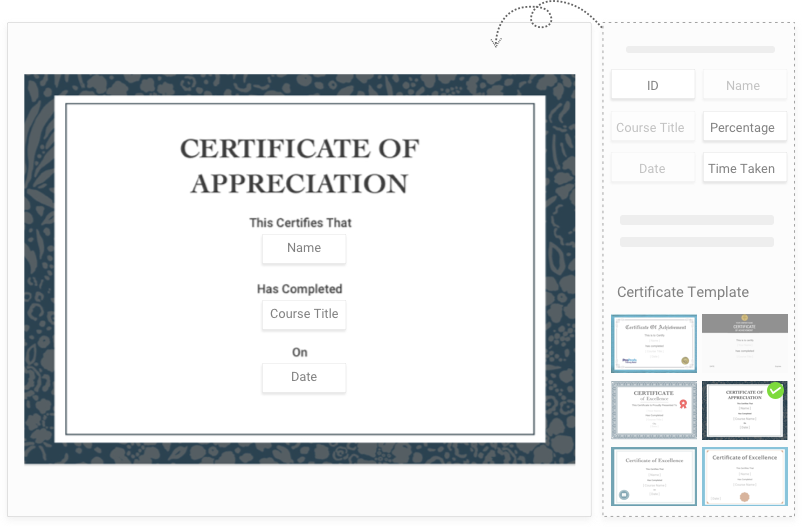
Step 2: Customize the certificate template
ProProfs includes a built-in editor. You can add your organization’s logo, choose which fields auto-populate (learner name, course title, completion date, score achieved), add a signature field, and adjust layout and branding. Every field pulls directly from your course data. No manual entry.
Step 3: Set the trigger condition
This is the decision that determines whether your certificate means anything:
- Course completion only: Certificate issues when all modules are finished
- Quiz passing score: Certificate issues only when the learner meets your defined threshold, for example 80 percent or above
- Both: Learner must complete all modules and pass the assessment
For compliance training, the third option is the more defensible choice. Set your threshold, save it, and the system enforces it automatically.
Step 4: Publish and let it run
Once live, certificates generate immediately when a learner qualifies. They appear in the learner’s dashboard for download or sharing. On the admin side, ProProfs stores every completion record: who completed the course, what score they achieved, when the certificate was issued. That is the report you hand an auditor.
For the full configuration walkthrough, see the ProProfs help documentation.
Path 2: The Spreadsheet Automation Route (No LMS Required)
If your training does not live in an LMS, you can still automate certificate generation using tools most organizations already have. This works well for one-time cohorts, event-based training, or programs where the training itself happens outside a platform.
What you need:
- Google Sheets (to collect and store completion data)
- Google Slides or Google Docs (as your certificate template)
- Autocrat (a free Google Workspace add-on that merges data into templates and exports PDFs)
- Optionally, Gmail or a tool like Make or Zapier to automate delivery
How the workflow runs:
- Learners complete training and submit a form (Google Forms works, or any tool that writes to a Sheet)
- Your Google Sheet captures name, course title, completion date, score, and any other fields you need on the certificate
- Autocrat reads each row, merges the data into your certificate template, and exports individual PDFs
- Those PDFs can be automatically emailed to each learner using Autocrat’s built-in email delivery, or routed through Gmail via a Zapier trigger
Before you run any batch, do these three things:
- Test your template with the longest name in your dataset. Long names break layouts in ways that are invisible until you are looking at 200 malformed certificates.
- Add a unique certificate ID to each row in your Sheet and include it on the template. This is your verification layer. Format it as something like CERT-2025-00142. When someone claims they hold a certificate, you look up the ID and confirm it exists.
- Run a test batch of five certificates and open every PDF before you commit to a full run.
Where this approach breaks down:
The spreadsheet route works well up to roughly 100 certificates. Above that, the manual overhead of managing the Sheet, catching data errors, and troubleshooting Autocrat jobs starts to outweigh the time you saved. It also has no built-in verification layer beyond whatever ID system you build yourself.
Path 3: Dedicated Certificate Platforms
Tools like Certifier and Accredible are designed specifically for professional certificate design, delivery, and verification. They are the right fit when the certificate is the product itself, such as in professional credentialing programs, partner certification, or continuing education.
What these platforms offer that the other two paths do not:
- Built-in verification pages: Every certificate gets a unique URL. Employers, auditors, or clients can confirm authenticity without contacting you.
- LinkedIn sharing: Learners can post credentials directly to their profiles.
- Expiry and renewal tracking: You set an expiration date; the platform flags renewals automatically.
- Batch import: Upload a CSV of completions and issue certificates to hundreds of learners at once.
What they do not offer: these platforms do not host courses or run assessments. You still need a separate system to manage the training itself, which means your stack gets more complex, not less. For organizations running ongoing training programs at scale, this is an addition to your workflow rather than a replacement for it.
Get Free Employee Training Software — All Features, Forever.
We've helped 567 companies train 200,000+ employees. Create courses in under a minute with our AI LMS or use 200+ ready-made courses on compliance, harassment, DEI, onboarding, and more!
Bulk Generation: What to Do When You Have Hundreds of Certificates to Issue
This is the question most guides do not answer directly. Here is the breakdown by volume:
Under 50 certificates: Any of the three paths above works. The spreadsheet route with Autocrat is probably the fastest to set up if you do not already have an LMS.
50 to 200 certificates: The spreadsheet route is viable but requires a clean, well-tested template and a structured Sheet. Plan for one round of troubleshooting. Dedicated platforms with CSV import (Certifier, Accredible) are worth considering here because they handle formatting and delivery automatically.
Over 200 certificates: An LMS or dedicated platform is the only realistic answer. At this volume, any manual step in the process, including reviewing PDFs individually or managing email delivery by hand, becomes a significant time cost. The LMS path is particularly strong here because certificates continue to be generated automatically as new learners qualify, without any action on your part.
Retroactive batches: If you need to issue certificates for a cohort that already completed training, export your completion data to a Google Sheet, build the certificate template, and run it through Autocrat. Test with five records first. For batches of 100 or more, run in groups of 50 to make troubleshooting manageable.
What Makes a Certificate Verifiable (and Why It Matters)
A PDF with someone’s name on it proves nothing on its own. Anyone with basic design software can edit it. If your certificates need to hold up in an audit, or function as genuine professional credentials, they need at least one of the following.
A unique certificate ID
A reference number printed on the certificate that maps to a record in your system. When someone claims they completed your training, you look up the ID and confirm it exists, who it belongs to, and when it was issued. This is the minimum standard for compliance documentation and it costs nothing to implement.
If you are using the spreadsheet route, add a column to your Sheet that generates a unique ID for each row. A simple formula like =”CERT-“&TEXT(ROW()-1,”00000”) gives you CERT-00001, CERT-00002, and so on. Include that field in your Autocrat merge. Store the Sheet as your certificate registry.
If you are using an LMS or dedicated platform, this is typically handled automatically.
A verification URL or QR code
Some platforms generate a scannable code or web address that displays the certificate record when accessed. This allows anyone to confirm authenticity without contacting you. For professional certification programs, this is increasingly the baseline expectation from employers and credentialing bodies. Certifier, Accredible, and Badgr all offer this natively. If you are building a custom solution, you can create a simple verification page using a Google Sheet published to the web, where someone enters a certificate ID and the page confirms whether it exists in your records.
Expiry and renewal tracking
Compliance certificates often have a shelf life. Safety training, HIPAA certification, and harassment prevention courses typically require annual renewal. If your system does not track expiry dates and surface renewals before they lapse, your records will drift out of sync with what is actually current. You will not discover the gap until an auditor does.
In an LMS, expiry dates can be built into the certificate configuration. In the spreadsheet route, add an expiry date column and use conditional formatting to flag records within 60 days of lapsing.
Certificate Design Checklist
Run through this before your certificate goes live. These are the issues that surface after the fact when you skip them.
- The learner name field is tested with the longest name in your organization
- Completion date populates automatically from your data source, not filled in manually
- Course title is specific (“HIPAA Privacy and Security Training 2025”) rather than generic (“Compliance Training”)
- The issuing organization name and logo are present
- A signature field or authorized signatory name is included
- A unique certificate ID is printed on the certificate
- For professional credentials, a verification URL or QR code is included
- Expiry date is included if the certification requires renewal
- Failing learners do not receive a certificate. Test this explicitly before launch.
- Passing learners receive the certificate immediately, without a manual approval step in between
Stop Issuing Certificates Manually
The certificate itself is not hard to create. The hard part is the work around it: the manual checks, the formatting, the email, the folder of PDFs that no auditor can actually verify.
Once you connect certificate generation to a trigger, whether that is inside an LMS, through an Autocrat workflow, or via a dedicated platform, the operational overhead disappears. Learners get their certificate the moment they earn it. You get a clean, reportable record without touching anything.
The setup time for any of the paths above is almost certainly less than what you spent last month doing this by hand.
Get Free Employee Training Software — All Features, Forever.
We've helped 567 companies train 200,000+ employees. Create courses in under a minute with our AI LMS or use 200+ ready-made courses on compliance, harassment, DEI, onboarding, and more!
Frequently Asked Questions
How do I make a certificate of completion that issues automatically after a quiz?
You need a system that connects quiz results to a certificate trigger. In ProProfs Training Maker, you configure a certificate template, set a minimum passing score, and attach the certificate to the course. When a learner meets the threshold, the system generates and delivers the certificate without any manual action. Setup takes under 30 minutes once you have a template ready. If you are not using an LMS, a Google Forms and Autocrat workflow can replicate this: the form captures quiz results, writes to a Sheet, and Autocrat generates the certificate when the score column meets your threshold.
What should a certificate of completion include for compliance training?
At minimum: the learner’s full name, the exact course title and the regulatory framework it addresses (for example, “HIPAA Privacy and Security” rather than just “Compliance”), the completion date, the issuing organization’s name, a unique certificate ID that maps to a record in your system, and the expiry date if renewal is required. For training with a defined pass threshold, include the score achieved.
How do I generate certificates in bulk for a large group?
If your training lives in an LMS, bulk generation happens automatically as learners complete the course. For retroactive batches or non-LMS setups, export your completion data to a Google Sheet, set up an Autocrat merge against your certificate template, and run in batches of 50 to keep troubleshooting manageable. For batches over 200, a dedicated certificate platform with CSV import (Certifier or Accredible) will be faster and more reliable than a manual spreadsheet workflow.
How do I prevent certificate forgery or make my certificates verifiable?
Add a unique certificate ID to every certificate and store the corresponding record in a system you control. For a basic setup, a Google Sheet functions as your certificate registry. For a higher level of assurance, use a platform that generates a verification URL or QR code linked to the certificate record. Certifier, Accredible, and Badgr all do this natively. If you need a custom solution, a Google Sheet published to the web can serve as a lightweight verification page where someone enters an ID and the page confirms whether it exists in your records.
What is the difference between a certificate of completion and a certificate of achievement?
A certificate of completion confirms a learner finished a course. A certificate of achievement confirms they finished it and met a defined performance standard, typically a minimum passing score on an assessment. For compliance purposes, the achievement certificate carries more weight because it documents demonstrated competency, not just attendance. If your training is ever audited, the question auditors ask is not whether employees sat through the course but whether they understood it.
How do I add a QR code to a certificate if my platform does not generate one?
Generate a unique verification URL for each certificate (this can be as simple as a Google Sheet row accessible by ID), then use a free QR code generator like QR Code Monkey or Google’s chart API to create a QR code from that URL. In Autocrat, you can embed QR code images dynamically using a merge field. In an LMS or dedicated platform, this is typically a built-in option.

Let ProProfs AI create your training course

 We'd love your feedback!
What did you like & how can we make it even better?
 Thanks for your feedback!
 Ask Your Question
Have a question? Get expert help to make your decision easier.